EasyManua.ls Logo

Go Partner 1680X - ADJUSTING DISPLAY CONTRAST; STARTING A NEW GAME; PLAY LEVELS; Displayed Level Codes

Default Icon
20 pages
Print Icon
To Next Page IconTo Next Page
To Previous Page IconTo Previous Page
Loading...
3.
Remove
or
replace
the
pieces
in
the
compartment.
4.
Replace
the
cover.
1
indefinite
response
time
level
(B6,
L-ln)
1
problem
level
(B7,
L-CF)
ADJUSTING
THE
DISPLAY
CONTRAST
Switch
I/O
to
I,
then
slide
Hill
on
the
back
of
the
computer
to
the
left
or
right
to
adjust
the
LCD
display’s
contrast.
STARTING
A
NEW
GAME
Press
NEW
GAME
to
start
a
new
game
and
erase
any
game
stored
in
memory.
Note:
The
computer
always
starts
a
new
game
with
you
playing
white
pieces
and
the
opponent
playing
black
pieces.
PLAY
LEVELS
When
you
play
against
the
computer,
you
can
select
a
level
that
matches
your
skill.
There
are
64
different
play
levels.
These
include:
8
beginner
levels
(A1,
L-bl
through
A8,
L-b8)
1
mate
finder
level
(B8,
L-Fi)
8
practical
levels
(Cl,
L-P1
through
C8,
L-P8)
8
brute
force
levels
(D1,
L-tl
through
D8,
L-t8)
8
fixed
depth
search
levels
(El,
L-dl
through
E8,
L-d8)
8
passive
levels
(FI,
L-cl
through
F8,
L-c8)
8
aggressive
levels
(G1,
L-al
through
G8,
L-a8)
8
normal
play
levels
(HI,
L-nl
through
H8,
L-n8)
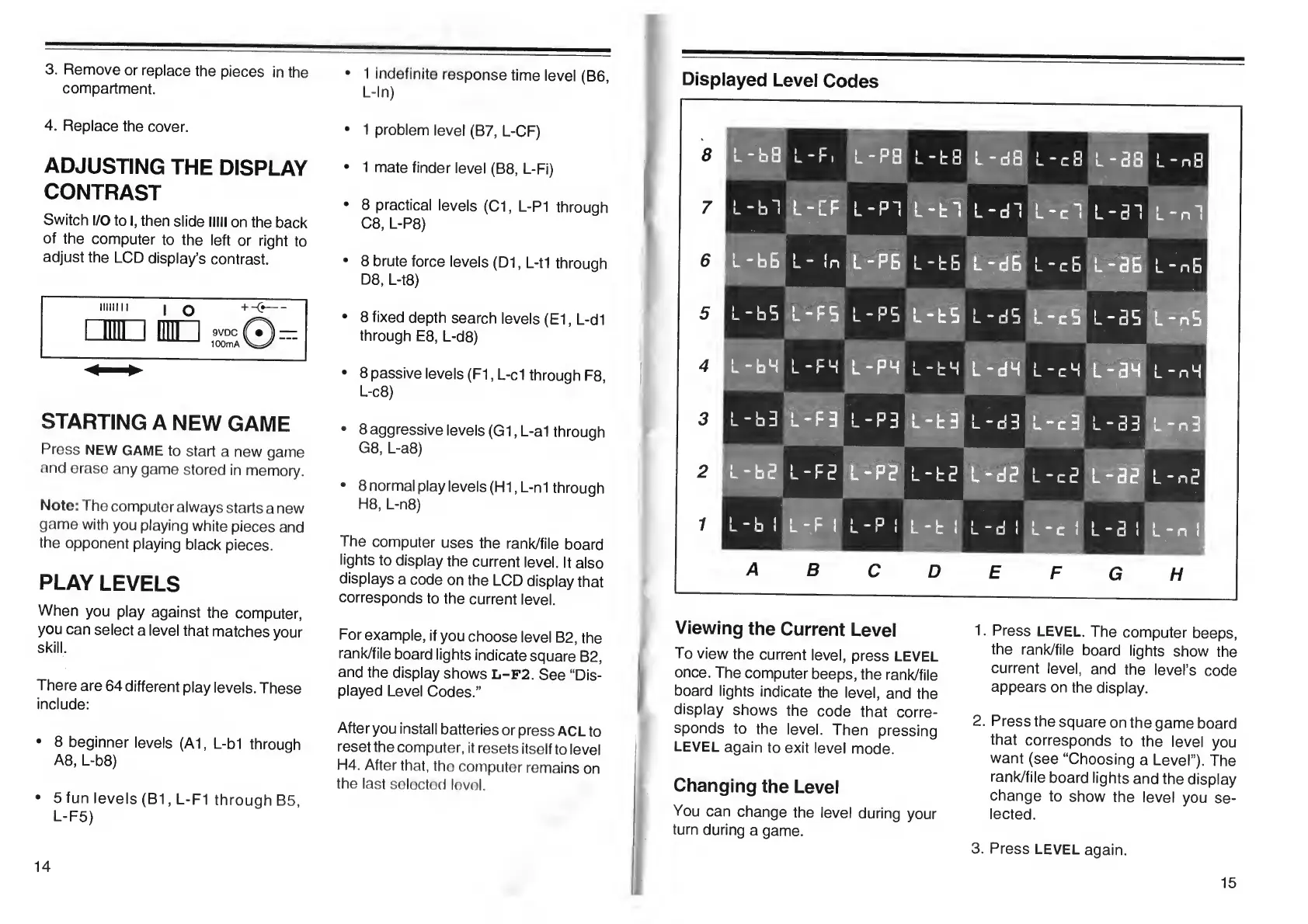
The
computer
uses
the
rank/file
board
lights
to
display
the
current
level.
It
also
displays
a
code
on
the
LCD
display
that
corresponds
to
the
current
level.
For
example,
if
you
choose
level
B2,
the
rank/file
board
lights
indicate
square
B2,
and
the
display
shows
L-F2.
See
“Dis¬
played
Level
Codes.”
Afteryou
install
batteries
or
press
ACL
to
reset
the
computer,
it
resets
itself
to
level
H4.
After
that,
tho
computer
remains
on
the
last
selectod
lovol.
14
5
fun
levels
(B1,
L-FI
through
B5,
L-F5)
(
V
iewing
the
Current
Level
To
view
the
current
level,
press
LEVEL
once.
The
computer
beeps,
the
rank/file
board
lights
indicate
the
level,
and
the
display
shows
the
code
that
corre¬
sponds
to
the
level.
Then
pressing
LEVEL
again
to
exit
level
mode.
I
Changing
the
Level
You
can
change
the
level
during
your
turn
during
a
game.
1
.
Press
LEVEL.
The
computer
beeps,
the
rank/file
board
lights
show
the
current
level,
and
the
level’s
code
appears
on
the
display.
2
.
Press
the
square
on
the
game
board
that
corresponds
to
the
level
you
want
(see
“Choosing
a
Level”).
The
rank/file
board
lights
and
the
display
change
to
show
the
level
you
se¬
lected.
3.
Press
LEVEL
again.
15

Table of Contents