EasyManua.ls Logo

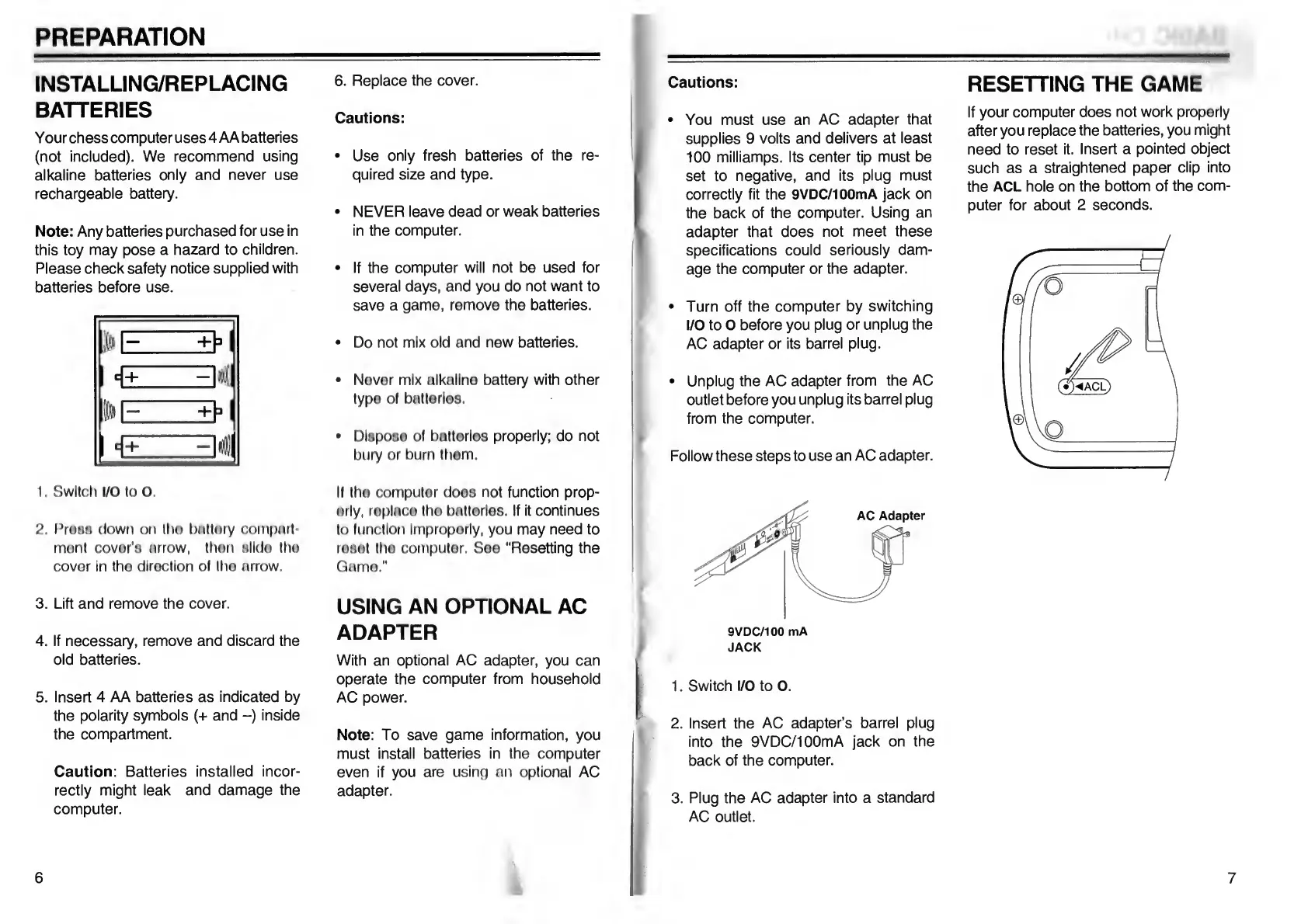
Go Partner 1680X - PREPARATION; Installing;Replacing Batteries; Using an Optional AC Adapter; Resetting the Game

Default Icon
20 pages
Print Icon
To Next Page IconTo Next Page
To Previous Page IconTo Previous Page
Loading...
PREPARATION
INSTALLING/REPLACING
BATTERIES
Your
chess
computer
uses
4
AA
batteries
(not
included).
We
recommend
using
alkaline
batteries
only
and
never
use
rechargeable
battery.
Note:
Any
batteries
purchased
for
use
in
this
toy
may
pose
a
hazard
to
children.
Please
check
safety
notice
supplied
with
batteries
before
use.
1.
Switch
I/O
to
O
2.
ProHH
down
on
Iho
battory
compart¬
ment
covor's
arrow,
then
Hilda
the
cover
in
tho
direction
ol
tho
arrow.
3.
Lift
and
remove
the
cover.
4.
If
necessary,
remove
and
discard
the
old
batteries.
5.
Insert
4
AA
batteries
as
indicated
by
the
polarity
symbols
(+
and
-)
inside
the
compartment.
Caution:
Batteries
installed
incor¬
rectly
might
leak
and
damage
the
computer.
6
.
R
eplace
the
cover.
Cautions:
Use
only
fresh
batteries
of
the
re¬
quired
size
and
type.
NEVER
leave
dead
or
weak
batteries
in
the
computer.
If
the
computer
will
not
be
used
for
several
days,
and
you
do
not
want
to
save
a
game,
remove
the
batteries.
Do
not
mix
old
and
new
batteries.
Never
mix
alkaline
battery
with
other
type
of
batteries.
Dlsposo
of
bntterles
properly;
do
not
bury
or
burn
them.
If
the
computer
does
not
function
prop¬
erly,
replace
the
batteries.
If
it
continues
to
function
Improperly,
you
may
need
to
reset
the
computer.
See
"Resetting
the
Game."
USING
AN
OPTIONAL
AC
ADAPTER
With
an
optional
AC
adapter,
you
can
operate
the
computer
from
household
AC
power.
Note:
To
save
game
information,
you
must
install
batteries
in
the
computer
even
if
you
are
using
an
optional
AC
adapter.
6
mmh
Cautions:
You
must
use
an
AC
adapter
that
supplies
9
volts
and
delivers
at
least
100
milliamps.
Its
center
tip
must
be
set
to
negative,
and
its
plug
must
correctly
fit
the
9VDC/100mA
jack
on
the
back
of
the
computer.
Using
an
adapter
that
does
not
meet
these
specifications
could
seriously
dam¬
age
the
computer
or
the
adapter.
Turn
off
the
computer
by
switching
I/O
to
O
before
you
plug
or
unplug
the
AC
adapter
or
its
barrel
plug.
Unplug
the
AC
adapter
from
the
AC
outlet
before
you
unplug
its
barrel
plug
from
the
computer.
Follow
these
steps
to
use
an
AC
adapter.
RESETTING
THE
GAME
If
your
computer
does
not
work
properly
after
you
replace
the
batteries,
you
might
need
to
reset
it.
Insert
a
pointed
object
such
as
a
straightened
paper
clip
into
the
ACL
hole
on
the
bottom
of
the
com¬
puter
for
about
2
seconds.
1
.
Switch
I/O
to
O.
2.
Insert
the
AC
adapter’s
barrel
plug
into
the
9VDC/100mA
jack
on
the
back
of
the
computer.
3.
Plug
the
AC
adapter
into
a
standard
AC
outlet.
7

Table of Contents