3 Printe r Se tting a nd C o ntro l
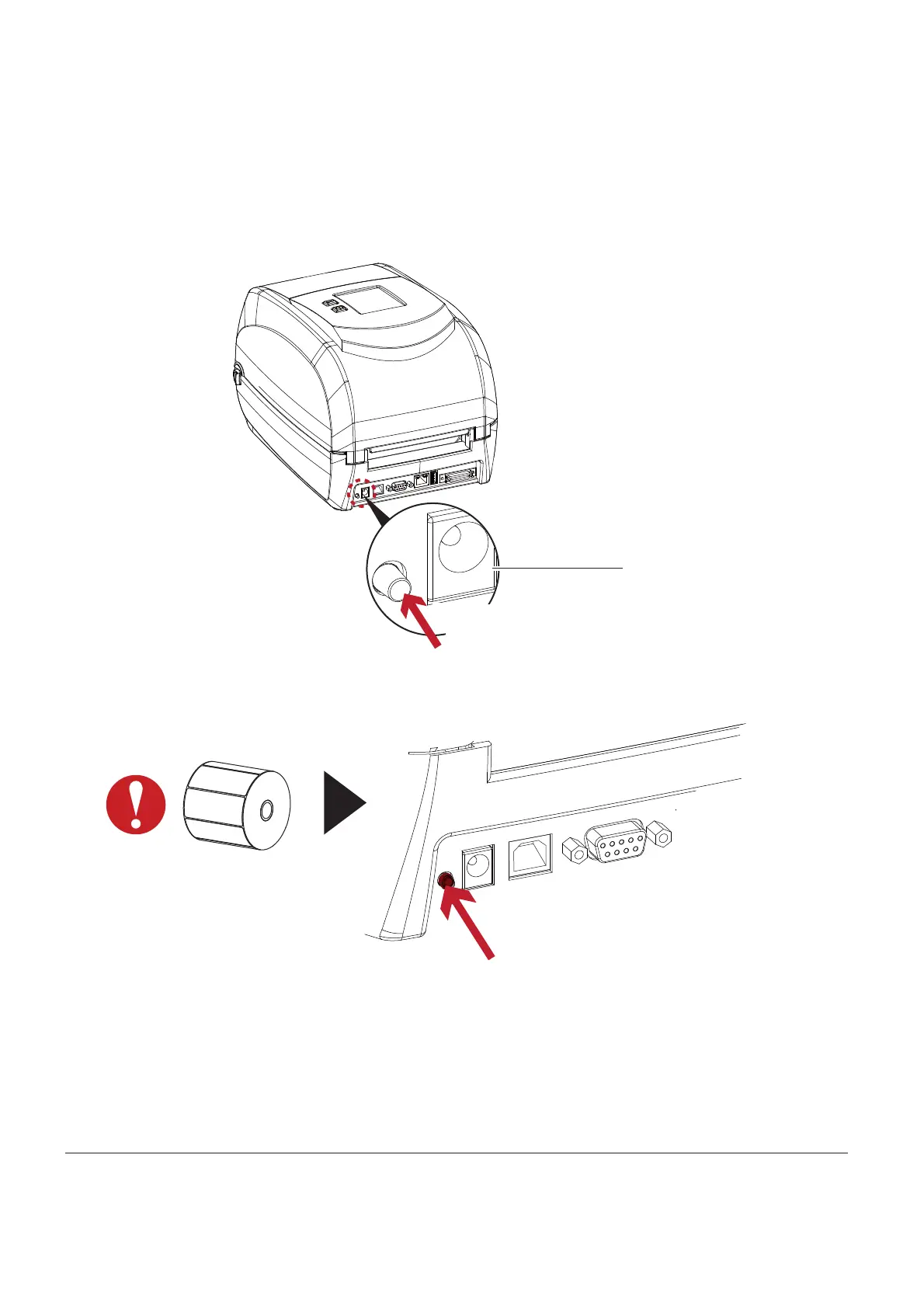
La be l C a libra tio n Butto n
A ha rd wa re b utto n to ma ke a La b e l C a lib ra tio n while p rinte r e nc o unte ring ‘ ’ Me d ia Erro r’ ’ d uring the c a se s whe n
first-time p rinte r sta rt up o r c ha ng e la b e l to a no the r typ e , suc h a s c ha ng e using g a p la b e l to c o ntinuo us o r
b la c k m a rk la b e ls.
Pre ss C a lib ra tio n b utto n fo r 1 ~ 2 se c o nd s, it will ma ke a n a uto -se nsing to c a lib ra te the la b e l’ s p a ra me te rs.
Pre ss a nd ho ld a b o ut
1 ~ 2 se c o nd s
****Pre ss Ca lib ra tio n b utto n is e q uiva le nt to the a uto -se nsing c o mma nd ‘ ’ ~S,SENSO R’ ’ tha t will c a nc e l o n-p rinting -jo b
a nd ma ke the La b e l C a lib ra tio n imm e d ia te ly.
C ALIBRATIO N BUTTO N
Pre ss a nd ho ld a b o ut
1 ~ 2 se c o nd s
No te
34



 To Next Page