2 Printe r Se tup
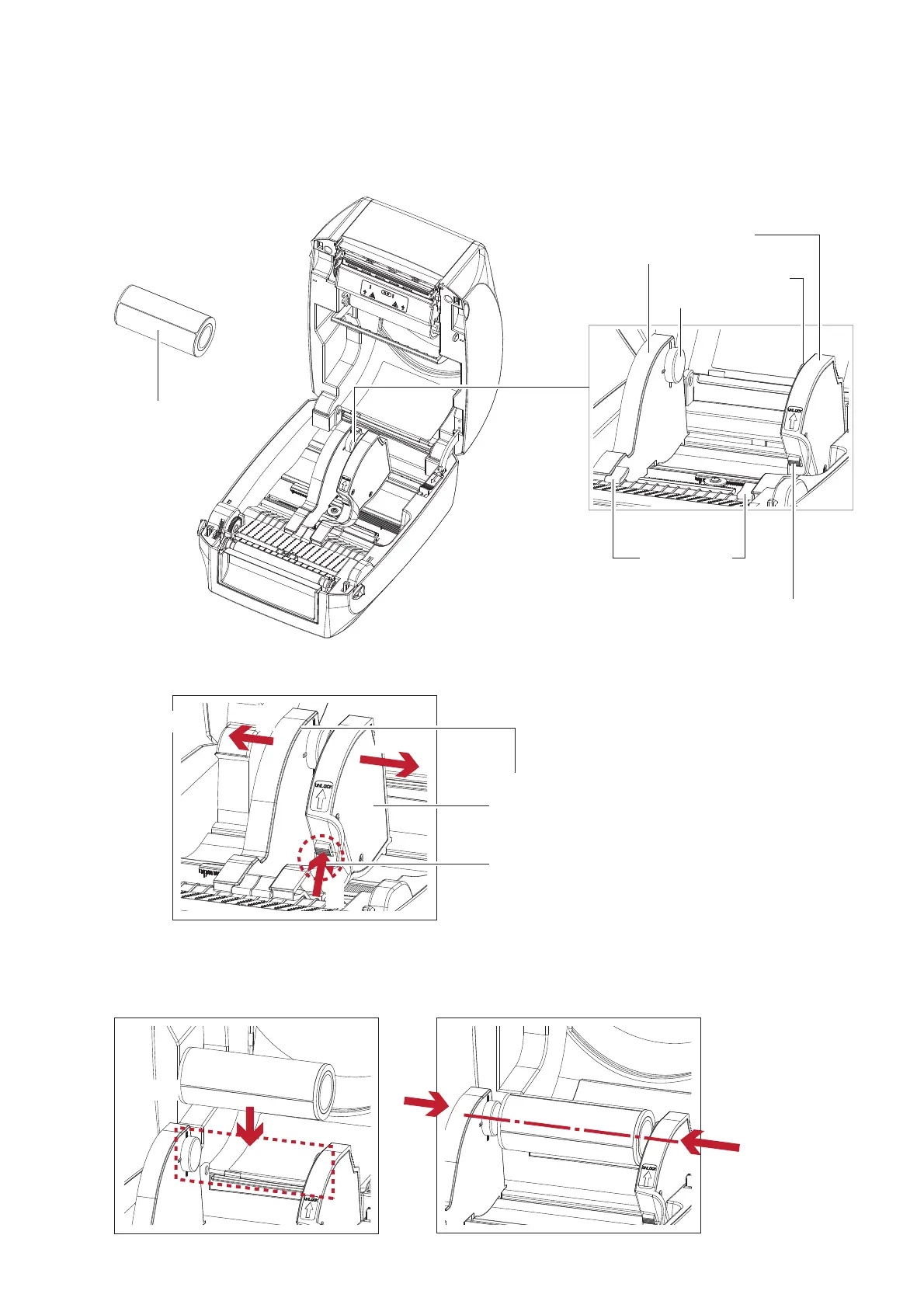
2.3 Lo a d ing the La b e l Ro ll Mo d ule
Lo a ding the La b e l Sto c k o n the Printe r
LABEL STO C K
LABEL
SUPPLY
MO DULE
RELEASE C ATCH
Re le a se c a tc h fo r o p e ning
the la b e l sup p ly hub
LABEL SUPPLY HUB
Se t o f 2
LABEL G UIDE
Se t o f 2
LABEL G UIDE PLATE
Se t o f 2
1. Unlo c k the rib b o n c a tc h a nd p ull to o p e n the la b e l g uid e p la te .
2. Pla c e the la b e l sto c k o n la b e l sup p ly hub s. Ma ke sure the la b e l sto c k is a lig ne d to b o th hub s.
Ad just the la b e l g uid e p la te s to fix the la b e l wid th.
Re me m b e r to p ush the re le a se c a tc h whe n m o ving the la b e l g uid e p la te s.
C lo se the p la te s
1
2
2
RELEASE C ATCH
Re le a se c a tc h fo r o p e ning the la b e l sup ply hub
LABEL G UIDE PLATE
Se t o f 2
Pull to o p e n
Pla c e



 To Next Page