2 Printe r Se tup
2.5
Wiza rd C D Sta nd a rd Insta lla tio n
* If the Sup e r Wiza rd p ro g ra m d id no t run a uto ma tic a lly, yo u c a n e ithe r turn o n the “ Auto -run” se tting fo r
yo ur C D/ DVD d rive r o r d o ub le -c lic k the ic o n o f C D/ DVD d rive r to run the p ro g ra m ma nua lly.
No te
1. Inse rt the Sup e r Wiza rd C D in the C D/ DVD d rive o f the ho st c o m p ute r a nd the insta lla tio n p ro g ra m sho uld p o p up
a uto ma tic a lly.
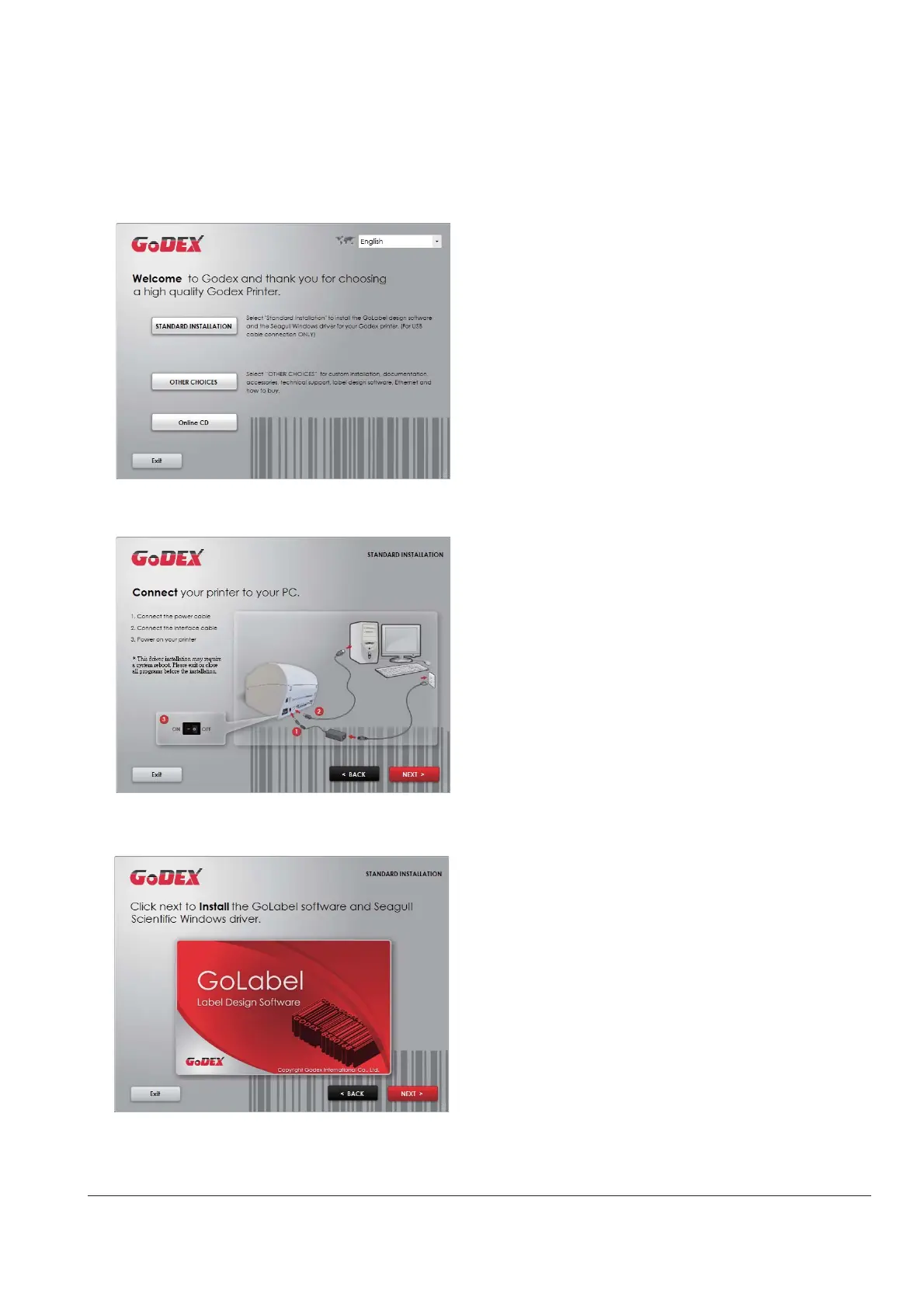
Yo u w ill se e the We lc o m e sc re e n first. O n the We lc o me sc re e n, c ho o se “ STANDARD INSTALLATIO N”.
2. The wiza rd will the n a sk yo u to ma ke sure yo ur USB a nd p o we r c a b le s a re c o nne c te d a nd tha t the p o we r is
turne d o n. The n c lic k “ NEXT” .
3. The ne xt sc re e n yo u will se e is, “ Insta ll the G o La b e l So ftwa re a nd Wind o w s d rive r” . C lic k “ NEXT” to c o ntinue .



 To Next Page