08 System Commissioning
User Manual V1.3-2023-01-31
34
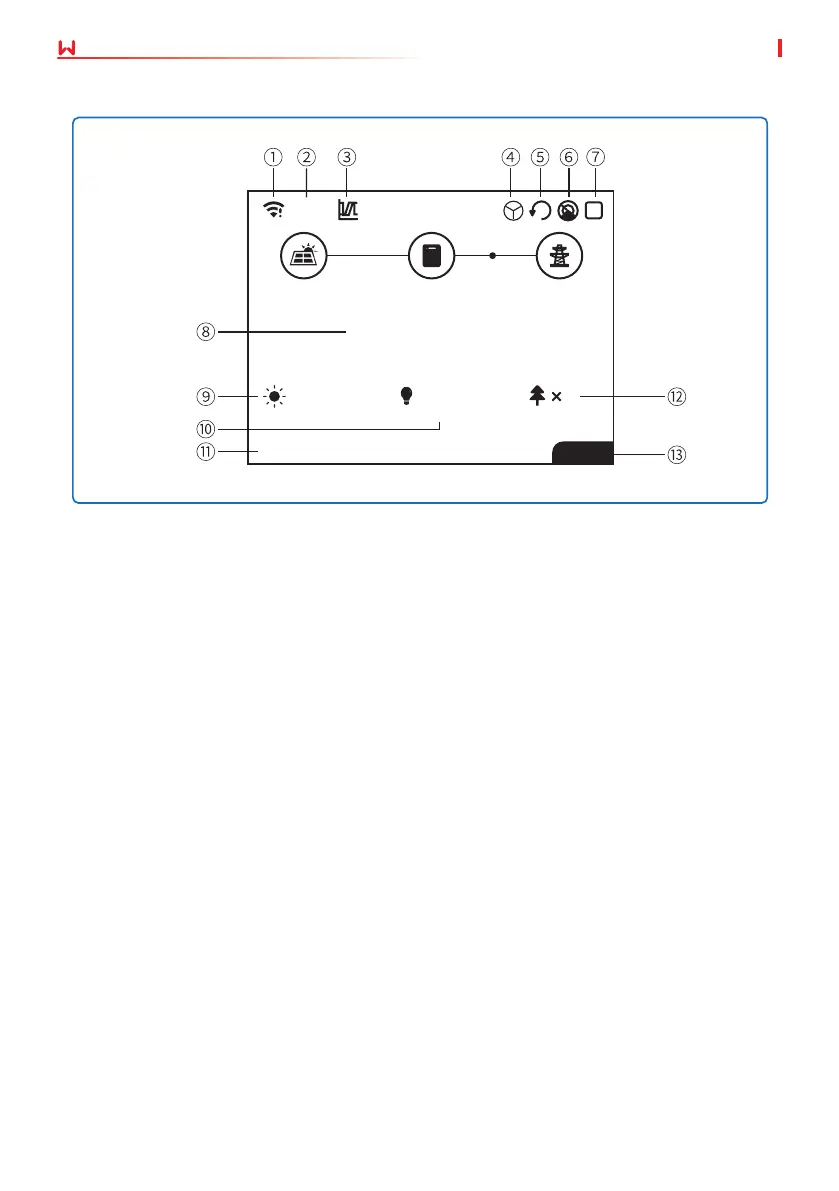
8.2.1 User Interface Introduction
01/01/2020 00:00:00
CARBON
Normal
kW
x
36.00
20.5kWH
WiFi
22
93.3kWH 4
E-TOTALE-DAY
1: Communication information icon: GPRS and WiFi show the signal strength, RS485 shows the
communication address.
2: Communication icon: The way of communication,There are GPRS, WiFi and RS485
3: LVRT/HVRT icon: The icon indicates that the system LVRT/HVRT function is on
4: Grid Type icon: The icon indicates that the system select Delta Grid/Star Grid
5: Power limit icon: The Power limit icon indicates that the Power limit function is on
6: Shadow scan: The icon indicates that the Shadow scan function is on
7: Safety icon: The number represents the safety country number
8: Real-time power
9: E-day: daily generation
10: E-Total: Total generation
11: System date and time
12: Carbon: Energy conservation and emission reduction
13: System status information


 To Next Page
 Loading...