38 39
Taking Photos
Your GoPro can take traditional, 360 and panoramic photos. Simply
choose the type of photo you want, and press the Shutter button
.
All HERO mode shots are captured at 5.5MP. 360 photos are captured
at 16.6MP.
PHOTO
Use this mode to take a single photo in either HERO or 360 mode. You
can also press and hold the Shutter button
in HERO mode to take a
continuous series of photos at a rate of 3 or 30 per second (depending on
lighting conditions).
POWERPANO
PowerPano takes incredible 270
°
distortion-free panoramic photos
without having to scan the horizon. Hold MAX horizontally for traditional
panoramic photos, or rotate it to portrait orientation for amazing extra-tall
shots. All PowerPano photos are captured at 6.2MP. Horizon Levelling is
on by default.
Heads Up: PowerPano uses both lenses to take the shot, no matter
whether your subject is in front of or behind your camera. Make sure both
lenses are uncovered.
PRO TIP: Keep your camera level with the horizon to minimise distortion
when taking a PowerPano shot.
Taking Photos
ONSCREEN SHORTCUTS
When taking photos, HERO and 360 mode each feature one default
shortcut. You can swap it out with another shortcut or add a second.
To learn more, see On-Screen Shortcuts (page 25).
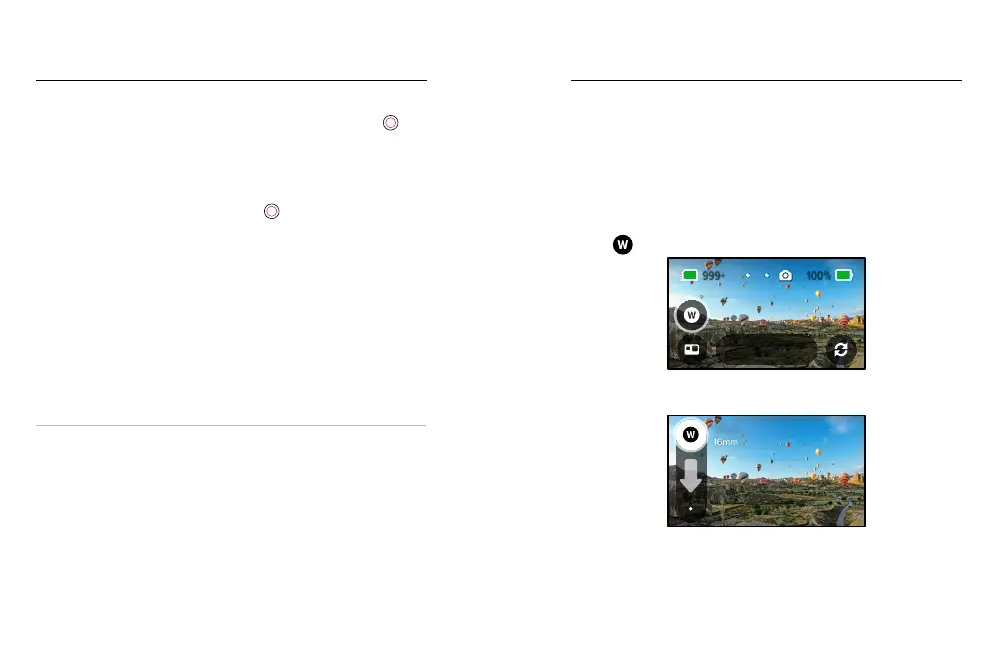
Digital Lens (HERO Mode)
Digital lenses aect the eld of view, the cropping and the sheye eect
in your photo. Switch between them to see what works best for your shot.
1. Tap
.
Wide
Photo
2. Scroll through the options to see a live preview of each option, then
tap the one that you want.
16mm
Wide















 To Next Page