12 13
UPDATING YOUR CAMERA’S SOFTWARE
To get the latest features and best performance from your GoPro, make
sure it’s using the most up-to-date software.
Updating With the GoPro App
1. Download the app from the Apple App Store or Google Play.
2. Follow the app’s on-screen instructions to connect your camera to
your mobile device. If new camera software is available, the app will
tell you how to install it.
Updating Manually
1. Visit gopro.com/update.
2. Choose MAX from the list of cameras.
3. Select Update your camera manually and follow the instructions.
PRO TIP: Need to know your camera’s name, password and software
version? Here’s where you can nd out.
1. Swipe down to access the Dashboard.
2. Tap Preferences > Connections > Camera Info.
Heads Up: Scroll down to see the software version.
Setting Up Your Camera
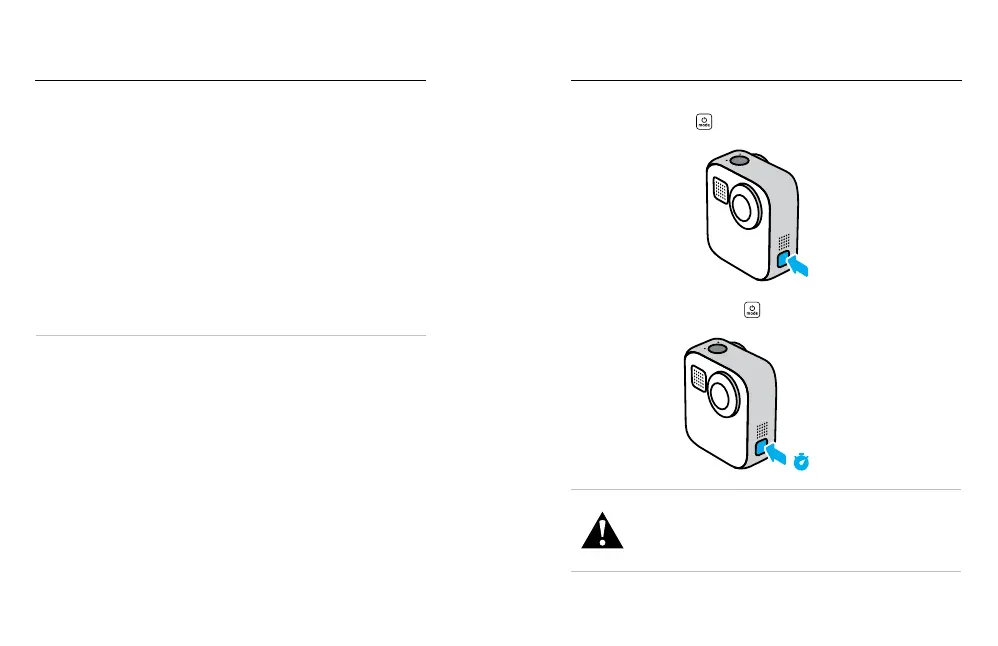
POWERING ON
Press the Mode button
to turn on MAX.
POWERING OFF
Press and hold the Mode button
for 3 seconds to turn it o.
3s
WARNING: Use caution when using your GoPro and related
mounts and accessories. Always be aware of your surroundings
to avoid injuring yourself and others.
Ensure you follow all local laws, including all privacy laws,
which may restrict recording in certain areas.
Getting to Know Your GoPro















 To Next Page