16 17
Getting to Know Your GoPro
GETTING THE SHOT
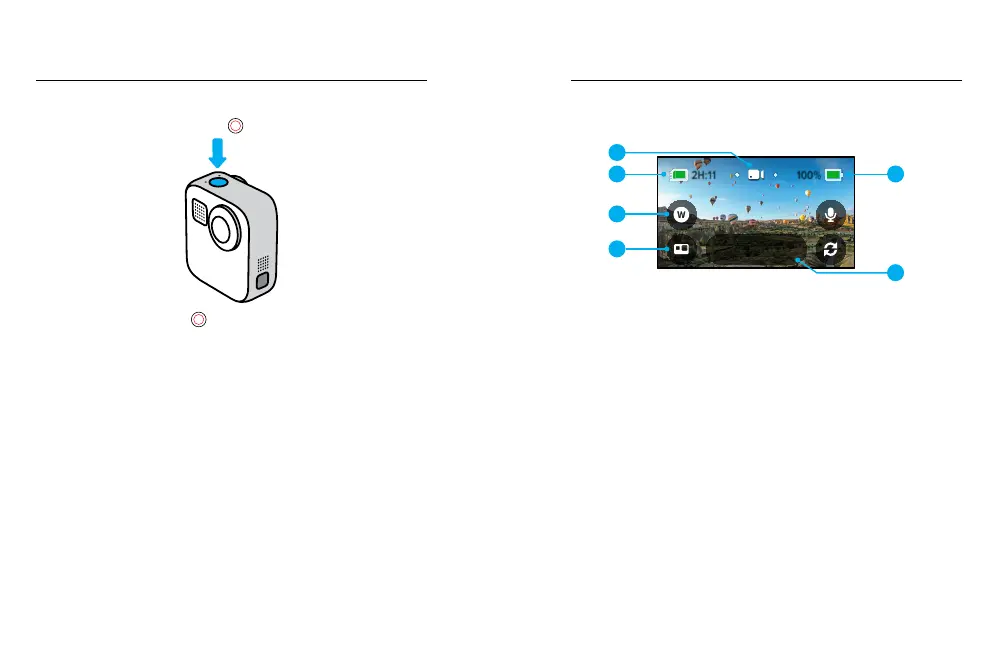
1. Simply press the Shutter button
to start recording.
2. Press the Shutter button
again to stop recording
(Video, Time Lapse and Live Streaming only).
Getting to Know Your GoPro
CAPTURE SCREEN
This screen gives you access to your camera’s capture settings.
1080 | 60 | W
Video
1
2
3
5
4
6
1. Current Mode (Video, Photo or Time Lapse)
2. Recording Time/Photos Remaining
3. Customisable On-Screen Shortcut
4. HERO/360 Mode Select
5. Battery Status
6. Capture Settings
Heads Up: The capture settings are not available when you rotate your
GoPro to take portrait shots. Make sure you choose the settings you want
before rotating your camera.















 To Next Page