EasyManua.ls Logo

Graco ProMix 2KS - User Manual

Graco ProMix 2KS
134 pages
Print Icon
To Next Page IconTo Next Page
Loading...
312779E
EN
Operation
ProMix
®
2KS
Plural Component Proportioner
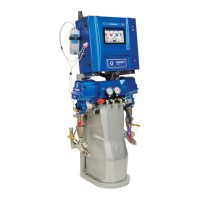
Automatic system for proportional mixing of plural component coatings, with Wall Mount
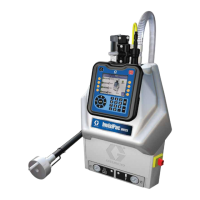
Fluid Station or RoboMix Fluid Station. For professional use only.
Approved for use in explosive atmospheres (except the EasyKey).
Automatic System with Wall Mount Fluid Station
Automatic System with RoboMix Fluid Station
TI12553a
TI12552a
See pages 4-7 for model information, including maxi-
mum working pressure. Equipment approval labels are
on page 3. Some components shown are not included
with all systems.
Important Safety Instructions
Read all warnings and instructions in this
manual. Save these instructions.
#53
II 2 G0359
Get other manuals https://www.bkmanuals.com

Table of Contents

Other manuals for Graco ProMix 2KS

Questions and Answers

  • S
    steven91Sep 2, 2025
    What to do if I get a MATERIAL_FILL_ALARM on my Graco ProMix 2KS?
    • C
      Christopher JohnsonSep 3, 2025
      A MATERIAL_FILL_ALARM indicates that, for systems with a minimum mixed material fill volume entered, the system detects that fill volume is not achieved during mixed material fill time. Check for restrictions or leaks in the fluid supply system. Also, verify that the fill volume is properly configured by adjusting the fill volume and fill time.
  • R
    Robert MejiaSep 2, 2025
    Why am I getting a COLOR/CATALYST_PURGE_ALARM on my Graco ProMix 2KS?
    • A
      Adam GriffinSep 2, 2025
      A COLOR/CATALYST_PURGE_ALARM indicates that the system detects no meter pulses, or a disruption in meter pulses lasting longer than 1 second throughout the Color/Catalyst purge time duration. Check that the meter cable is connected and clean or repair the meter.
  • L
    lindawilliamsSep 1, 2025
    What causes PURGE_INITIATE_ALARM on Graco ProMix 2KS?
    • L
      Lorraine FranklinSep 1, 2025
      A PURGE_INITIATE_ALARM is triggered when the system detects atomizing air to the gun when purge is selected, so shut off gun air. For systems with a gun flush box, this alarm also occurs if the gun is not in the box when purge is selected. Place the gun in the gun flush box and verify that the gun flush box is operating properly. The same applies for systems with auto dump on: ensure the gun is in the gun flush box when auto dump is initiated and that the box is functioning correctly.
  • T
    Tamara MillerAug 31, 2025
    How to resolve CAN_COMM_ERROR_ALARM on Graco Industrial Equipment?
    • A
      Allison Hudson MDAug 31, 2025
      A CAN_COMM_ERROR_ALARM indicates an interruption in communication. Verify that the cable is correctly connected between the Color Change Module and the Fluid Station, or between the Booth Control and the Fluid Station. Also, check the fluid control board fuse and replace if necessary.
  • P
    Patrick WrightAug 30, 2025
    What to do if I get a COLOR/CATALYST_FILL_ALARM on my Graco ProMix 2KS Industrial Equipment?
    • J
      Jermaine MooreAug 30, 2025
      A COLOR/CATALYST_FILL_ALARM can occur if the system detects no meter pulses, or doesn't detect at least 10cc of material from each side during the Color/Catalyst fill time. Check that the meter cable is connected and clean or repair the meter. Also, ensure the gun, dump valve, or correct color/catalyst valve is open. Finally, verify that the fluid supply isn't exhausted and refill if necessary.
  • J
    Joshua GrahamAug 30, 2025
    What does OVERDOSE_A/B_DOSE_TOO_SHORT_ALARM mean on my Graco ProMix 2KS?
    • W
      wpachecoAug 30, 2025
      An OVERDOSE_A/B_DOSE_TOO_SHORT_ALARM suggests a valve seal or needle/seat leak, or a sampling valve leak. In this case, repair or tighten/replace the valve. It can also be caused by flow meter fluctuations due to pressure pulsations. Check for pressure pulsations by closing all manifold valves, turning on circulating pumps and booth equipment, and seeing if the ProMix 2KS reads fluid flow without any leaks. If necessary, install pressure regulators or a surge tank on the fluid inlets to reduce fluid supply pressure. Also, consider restricting the flow rate through the component B dose valve by adjusting its hex nut if you are running a high mix ratio and a high flow rate.
  • S
    Susan GrimesAug 29, 2025
    What causes PURGE_VOLUME_ALARM in Graco Industrial Equipment and how to solve it?
    • H
      Heidi CalhounAug 29, 2025
      A PURGE_VOLUME_ALARM can occur if the ProMix 2KS solvent flow switch is not activated while purging. Make sure the gun is not shut off and that the solvent flow switch is activated during the purge. The alarm can also appear if the minimum flush volume is set too high, so increase the solvent supply or decrease the minimum volume setting. Finally, check that the color change solvent supply is set up and functional if there are no meter pulses during Color/Catalyst Dump.
  • S
    Samantha OwensAug 28, 2025
    How to troubleshoot COMM_ERROR on Graco ProMix 2KS?
    • J
      Jessica HolmesAug 28, 2025
      A COMM_ERROR indicates a communication issue. First, ensure the EasyKey has power. Then, check the connection of the intrinsically safe power cable between the EasyKey and Fluid Station. Also, verify the condition of the fluid control board fuse and replace if necessary. Check the fiber optic cable connections between the EasyKey and Fluid Station, ensuring the cable isn't cut or bent too sharply (smaller than 1.6 in. or 40 mm radius). Clean the fiber optic cable ends with a lint-free cloth. Finally, if all else fails, replace the communication cable.
  • K
    Kelly DiazAug 27, 2025
    How to fix DOSE_TIME_A/B_ALARM on Graco ProMix 2KS?
    • J
      Joann GarciaAug 27, 2025
      If you're getting a DOSE_TIME_A or DOSE_TIME_B alarm, try these steps: fully trigger the gun if the system is in Mix mode and the gun is only partially triggered. Increase the fluid flow rate or the dose time setting. If the flow meter or cable has failed, or the flow meter is clogged, clean or repair the meter. Ensure that the supply pump is turned on. Check the air lines for leaks and repair or clean/replace the air flow switch.
  • A
    Allen JosephAug 27, 2025
    What to do if I get a RATIO_LOW_ALARM on my Graco ProMix 2KS Industrial Equipment?
    • W
      westjohnAug 27, 2025
      A RATIO_LOW_ALARM indicates there is too much restriction in the system. Check that the system is fully loaded with material, the supply pump’s cycle rate is set properly, the spray tip/nozzle is properly sized and not clogged and that the fluid regulator is set correctly. If the alarm occurs during start up, after purging, restrict gun needle travel to slow down the initial fluid delivery rate until fluid hoses are loaded with material. If the alarm occurred after you were spraying for some time, adjust component A and B fluid supply regulator pressures until they are about equal. Increase air pressure to the valve actuators to 75-120 psi (120 psi is recommended). Ensure there is no dirt or moisture in the air supply and adjust air and fluid pressure.

Summary

Operation

ProMix 2 KS

Electronic two-component paint proportioner for mixing plural component coatings.

Plural Component Proportioner

System for proportional mixing of plural component coatings.

Important Safety Instructions

System Configuration and Part Numbers

Wall Mount Fluid Station Configurator Key

Key for configuring part numbers for Wall Mount Fluid Station systems.

RoboMix Fluid Station Configurator Key

Key for configuring part numbers for RoboMix Fluid Station systems.

Warnings

FIRE AND EXPLOSION HAZARD

Warnings related to flammable fumes and preventing fire and explosion.

ELECTRIC SHOCK HAZARD

Warnings related to grounding, setup, and usage to prevent electric shock.

INTRINSIC SAFETY

Warnings regarding the proper installation and connection of intrinsically safe equipment.

SKIN INJECTION HAZARD

Hazards associated with high-pressure fluid injection and necessary precautions.

EQUIPMENT MISUSE HAZARD

Hazards related to improper operation, misuse, or alteration of the equipment.

TOXIC FLUID OR FUMES HAZARD

Hazards from toxic fluids or fumes and necessary safety measures.

PERSONAL PROTECTIVE EQUIPMENT

Requirements for protective equipment to prevent serious injury during operation or servicing.

Overview

Component Identification and Definition

Identification and description of key system components.

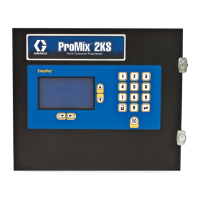
EasyKey Display and Keyboard

Run Mode Screens

Status Screen

Detailed explanation of the information presented on the Status Screen.

Manual Override Screen

Screen for manually controlling system operations and modes.

Flow Control Calibration

Procedure for calibrating the flow control system for each recipe.

Alarms Screen

Screen displaying active alarms and their E-Codes.

Level Control Screen

Screen showing current fluid volumes and alarm levels.

Setup Mode

Password Screen

Screen for entering password to access Setup mode.

Set Up Home Screen

Main screen for navigating Setup Mode options.

System Configuration Screens

Screens for configuring system settings and options.

Option Screens

Advanced Setup Screens

Advanced Setup Screen 1

Setup for Flow Control Override, Manual Override, Potlife Volume, and Color/Catalyst Purge/Fill.

Advanced Setup Screen 2

Setup for Purge Sources, Chop Type, and Chop Times.

Advanced Setup Screen 3

Setup for Purge Times, Chop Time, and Mixed Material Fill Time.

Advanced Setup Screen 4

Setup for K-Factor values for meters.

Advanced Setup Screen 5

Setup for Flow Rate Range, Tolerance, Ki, Kp, and Alarm Time.

Advanced Setup Screen 6

Status of recipe analog inputs and digital outputs.

Advanced Setup Screen 7

Status of digital inputs and digital outputs.

Advanced Setup Screen 8

Setup for Special Outputs timing and configuration.

Recipe Setup Screens

Recipe Setup Screen 1

Setup for Ratio, Ratio Tolerance, and Color/Catalyst Valves.

Recipe Setup Screen 2

Setup for Minimum Flush Volume, Potlife Time, and Color/Catalyst Purge/Fill.

Recipe Setup Screen 3

Setup for Purge Sources, Chop Type, and Chop Times for recipes.

Recipe Setup Screen 4

Setup for Purge Times, Chop Time, and Mixed Material Fill Time for recipes.

Recipe Setup Screen 5

Setup for K-Factor values for recipes.

Recipe Setup Screen 6

Setup for Flow Rate Monitor, Low Flow Limit, and High Flow Limit.

Recipe Setup Screen 7

Setup for Special Outputs timing and configuration for recipes.

Calibration Screen

ProMix 2 KS Integration Specifics

Discrete I;O vs Network Communications

Overview of system integration methods using Discrete I/O or Network Communications.

Discrete I;O

Requirements and connections for Discrete I/O integration.

Automation Flow Charts

Integrated Flow Control

Flow Control Calibration

Automatic routine to establish a pressure vs flow profile.

Flow Control Troubleshooting

Steps to diagnose and resolve issues with Flow Command not producing fluid output.

System Operation

Typical PLC Interaction with ProMix 2 KS

Description of typical interaction between a PLC and the ProMix 2KS.

Start Up

Shutdown

Pressure Relief Procedure

Purging

Solvent Push Feature

Meter Calibration

Color Change

Alarms and Warnings

Alarm Troubleshooting

Schematic Diagrams

System Pneumatic Schematic

Pneumatic schematic illustrating air and fluid flow paths.

System Electrical Schematic

Electrical schematic showing wiring and connections for the system.

EasyKey Electrical Schematic

Electrical schematic specific to the EasyKey unit.

Graco Standard Warranty

Graco ProMix 2KS Specifications

General IconGeneral
BrandGraco
ModelProMix 2KS
CategoryIndustrial Equipment
LanguageEnglish

Related product manuals