30
8.14 Account Management
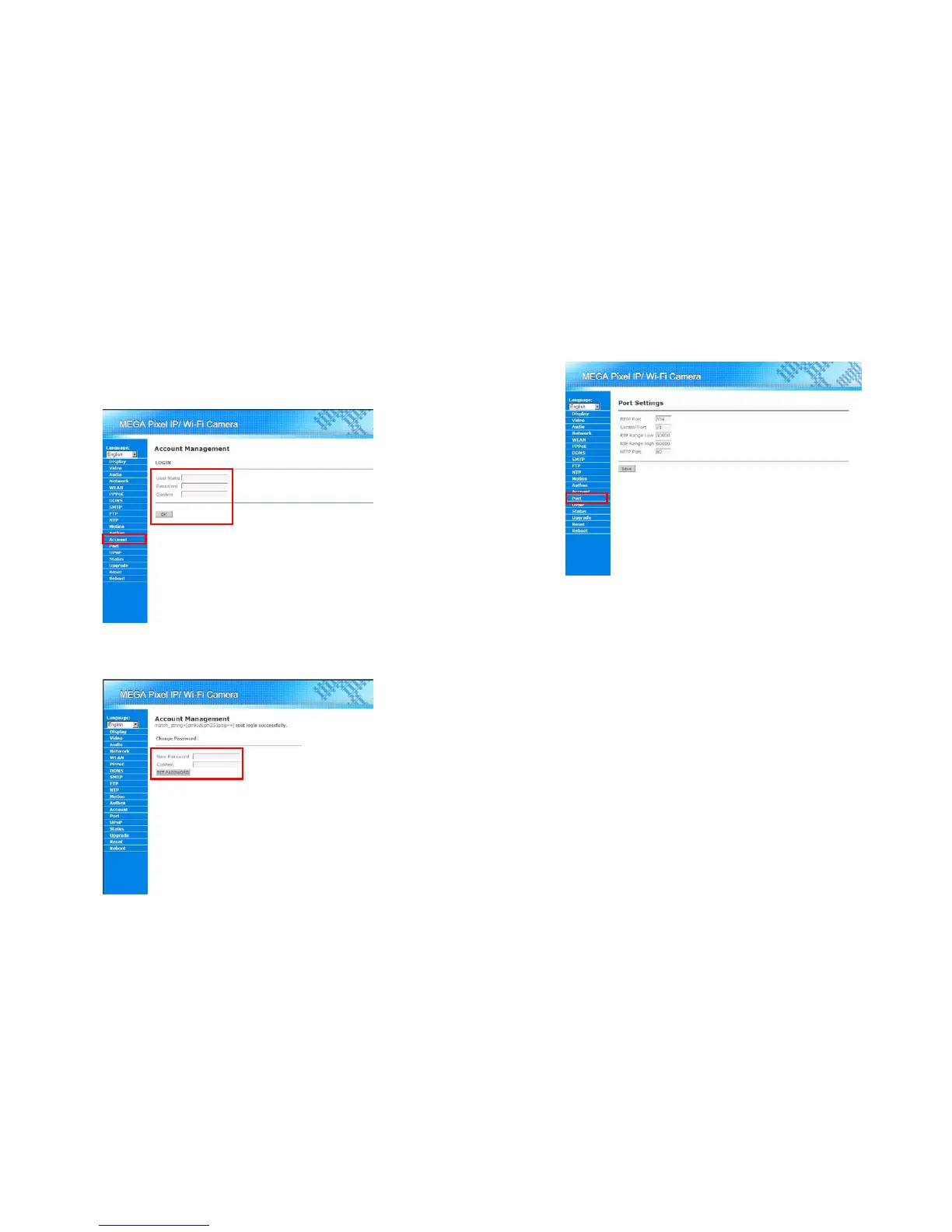
User could change the password of the root account through the Account Management. Click on
“Account” in the Menu List and follow the steps below for changing the password:
Step 1: Enter the user name and current password twice. Then press the “OK” button for getting into the
“Change Password” page.
Step 2: Enter the new password twice. And then press “SET PASSWORD” button for changing the
password.
31
8.15 Port Settings
User could change the port number that used by the video stream. The video stream utilizes the
RTP/RTSP protocol for delivering through the network. Click on “Port” in the Menu List for further settings.
RTSP Port: Specify the port number the user wants to use for RTSP. The default port is 554.
Control Port: Specify the control port the user wants to use for sending controlling message to
Mega Pixel Wi-Fi Camera. The default port number is 21.
RTP Range Low/High: User might specify the range of the random port that used by RTP protocol.
The default range is from 50000 to 60000.
HTTP Port: User might change the default port used by HTTP protocol here. The default port
number is 80.
Save button: Save and apply the configuration.



 To Next Page