36
8.20 Reboot the Camera
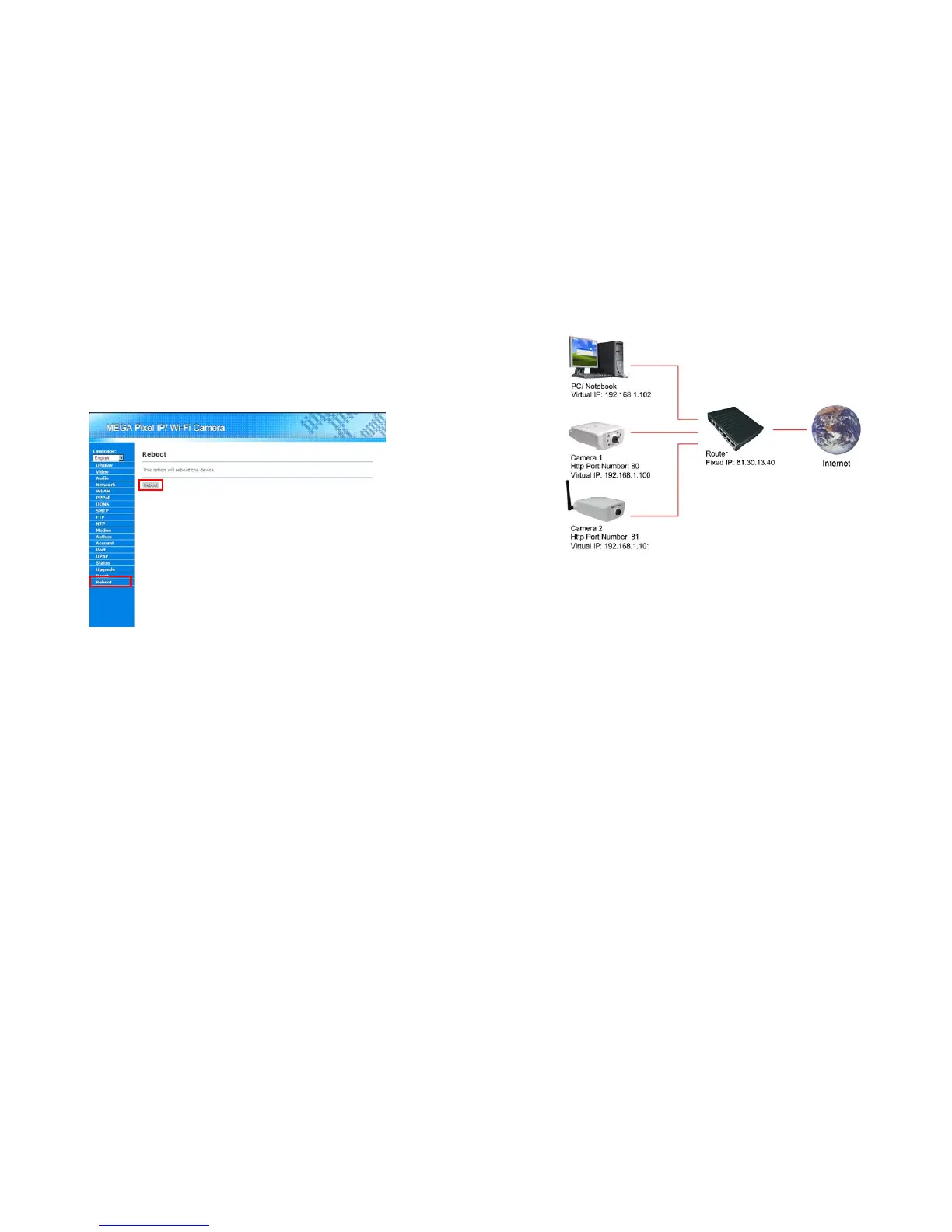
User could reboot Mega Pixel Wi-Fi Camera via the browser. Please follow the steps below for rebooting
the camera.
Step 1: Log in Mega Pixel Wi-Fi Camera and click on the “Reboot” in the Menu List.
Step 2: Click on the “Reboot” button in the Main Display area for rebooting the camera.
37
9. Connecting Multiple Cameras to a Router
Step 1: Assign a local IP Address and Http Ports for your cameras (confirm the cameras settings
corresponding to your network settings; you must use the same gateway and Subnet Mask).
Step 2: Set up the router to open the ports of cameras for remote access the cameras via internet (refer
to your router’s user manual for how to open up ports).
Step 3: Accessing your cameras.
- Access on local network
Enter “http:// 192.168.1.100” to access the camera 1;
Enter “http:// 192.168.1.101” to access the camera 2.
- Access from the internet
Enter “http:// 61.30.13.40:80” to access the camera 1;
Enter “http:// 61.30.13.40:81” to access the camera 2.



 To Next Page