34
8.18 Firmware Update
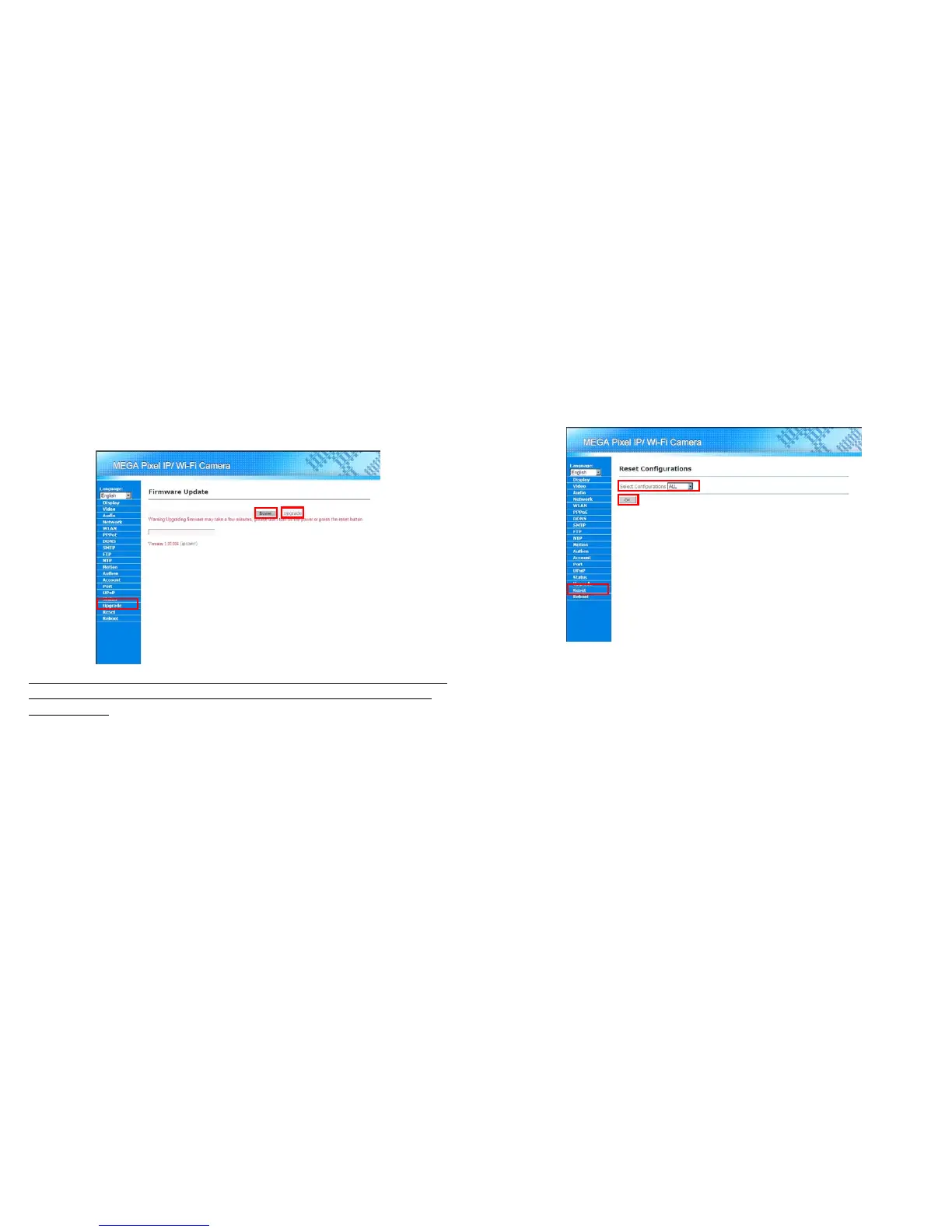
User could update the firmware of Mega Pixel Wi-Fi Camera when upgrade is needed. Please follow the
steps below for updating your firmware.
Step 1: Get the new firmware and save it in the hard disk.
Step 2: Log in the Mega Pixel Wi-Fi Camera. Click on the “Upgrade” in the Menu List.
Step 3: Click on the “Browser” button in the Main Display area and a dialogue box will pop up for the user
to choose the new firmware file (the file saved in Step 1).
Step 4: Click on “Upgrade” button for starting the upgrade process.
NOTE: The upgrading process should not be interrupted, that is user should not turn off the power of or
reset the Mega Pixel Wi-Fi Camera when upgrading, for that will cause a hardware damage of Mega
Pixel Wi-Fi Camera.
35
8.19 Reset Configuration
User could reset the configuration of Mega Pixel Wi-Fi Camera. Please follow the step for resetting the
camera.
Step 1: Log in Mega Pixel Wi-Fi Camera and click on the “Reset” button in the Menu List.
Step 2: Select which kind of configuration or “ALL” for all configurations to reset.
Step 3: Click on “OK” button for resetting the configuration.



 To Next Page