EasyManua.ls Logo

GRAUPNER HoTT mz-8P - User Manual

GRAUPNER HoTT mz-8P
24 pages
Print Icon
To Next Page IconTo Next Page
Loading...
EN
No. S1032
4 channel HoTT 2,4 GHz transmitter
mz-8P HoTT
Manual
Copyright © Graupner/SJ GmbH
CAMERA ACRO
ENGINE OFF
Question and Answer IconNeed help?

Do you have a question about the GRAUPNER HoTT mz-8P and is the answer not in the manual?

Summary

Introduction and Service Information

Service Centre Details

Provides contact details for Graupner Service Centers in Germany and USA, including hotline and email.

Intended Use and Target Audience

Intended Use

Specifies the transmitter's intended use for remote control models without passengers and warns against misuse.

Target Group

States the product is not a toy, unsuitable for children under 14, and requires experienced modellers.

Package Contents

Lists the items included in the transmitter package.

Technical Data and Symbols

Technical Data

Lists technical specifications for the mz-8P HoTT transmitter, including frequency, modulation, and dimensions.

Symbol Description

Explains warning symbols (Caution, Warning, Note, Attention) and their meanings regarding injury and damage.

General Safety Notes

General Safety Instructions

Provides essential safety instructions to protect the product and ensure user safety before operation.

Transmitter Handling Safety

Transmitter Handling Safety

Warns about accidental motor start, short-circuits, and unauthorized modification of the transmitter.

Battery Safety Guidelines

Battery Handling Safety

Advises protecting batteries from moisture, heat, and vibration, and not using damaged batteries.

Battery Precautions and Disposal

Battery Operational Safety

Details precautions against heating, burning, short-circuiting, and handling leaked electrolyte.

Battery Storage and Disposal

Instructs on proper battery storage and responsible disposal according to regulations.

Transmitter Description

Transmitter Front Side Overview

Identifies and describes the buttons, sticks, and LEDs on the front of the mz-8P HoTT transmitter.

Transmitter Back Side and Power

Transmitter Back Side

Illustrates and labels the components on the rear of the transmitter, including screws, data socket, and battery case.

Transmitter Power Supply

Explains how to install batteries and indicates how the voltage level is monitored via the status LED.

Transmitter Setup and Startup

Data Socket Functionality

Describes the function of the data socket for connecting modules and updating the transmitter.

Optional Accessories

Lists optional accessories such as SMART-BOX, Bluetooth module, and USB interface for telemetry and programming.

Factory Reset Procedure

Explains the procedure to reset the transmitter to its factory default settings by holding trims and powering on.

Transmitter Startup Procedure

Details the steps to power on the transmitter and describes the initial LED and buzzer feedback indicating status.

Binding Process

Binding Notes

Mentions the default highest control sensitivity after binding and how to adjust it using the "SPEED" button.

Range Testing

Range Test Operation Warning

Warns against performing a range test during normal model operation.

Stick Calibration

Flight Control Modes

Flight Control Overview

Illustrates the control movements for a drone in "MODE 2" configuration, showing climb, sink, turn, and roll actions.

MODE 2 Configuration

Explains the "MODE 2" flight control configuration for throttle, pitch, yaw, and roll functions.

Control Mode and Fail-Safe

Changing Control Mode

Describes how to change the transmitter's control mode from the default Mode 2 to Mode 4 via firmware update.

Fail-Safe Functionality

Explains the transmitter's behavior during radio connection interruption, including holding or switching off controls.

Transmitter Button Functions

Motor OFF Button Operation

Explains the safety function of the motor OFF button and how to engage/disengage motors.

Attitude vs. Rate Mode

Describes how to switch between Attitude and Rate flight modes and the corresponding LED/sound feedback.

LED Button Functions

Details the functions of the LED button for binding, controlling front LEDs, and cycling FPV channels.

Advanced Button Functions

SPEED Button Settings

Explains how the SPEED button cycles through three preset path settings for Pitch, Roll/Nick/Yaw.

SNAP Button Actions

Describes the SNAP button's function for taking snapshots or switching channel 8 on compatible copters.

RECORD Button Usage

Details how to start and stop video recording on compatible copters using the RECORD button.

Auto-Flip Function Trigger

Explains how to trigger a self-rollover or flip maneuver using the control sticks in Attitude mode.

Auto-Flip Function Notes

Post-Rollover Correction

Advises that the copter's position might need manual correction after a rollover due to potential loss of exact starting position.

Auto-Flip Usage Warning

Warns that repeated use of auto-flip can cause loss of attitude information and uncontrolled movement.

Firmware Update Procedure

Declarations and Manufacturer Info

Simplified Declaration of Conformity

Declares that the transmitter system complies with EU Directive 2014/53/EU, with a link to the full text.

Manufacturer Details

Lists the manufacturer's name and address details for the transmitter system.

Environmental, Care, and Warranty

Environmental Protection Notes

Explains the meaning of the recycling symbol and advises on proper disposal of the product and batteries.

Care and Maintenance

States the product needs no maintenance and how to clean it using a dry cloth.

Warranty Conditions

Outlines the 24-month warranty terms, exclusions, and instructions for claims.

Overview

The Graupner mz-8P HoTT is a 4-channel 2.4 GHz HoTT transmitter, model number S1032, designed for remote control models without passengers. It operates on a frequency band of 2.4 to 2.4835 GHz using FHSS modulation, with a transmitting power greater than 25 mW EIRP. The transmitter supports 8 functions, 4 of which can be trimmed, and operates within a temperature range of -10 to +55 °C. Its operating voltage is 3.4 to 4.5V, with a power consumption of approximately 70mA. The dimensions are approximately 151 x 134 x 65 mm, and it weighs about 190g without batteries, or 260g with batteries.

Function Description

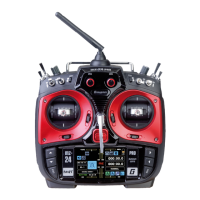
The mz-8P HoTT transmitter is used to control radio-controlled models. It features various buttons and sticks for precise control and mode selection. The front side includes a motor "ON/OFF" switch, an "Attitude / Rate mode" pushbutton, "Snapshot / C8-switching" pushbutton, "Video ON/OFF" pushbutton, ON/OFF switch, "Binding / Video channel switching" pushbutton, and a "Control sensitivity" pushbutton. It also has left-hand and right-hand control sticks with trims. LEDs indicate various statuses such as motor OFF, camera recording, Attitude/Rate mode, receiver connection, and battery voltage levels.

Important Technical Specifications

  • Frequency Band: 2.4 ... 2.4835 GHz
  • Modulation: FHSS
  • Transmitting Power: >25 mW EIRP
  • Control Functions: 8 (4 trimmable)
  • Temperature Range: -10 ... +55 °C
  • Operating Voltage: 3.4 ... 4.5V
  • Power Consumption: Approx. 70mA
  • Dimensions: Approx. 151 x 134 x 65 mm
  • Weight: Approx. 190g (without batteries), Approx. 260g (with batteries)
  • Power Supply: Three AA alkaline batteries (included, subject to modification) or AA size NiMH batteries (charged externally).
  • Low Voltage Warning: Red status LED flashes rapidly and 4x beeps sound when transmitter power drops below 3.2V.

Usage Features

  • Binding: The transmitter can be bound to a copter. The red status LED flashes once per second when unbound. After successful binding, it lights up constantly.
  • Range Test: A built-in range test reduces transmit power for testing at 5-10m. It is activated by simultaneously pressing the "SPEED" and "SNAP" buttons. The red status LED blinks quickly, and a signal tone sounds twice every two seconds. The test lasts 90 seconds, after which the transmitter returns to full output.
  • Stick Calibration: Allows users to check and correct the middle position of self-neutralizing sticks. This is done by entering programming mode (holding the left control stick), moving joysticks to end stops and back to middle, then pressing the left stick.
  • Flight Control Modes: The transmitter is delivered in Mode 2 (throttle/pitch and yaw on the left). It can be updated to Mode 4 via firmware.
  • Fail-Safe Function: If radio connection is interrupted for less than 0.5 seconds, control signals are held. If the interruption lasts longer, motors switch OFF.
  • Motor OFF Button: Activates/deactivates motors. Pressing the left front key (with throttle/pitch stick at idle) starts motors at low speed. Pressing it again switches them off. The yellow motor OFF LED indicates motor status.
  • Attitude / Rate Mode: Switches between Attitude mode (green ACRO LED off) and Rate mode (green ACRO LED on). A low signal sounds for Rate mode, and a bright 2x signal for Attitude mode.
  • LED Button: Triggers binding when the red status LED flashes. When the red status LED is constantly lit, a short press switches the large white front LED on/off (for compatible models). A long press (with motor stop activated) rotates to the next FPV channel and LED illumination (for compatible models with Flight Control S1038).
  • SPEED Button: In "Motor OFF" mode, each press cycles through three preset path settings for Pitch, Roll/Nick/Yaw (3-times signal: -94...+100% / ±100%; 2-times signal: -94...+55% / ±60%; 1-times signal: -94...+55% / ±40%). The highest sensitivity is default after binding.
  • SNAP Button: A short press triggers a snapshot (red CAMERA LED lights for 1 second). A long press switches channel 8 between + and -100% (compatible copters only).
  • RECORD Button: Starts video recording on compatible copters (low beep, rhythmic CAMERA LED flashing). Pressing again stops recording (red flashing CAMERA LED off, bright 2x signal).
  • Auto-Flip Function: Allows compatible copters in attitude mode to flip or roll. Activated by pressing the self-neutralizing control stick (fast beep for 5 seconds), then moving the roll or pitch stick more than 50% towards the end stop while accelerating.
  • Firmware Update: Updates are performed via the back DATA connection using a PC (Windows 7-10), a USB interface (No. 7168.6), and an adapter lead (No. 7168.6A or 7168.S). Software and files are available on www.graupner.de.

Maintenance Features

  • General Care: The product requires no specific maintenance. Protect it from dust, dirt, and moisture. Clean with a dry cloth only; do not use detergent.
  • Battery Removal: If the transmitter will not be used for a long time, remove batteries to prevent damage from electrolyte leaks.
  • Factory Reset: All stored values can be reset to factory settings by pushing and holding all trims to the inside, then switching the transmitter on.
  • Environmental Protection: The product should not be disposed of with normal household waste at the end of its service life. It must be turned over to a recycling collection point for electric and electronic apparatus. Batteries must be removed and disposed of separately at an appropriate collection point.

GRAUPNER HoTT mz-8P Specifications

General IconGeneral
BrandGRAUPNER
ModelHoTT mz-8P
CategoryRemote Control
LanguageEnglish

Related product manuals