182
Programming examples: Fixed-wing model
Controlling timed sequences
by means of time delays and curve mixers
An interesting feature of the mx-24s software, and
one which deserves to be better known, is that it is
possible to slow down virtually all servo movements
over a period of up to 9.9 seconds simply by opera-
ting a switch.
The following section will explain how such functions
can be programmed, with the help of a few examples.
Once you have made yourself familiar with these faci-
lities we are sure you will think of more applications.
The programming procedure commences in the menu
…
»Control adjust« (page 78)
0% +100%+100% 0.0 0.0
0% +100%+100% 0.0 0.0
0% +100%+100% 0.0 0.0
0% +100%+100% 0.0 0.0
SYM ASY
ASYSYM
SEL
SEL
«normal »
Cnt. 5
12
11
10
9
offset
–time+
Input
Input
Input
Input
free
free
free
–travel+
… where the fi rst step is to assign one of the two
side-mounted proportional controls or one of the two
INC / DEC buttons to the desired control channel, so
that it is possible to move to all points on the control
curve during the programming procedure. In our ex-
ample we are using CONTROL 5 assigned to Input 9.
Don’t be tempted to enter a time delay in the “-time+”
column at this stage.
Now move to the menu …
»MIX-only channel« (page 142)
12
3
5678
9
1112
410
MIX ONLY CHANNEL
MIXonly
normal
… and set the selected control channel – in our ex-
ample “9” – to “MIX only”.
This setting of “MIX only” is absolutely essential, be-
cause the control curves of the curve mixers descri-
bed in the following example only affect the output of
the same channel – which is what we want to achieve
– if there is no direct connection between the trans-
mitter control and the output. In this mode the trans-
mitter control signal carries out a detour via a curve
mixer, during which it can be manipulated in almost
any way you like before being passed to the appropri-
ate output.
For this reason the next step is to move to the menu
…
»Free Mixers« (page 135)
SEL
??
??
----
----
----
??
??
9
??
??
8
7
6
9
SEL SEL
=>
9
LinearMIX
type
LinearMIX
LinearMIX
from to Adjust
Curve MIX
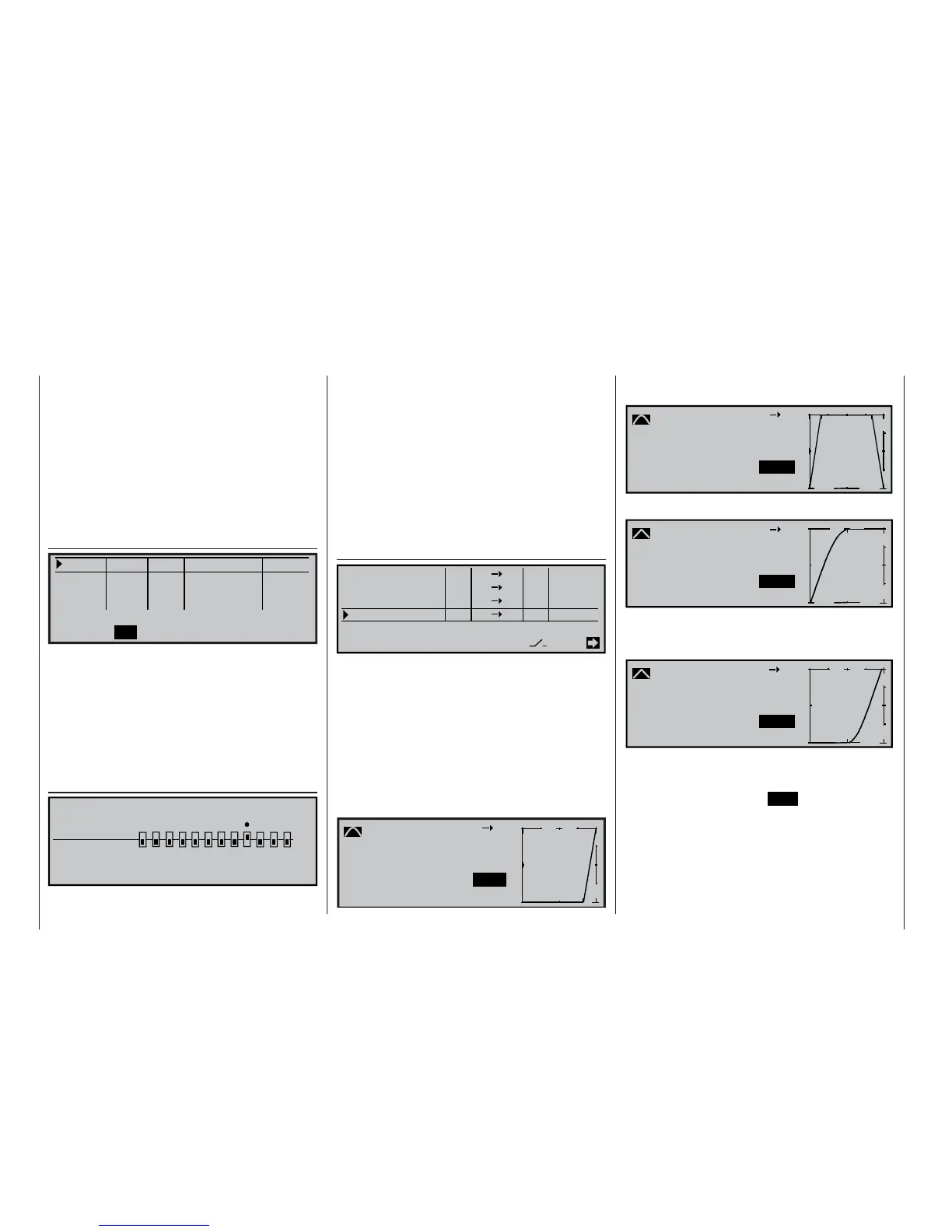
… and program a same-channel curve mixer, e. g.
from “9” to “9”. On the second page of this menu you
can defi ne the shape of the control curve, but please
bear in mind that the following examples should only
be considered as ideas and guidelines, and that you
can set up your own control curves in any way you
wish.
For example, this is how the control curve might look
for …
... the delayed switching of a searchlight after a
retractable undercarriage has started to extend:
-100%
L
-100%
m
OUTPUT
--
+
1
100
-103%
99
Curve MIX 9
Input
Curve
off
Point
Output
… actuating a wheel door which closes again af-
ter the wheel has been extended:
-100%
L
m
OUTPUT
--
100
+
1
2
99
-103%
-100%
Curve MIX 9
Input
Curve
off
Point
Output
… starting extending a folding power system …
-100%
L
m
OUTPUT
--
100
+
1
99
-103%
-100%
Curve MIX 9
Input
Curve
on
Point
Output
… starting the electric motor connected to out-
put 10 and actuated by the same switch, but with
a delay:
-101%
L
m
OUTPUT
--
100
+
1
9 10
-104%
-100%
Curve MIX 10
Input
Curve
on
Point
Output
Once the function you have programmed according
to these ideas is working as you want it to – you can
check this at any time by calling up the »Servo dis-
play« menu by pressing the HELP button with the ro-
tary control pressed in – then you should conclude
the programming procedure by moving to the menu
…















 To Next Page