EN - 28
CHECK PARKING BRAKE
IMPORTANT: Check brake on both sides of
unit.
1. Park unit on a flat, level surface.
2. Position steering levers in neutral.
3. Engage parking brake.
4. Stop engine and wait for moving parts to
stop and for hot parts to cool.
5. Turn transaxle bypass valves to bypass
position. See Move Unit Manually on
page 22.
6. Push unit forward.
• If unit does not move forward, no
adjustment is needed.
• If unit moves forward easily, adjust the
brake lever. See Adjust Parking Brake
on page 34.
CLEAN BATTERY
Remove Battery
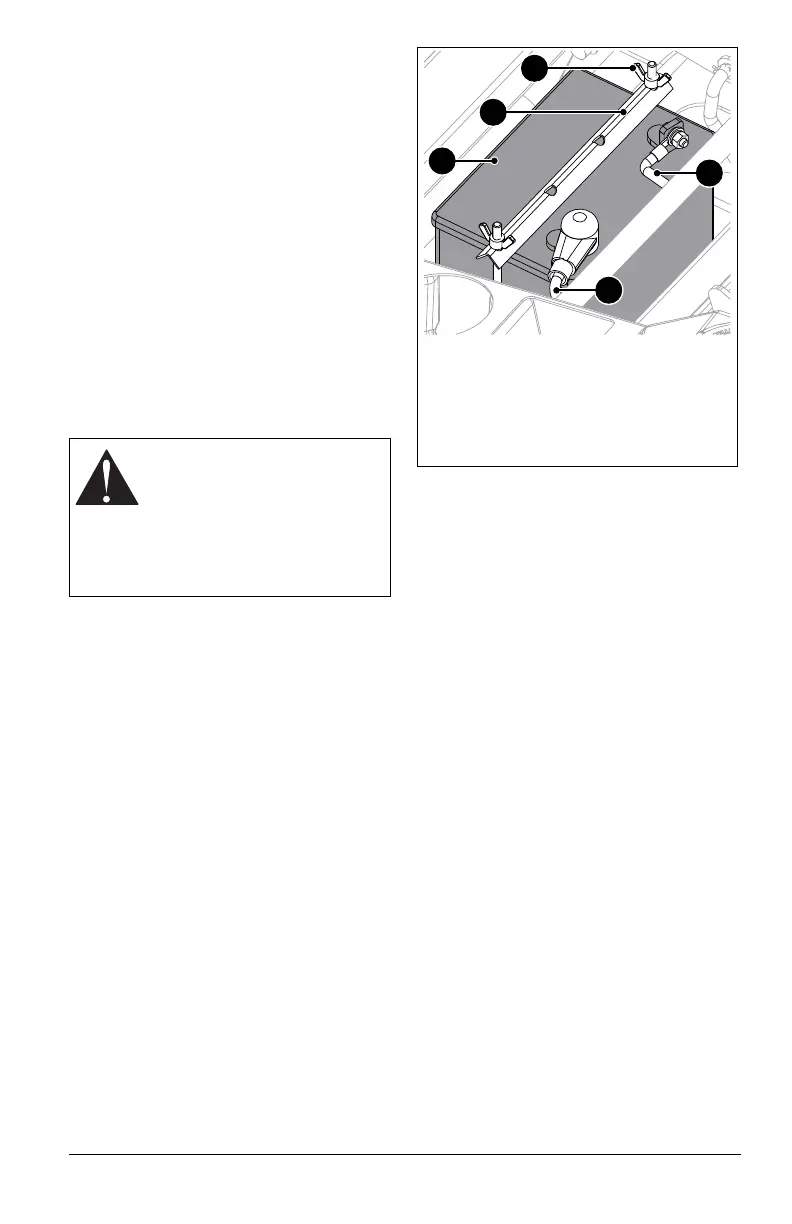
See Figure 30.
1. Stop engine, remove key and wait for
moving parts to stop and for hot parts to
cool.
2. Engage parking brake.
3. Rotate seat to service position. See
Service Position on page 23.
4. Disconnect the negative cable and then
the positive cable from battery.
5. Remove wing knobs securing hold-down
bracket to battery and remove bracket.
6. Remove battery.
Clean Battery
1. Clean terminals and battery cable ends
with a wire brush.
2. Coat terminals with dielectric grease or
petroleum jelly.
Install Battery
1. Install battery and secure with hold-down
bracket and wing knobs.
2. Reconnect positive cable and then the
negative cable.
3. Place boot over positive terminal.
4. Return seat to operating position.
CHARGE BATTERY
Check battery with a voltmeter. If battery is
less than 11 volts, charge battery.
IMPORTANT: DO NOT fast charge. Charging
at a higher rate damages or destroys battery.
ONLY use an automatic charger designed for
use with your battery.
IMPORTANT: Always follow information
provided on battery by battery manufacturer.
Contact battery manufacturer for details
regarding charging.
1. Remove battery from unit. See Remove
Battery on page 28.
2. Place battery on bench in a well-
ventilated area.
3. Connect positive lead of charger to
positive terminal.
4. Connect negative lead of charger to
negative terminal.
WARNING: AVOID INJURY.
Battery posts, terminals and
related accessories contain lead
and lead compounds, chemicals
known to the State of California
to cause cancer and
reproductive harm. Wash hands
after handling.
Figure 30
1. Battery
2. Wing Knob
3. Hold-Down Bracket
4. Positive Battery Cable
5. Negative Battery Cable
3
2
4
5
1



 To Next Page