EN - 33
Adjust Height
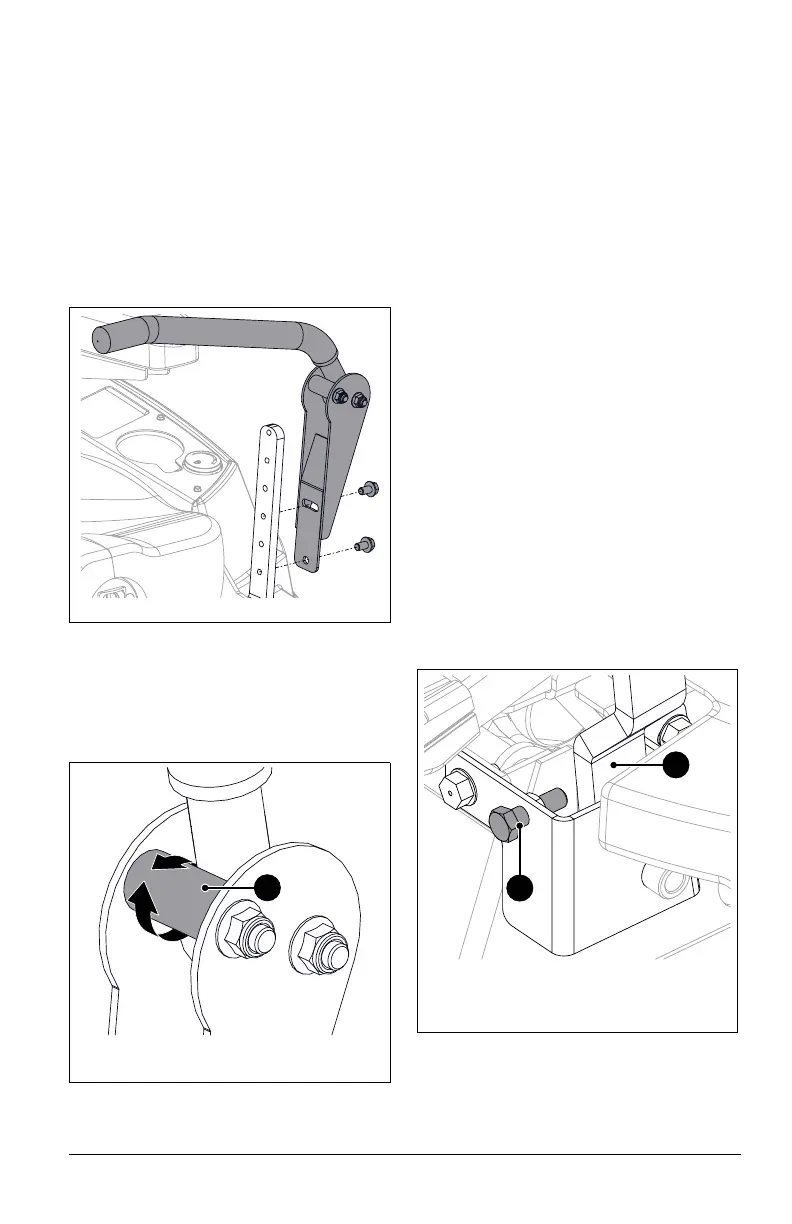
See Figure 40.
The steering lever height may be adjusted for
operator comfort.
1. Stop engine, remove key and wait for
moving parts to stop and for hot parts to
cool.
2. Remove steering lever hardware and
remove steering lever from lower control
arm.
3. Position steering lever at desired height
and align with lower control arm. Secure
with original hardware.
4. Adjust steering lever position. See Adjust
Forward Position on page 32.
5. Turn eccentric spacer so levers are at the
same height and have a 1.3 – 2.5 cm
(1/2 – 1") gap between lever ends. See
Figure 41.
ADJUST UNIT TO DRIVE
STRAIGHT
Adjust Tire Pressure
1. Stop engine, remove key and wait for
moving parts to stop and for hot parts to
cool.
2. Engage parking brake.
3. Check tire pressures. If needed, adjust to
recommended pressures. See
Specifications on page 44.
4. Check tracking.
• If unit does not track straight, increase
tire pressure to the drive wheel of the
side it moves toward.
IMPORTANT: DO NOT inflate tires outside
recommended range. See Specifications on
page 44.
• If increasing tire pressure does not
correct tracking, adjust the limiter bolts
as directed below.
Adjust Limiter Bolts
See Figure 42.
Limiter bolts can be adjusted to increase or
decrease drive wheel speeds:
• Turn front limiter bolt counterclockwise
to increase maximum drive wheel
speed on that side.
• Turn front limiter bolt clockwise to
reduce maximum drive wheel speed on
that side.
1. Adjust steering lever position. See Adjust
Forward Position on page 32.
Figure 41
1. Eccentric Spacer
1
Figure 42
1. Lower Control Arm
2. Limiter Bolt
1
2



 To Next Page