Jaguar II User Manual
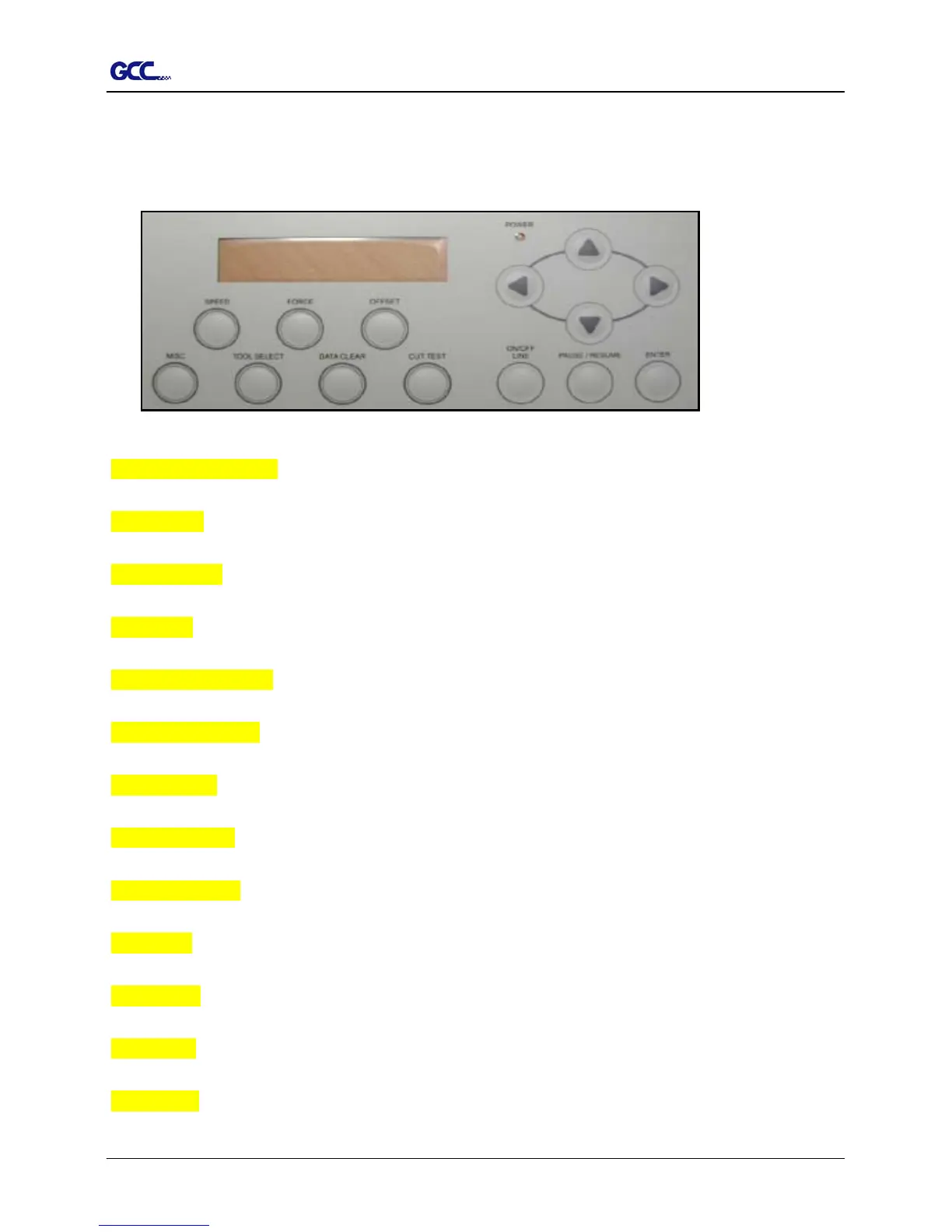
1.7 Control Panel (Figure 1-6)
Please refer to the Chapter3 – the description of operation for detailed explanation.
Figure 1-6
LCD Display Screen: various functional and error message are displayed here.
Power LED: it lights up when the power is on.
4 Arrow Keys: used to move the carriage or sheet or changing setting.
Enter Key: used to set item, registers the immediately preceding input value.
Pause/Resume Key: temporarily halts cutting in process or continues.
ON/OFF LINE Key: used to stop the cutting job or aborting the change of the setting.
Cut Test Key: executes a cutting test for verifying the blade force and offset are correct.
Data Clear Key: used to aborting the data being received.
Tool Select Key: used to selecting tools and setting the conditions.
Misc. Key: used to selecting items mentioned in Chapter 3.
Speed Key: used to selecting the cutting speed, up-speed, and cutting quality.
Force Key: used to select the cutting force.
Offset Key: used to adjust the setting value of the blade offset.
1 – Setting Up Your sign Cutting Plotter 1-5



 To Next Page