17
4 Screen
The ACS 921 features a large 10” touchscreen.
This screen is used to perform all functions and settings.
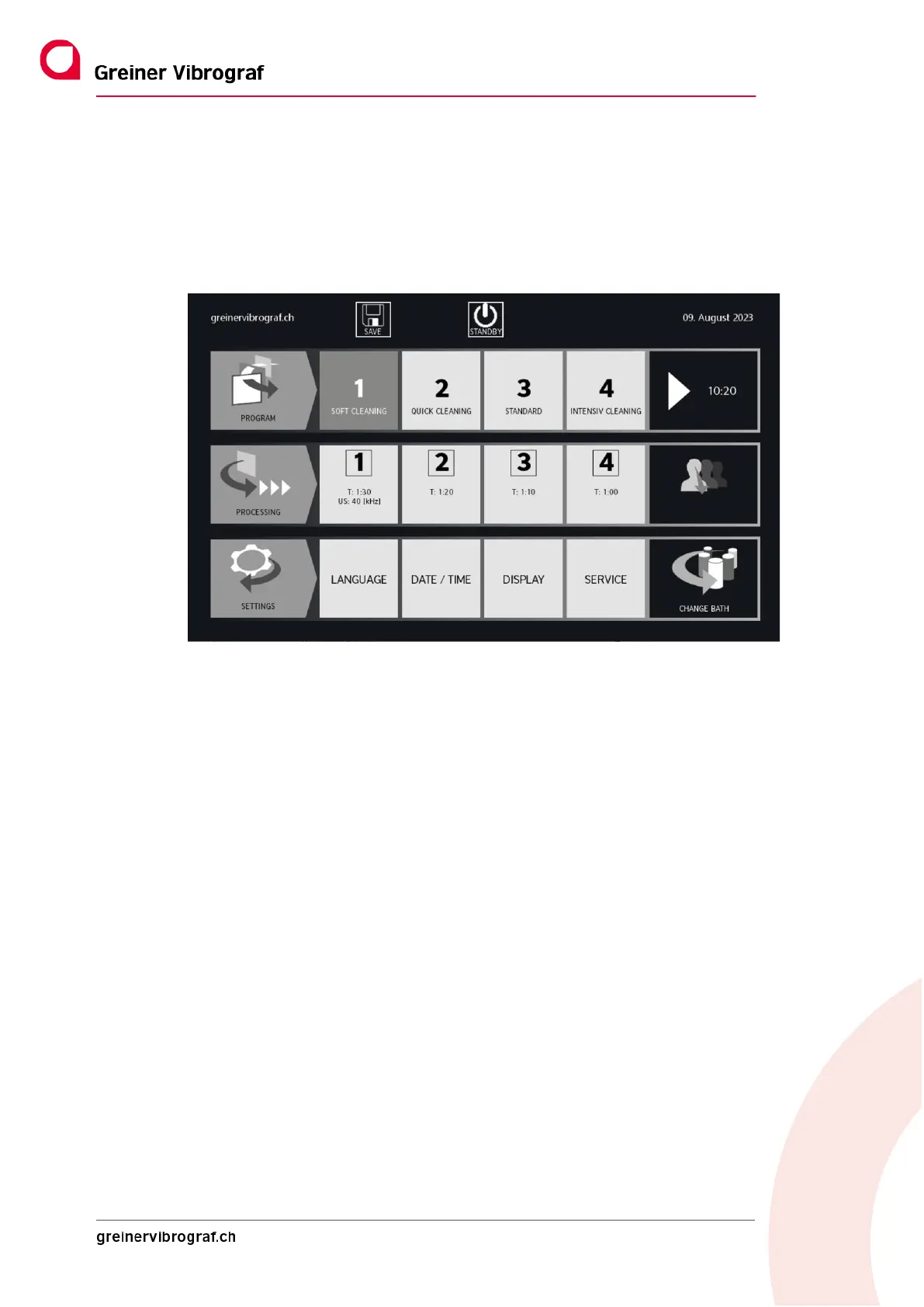
After starting up the ACS 921, the following main menu is always displayed:
The main menu is divided into three areas:
4.1.1 PROGRAMME:
This is where previously configured and saved individual programmes are stored. A maximum of 20
programmes can be saved. A name can be set for each programme.
The total time of the selected programme is displayed in the far right area.
The arrow triangle is the start button for the previously selected programme.
4.1.2 PROCESS:
The individual process steps (1-6) and their duration are displayed here. Each process step can be
modified or adapted individually. To do this, hold down the display field for at least two seconds and
the next menu level appears.
The USER can make settings in the field on the far right.
4.1.3 SETTINGS
Here you can set the language, date and time, display and service.
The BATH CHANGE field on the far right indicates the status of the individual baths. Flashing means
that a change of bath is necessary. Changing the bath is described in more detail in Section 4.3.6.



 To Next Page