18
4.2 Settings
Important! Most function keys have to be pressed for at least two seconds to go to the next setting
level.
4.2.1 Process no. 1 (ultrasound bath)
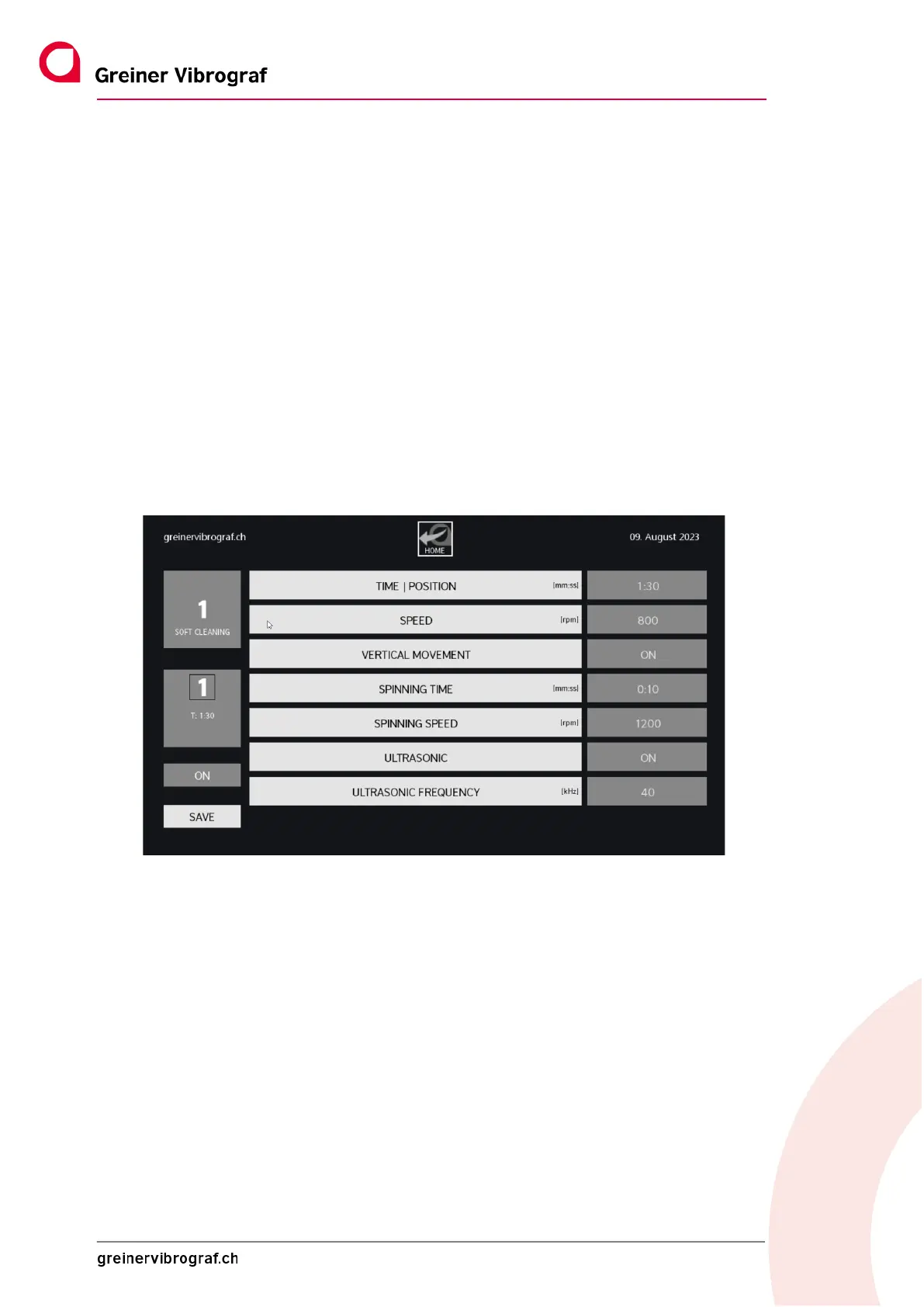
Process no. 1 is a cleaning bath, with or without ultrasound. The following screen menu shows the in-
dividual process parameters that can be changed. The setting can be changed by tapping the field
highlighted in grey.
Process no. 1 can be activated or deactivated using ON/OFF.
Important! New settings have to be confirmed with SAVE. This automatically takes the user back to
the main menu.
At the top in the middle is the HOME button which is used to return to the main menu.
The following is a detailed explanation of the individual setting options for Process no. 1:
TIME/POSITION Process duration in minutes and seconds
SPEED Speed in revolutions per minute during the ultrasound process
VERTICAL MOVEMENT Vertical movement during the cleaning process ON or OFF
SPINNING TIME Switch-on time of the SPIN drive in minutes and seconds
SPINNING SPEED Speed of SPIN drive in revolutions per minute
ULTRASONIC Ultrasound ON or OFF
ULTRASONIC FREQUENCY Ultrasound frequency 40 or 80 kHz or combined 40/80 kHz



 To Next Page