7.5.1. TEST OPERATING MODE
This operating mode is activated by pressing the button. A led next to the button
confirms this action. To start the generator in test mode, simply press the button.
At this moment, the start sequence begins, it starts the group, transferring the load to the
generator.
To stop the group, press , then the system will stop immediately.
7.5.2. MANUAL OPERATING MODE
It is used to start and stop the group depending on the operator’s wishes.
This mode is activated by pressing / , a led next to the button confirms this action,
however to start the boot sequence it is necessary to press the button . It will be neces-
sary to carry out a load request in order for the load to be transferred to the generator, this
is, pressing the button , by network voltage out of limits, by remote start or by being
configured in this way, by activating the event scheduler.
To restore the load to the mains supply, press the button or the or the button to
return to return to automatic mode.
To stop the generator you will have to press , Then the system will stop immediately.
7.5.3. MODO DE FUNCIONAMENTO AUTOMÁTICO
The generator starts by external signal or by voltage failure. The unit starts up to its normal
operating conditions. If after 5 seconds, there is no fault signal, the circuit breaker closes
and the group takes over the load.
This mode is activated by pressing .
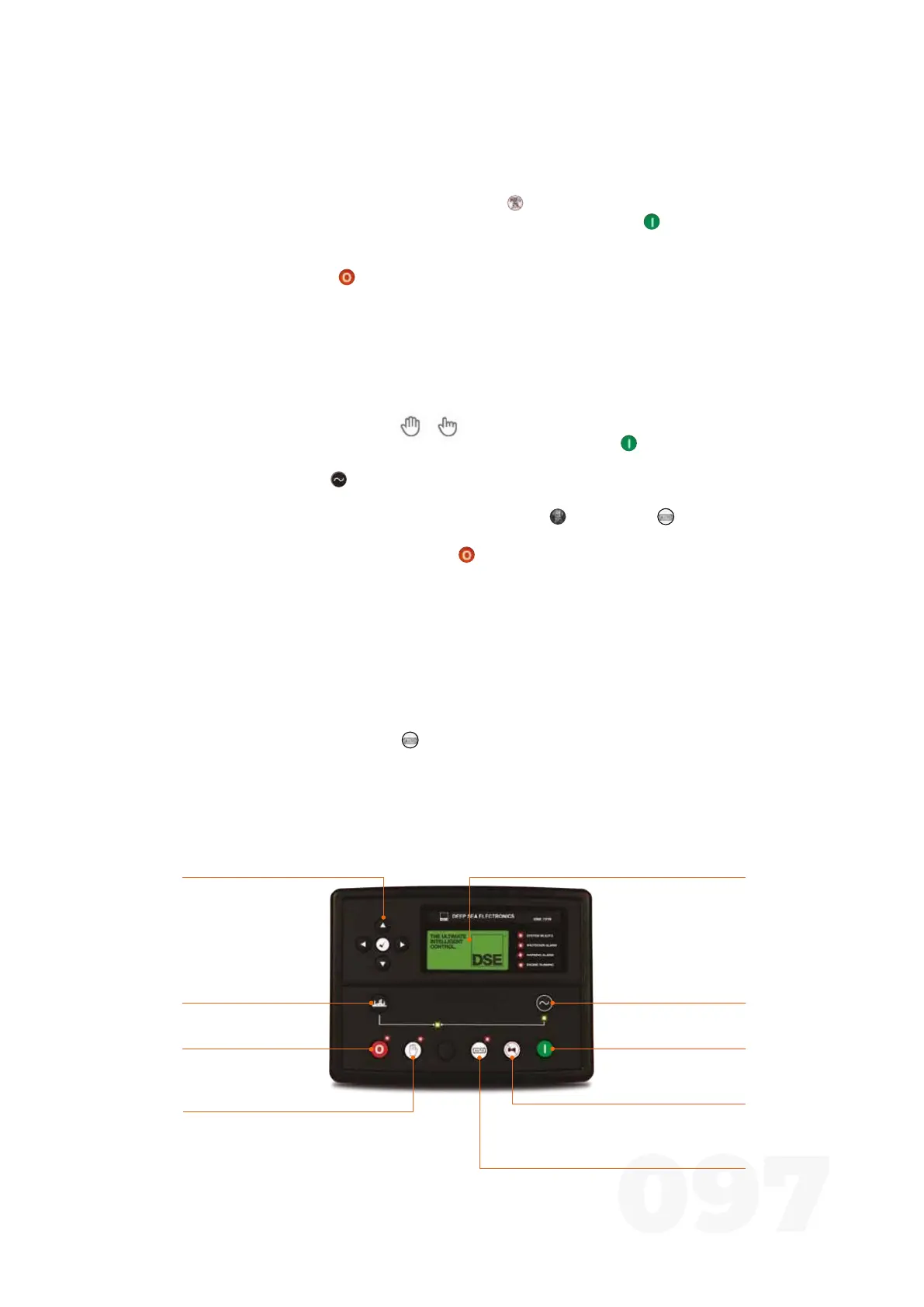
7.6. DSE 8610
Closes generator
circuit breaker
(Manual)
generator takes over the load
On Mode selection
allows the generator to start
Mute Siren / Lamps Test
mute the audible alarms and
turn on all the LEDs as a test
Auto mode selection
sets the group to auto mode
Opens generator
circuit breaker
(Manual)
Off mode selection
llows the generator to
stop and reset
Instrumentation and control screenNavigation keys
navigation between
information such as
instrumentation values of
the generator, network, etc
Manual Mode Selection
allows manual start
Figure 26 - DSE 8610



 To Next Page