12 ENG - Version 2.2 - P/N 04131.02
Pacing
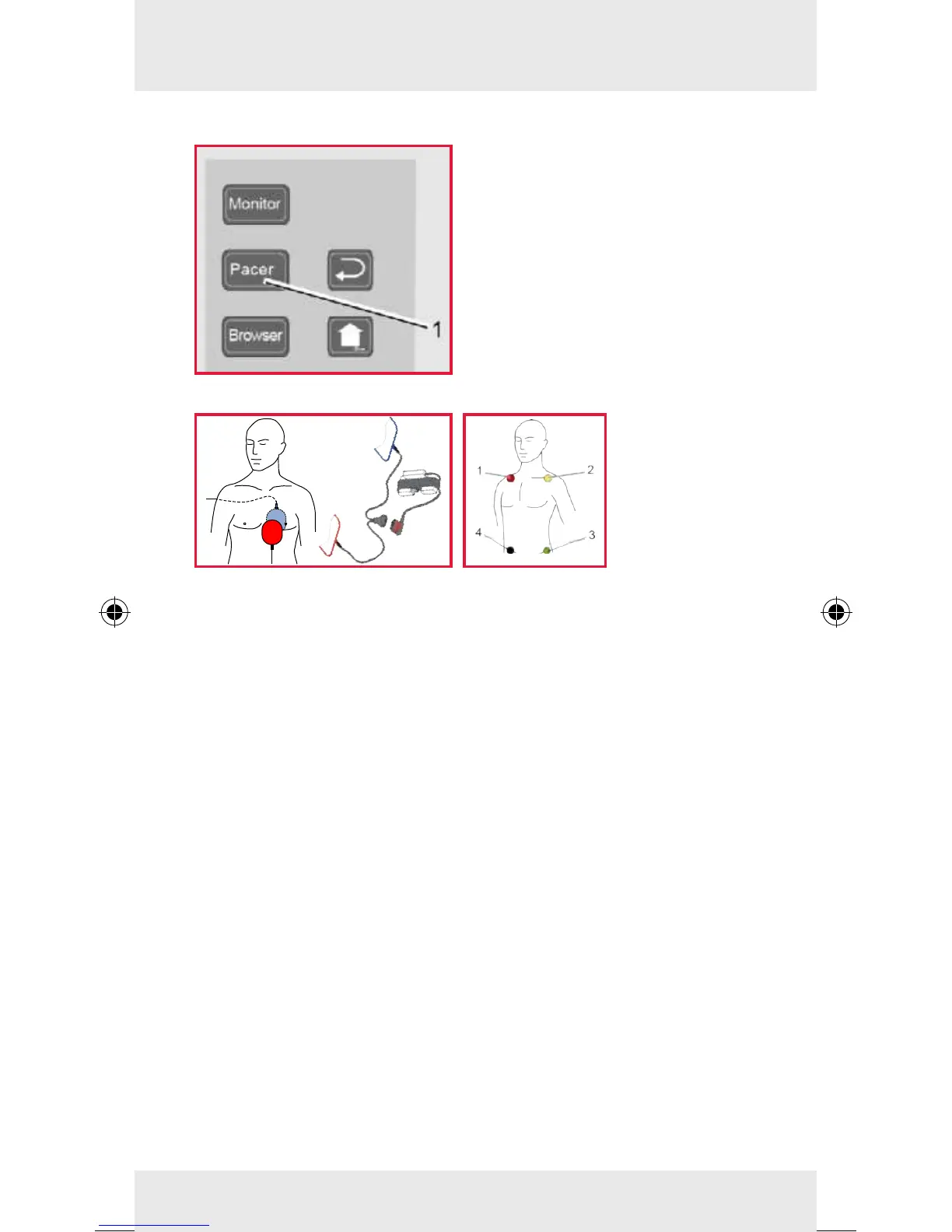
1. To call up the pacer func-
tion, press the Pacer key
(item 1).
2. Attach the corPatch therapy
electrodes to the patient's
thorax (anterior/posterior)
and connect them to the
therapy master cable, if
necessary (see below, on
the left).
For the DEMAND mode or the OVERDRIVE function, additio-
nally place all 4 electrodes of the 4-pole ECG monitoring cable
on the patient (see above, on the right):
• Red ECG electrode: under the right clavicle (item 1)
• Yellow ECG electrode: under the left clavicle (item 2)
• Green ECG electrode: area of the left inguinal fold (item 3)
• Black ECG electrode: area of the right inguinal fold (item 4)
Softkey [Mode]: Selection of the operating modes FIX and
DEMAND as well as the OVERDRIVE function.
Via the softkeys [Freq] and [Intens] the stimulation frequency
and the intensity in milliampere can be selected and adjusted
with the jog dial.
Pacing can be interrupted via the softkey [Pause].
To continue pacing after the pause, press the softkey [Cont.].
To stop pacing, press the softkey [O].
External Pacer



 To Next Page