4 ENG - Version 2.2 - P/N 04131.02
Printer and Printing
Note
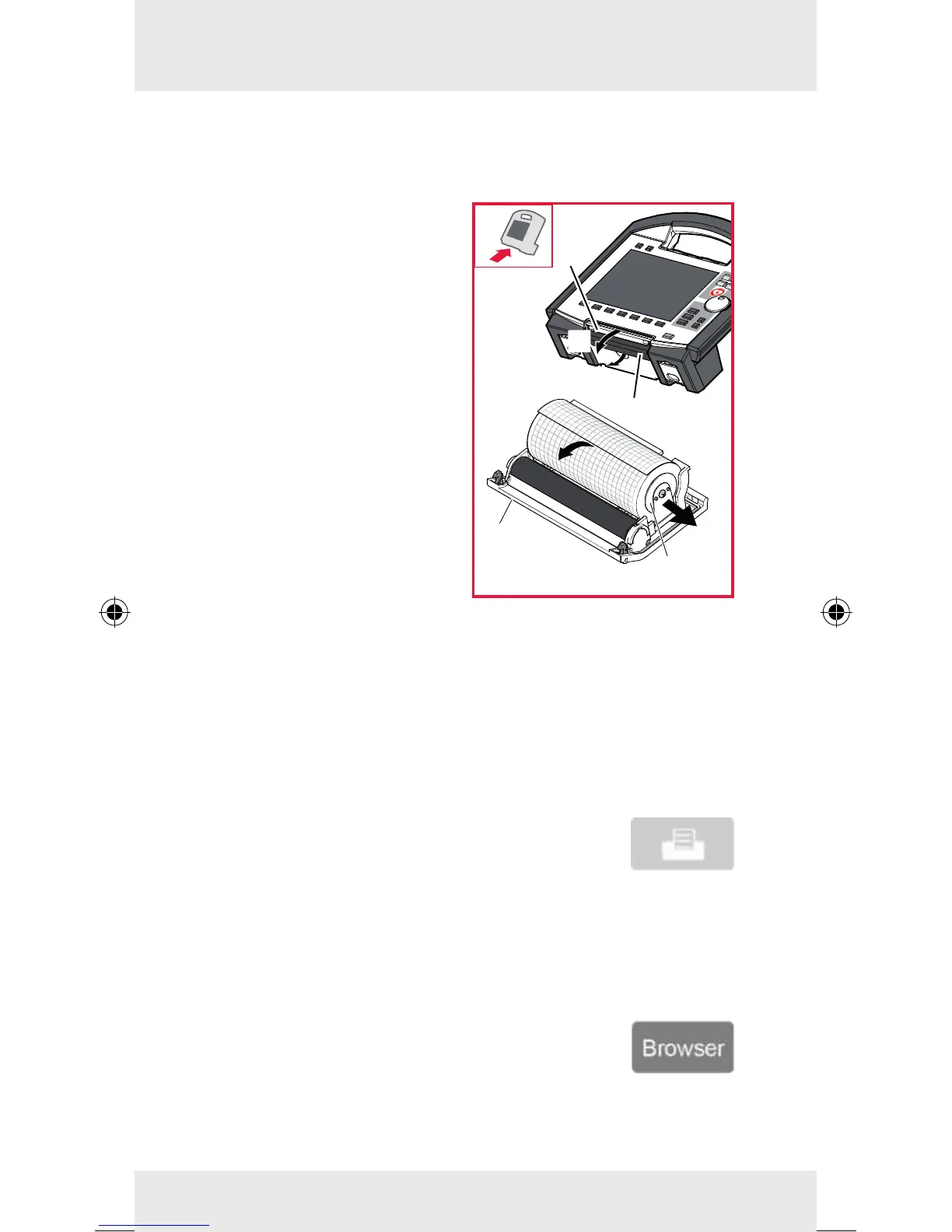
The easiest way to open the printer ap is to disconnect the mo-
nitoring unit from the debrillator and place it on a at surface.
1. Pull the locking lever (item
1) of the printer ap slightly
downwards to unlock (item
A) the printer ap (item 2)
and open it downwards
(item B).
2. To remove the empty roll
of paper, push the paper
roll holder (item 3) on both
sides slightly outwards
(item C).
3. Insert a new roll of paper
into the holder (item 3) so
that the end of the paper
has its printed side facing
upwards.
4. Pull the paper forwards
(item D) over the edge of the
printer ap (item 4) and hold.
5. Push the printer ap (item 2) upwards and close the printer
compartment. The lock has to engage engage perceptibly.
6. Make sure that the locking hooks at the printer ap are rmly
engaged on both sides.
Printer and Printing
To start printing the curves displayed on the
screen, briey press the Print key.
To cancel the printout in progress, press the Print key again.
Screenshot
Hold down the Print key for 3 seconds.
Protocol printout
Briey press the Browser key.
3
4
C
D
1
A
2
B



 To Next Page