49
Initial Setting Examples Section 3-1
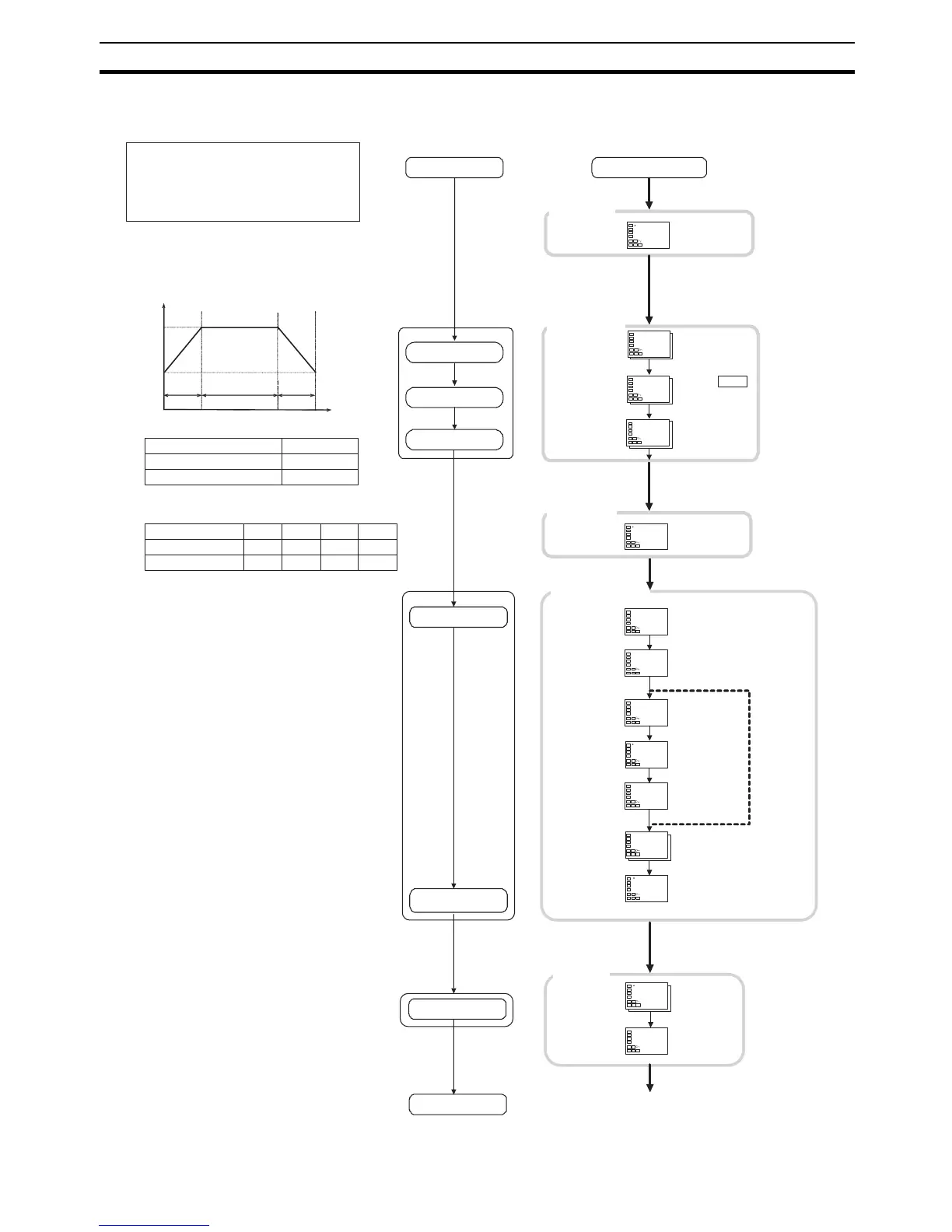
Example 1 (Models with Standard or Heating/Cooling Control)
Input type: 5 (K thermocouple,
−200.0°C to 1,300.0°C)
Control method: ON/OFF control
Alarm type: 2 (upper limit)
Alarm value 1: 20°C (deviation)
Setup Procedure
Power ON
Initial Setting
Level
Set input
specifications
Set control
specifications
Set alarm type
Operation
Level
Set alarm values
Start operation
Power ON
PV/SP
Press the O Key for
at least 3 s.
Input Type: 5
ON/OFF
control:
PID
control:
Alarm 1 Type: 2
Press the O Key for
at least 1 s.
Start operation.
25.0
0.0
c
pid
M
M
M
in-t
5
cntl
ono f
alt1
2
onof
50.0
100.0
0.20
0.40
0. 20
d. prg
0
M
s-no
4
M
0
M
d. seg
M
sp
50.0
c
0.0 0
M
time
M
end
d. seg
al-1
20.0
MM
25.0
50.0
run
r-r
25.0
0.0
c
c
c
0
50.0
0.00
1 2 3
100.0 100.0 50. 0
0.20 0.4 0 0.2 0
4
0
Operation
Level
Operation
Level
Initial Setting
Level
Set point
Segment 1
Segment 2
Segment 3
Time (h.min)
Parameter
Setting
Number of Segments Used (Program 0)
Program No.
Segment No.
Segment Set Point
Segment Time (h.min)
Program Setting
Level
Set the programs
Trial operation
Press the O Key
for less than 1 s.
Program
Setting Level
Make sure that the
Display Program
Selection is 0.
Use the
UD
Keys
to set the Number of
Segments Used.
Display Program Selection
Use the
UD
Keys
to set the Display
Segment Selection.
No. of Segments Used changed
from 8 to 4.
Display Segment
Selection changed
from end to 0.
Use the
UD
Keys
to set the Segment
Set Point.
Segment Set Point
changed from 0.0 to
50.0.
Set segments 1,
2, and 3 in the
same way.
Use the
UD
Keys to set the
Segment Time.
Segment Time
The default is
h.min.
end will be
displayed when all
segments are set.
Display Segment
Selection
Use the
UD
Keys
to set Alarm Value 1
to 20°C.
Alarm Value 1 changed
from 0.0 to 20.0.
Operation
Level
PV/SP
Confirm that the set
point is 50.0°C.
PV/SP
Set Run/Reset to
Run.
Run/Reset
rst to run
If the power supply is
turned ON before the
sensor is wired,
s.err will be
displayed.
Check alarm type.
Check input type.
Press the O Key three times
(for less than 1 s).
Press the UD
Keys to select
ON/OFF control.
For ON/OFF
control, set
onoff.



 To Next Page