53
Attaching the base
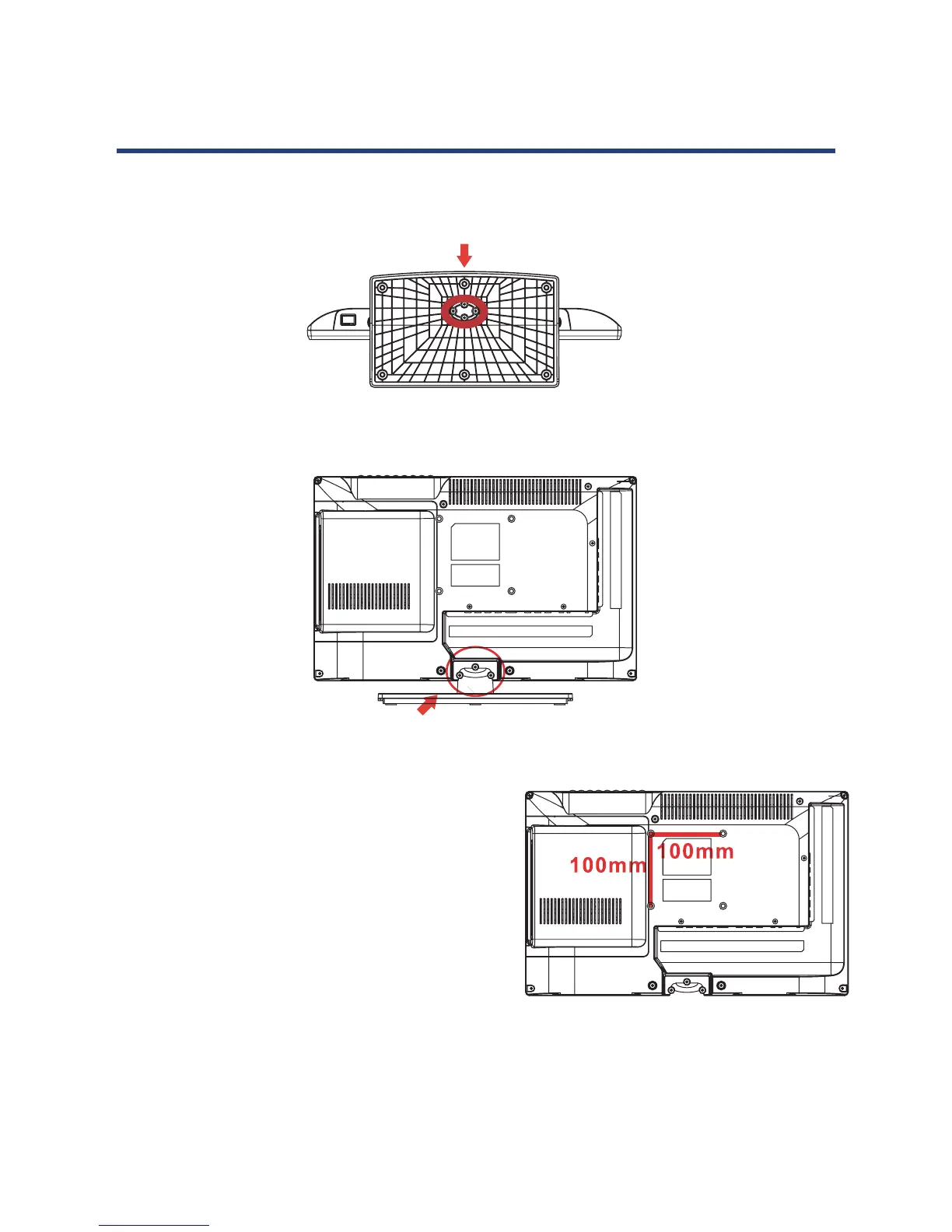
Place the screen face down on a protective surface. Place the stand on the neck of the TV
and insert metal disc and tighten the screws (found in the accessories box) in the circled area
with the screw drive provided.
Remove the Stand
To remove the stand, remove the screws in the circled area and the neck will come off.
52
Attaching the base
Place the advice face down on a protective surface. Place the stand on the neck of the TV and
insert and tighten the screws (found in the accessories box) in the circled area with the screw
drive provided.
Remove the Stand
To remove the stand, remove the screws in the circled area and the neck will c
.
Wall-mounting the Device
If you are mounting the device, place c
for future instructions on
bracket support and wall support.
Moun
ation: 100mm x 100mm using screw size M4 (not supplied). Length of screw
should not exceed 10mm.
Please note: The 10mm length of screw refers to how deep the screw can go inside the
mounting holes.
When you are buying screws, you should add the original 10mm to the thickness of your
mounting plate in order to get the total screw length.
Wall Mounting Instructions
Wall-mounting the Device
If you are mounting the device, please consult
a qualified installer for further instructions on
bracket support and wall support.
Mount Specification: 100 mm x 100 mm using
screw size M4 (not supplied). Length of screw
should not exceed 10 mm.
Please note: The 10 mm length of screw refers to
how deep the screw can go inside the mounting
holes.
When you are buying screws, you should add the original 10mm to the thickness of your
mounting plate in order to get the total screw length.
Wall Mounting Instructions
52
Attaching the base
Place the advice face down on a protective surface. Place the stand on the neck of the TV and
insert and tighten the screws (found in the accessories box) in the circled area with the screw
drive provided.
Remove the Stand
To remove the stand, remove the screws in the circled area and the neck will c
.
Wall-mounting the Device
If you are mounting the device, place c
for future instructions on
bracket support and wall support.
Moun
ation: 100mm x 100mm using screw size M4 (not supplied). Length of screw
should not exceed 10mm.
Please note: The 10mm length of screw refers to how deep the screw can go inside the
mounting holes.
When you are buying screws, you should add the original 10mm to the thickness of your
mounting plate in order to get the total screw length.
Wall Mounting Instructions
52
Attaching the base
Place the advice face down on a protective surface. Place the stand on the neck of the TV and
insert and tighten the screws (found in the accessories box) in the circled area with the screw
drive provided.
Remove the Stand
To remove the stand, remove the screws in the circled area and the neck will c
.
Wall-mounting the Device
If you are mounting the device, place c
for future instructions on
bracket support and wall support.
Moun
ation: 100mm x 100mm using screw size M4 (not supplied). Length of screw
should not exceed 10mm.
Please note: The 10mm length of screw refers to how deep the screw can go inside the
mounting holes.
When you are buying screws, you should add the original 10mm to the thickness of your
mounting plate in order to get the total screw length.
Wall Mounting Instructions



 To Next Page