15
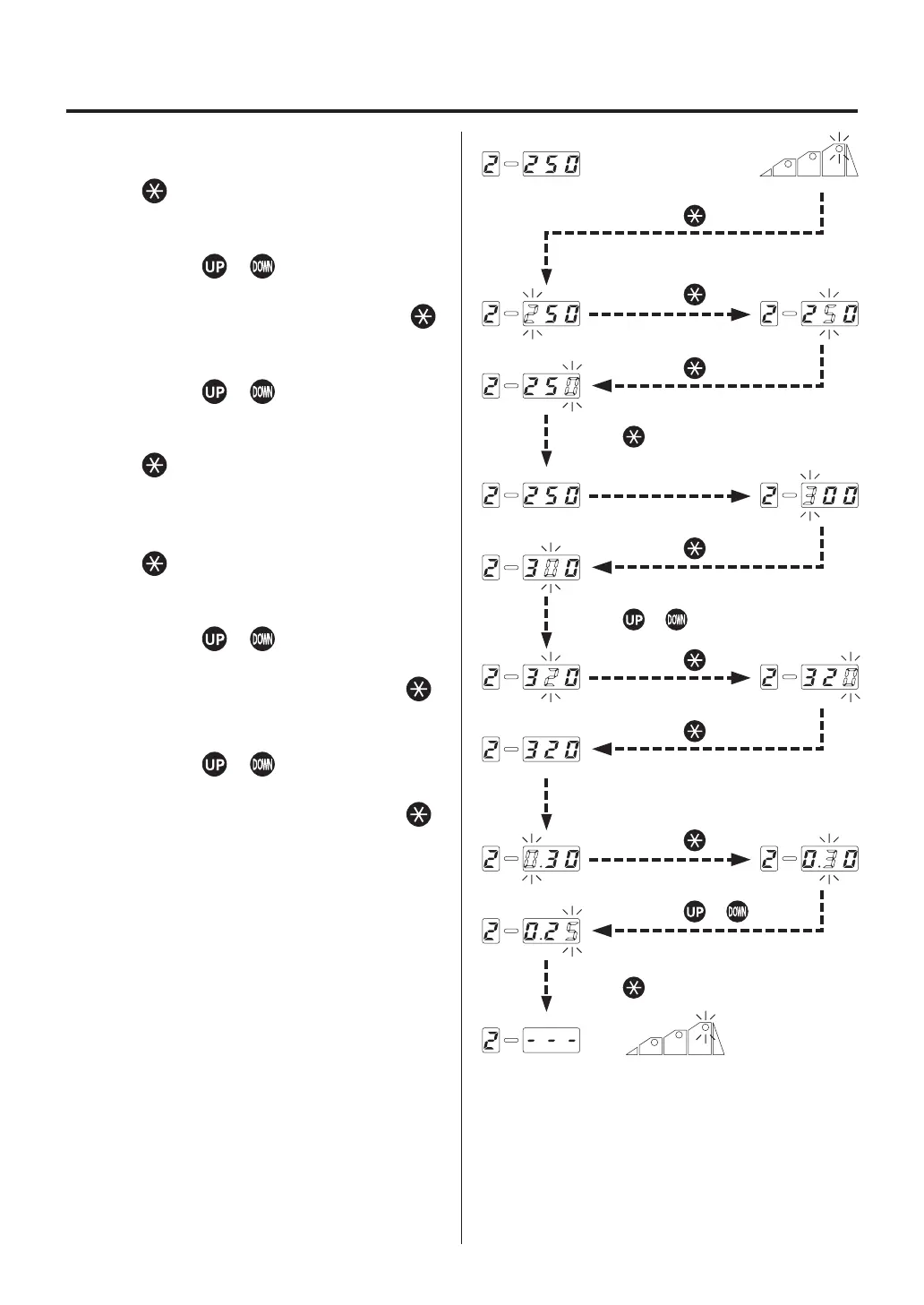
7. a. The HUNDREDS digit on the temperature/
timer display section flashes. Press the
button to select. The TENS digit
begins to flash.
b. Enter the TENS digit.
Use the or button to select your
desired value for the TENS digit. If your
desired value is displayed, press the
button. The UNITS digit begins to flash.
c. Enter UNITS digit.
Use the or button to select your
desired value for the UNITS digit. When
your desired value is displayed, press the
button. The mode will be shifted to
the timer time setting mode in step 3
.
8. a. The HUNDREDS digit on the temperature/
timer display section flashes. Press the
button to select. The TENS digit
begins to flash.
b. Enter the TENS digit.
Use the or button to select your
desired value for the TENS digit. If your
desired value is displayed, press the
button. The UNITS digit begins to flash.
c. Enter UNITS digit.
Use the or button to select your
desired value for the UNITS digit. If your
desired value is displayed, press the
button. The temperature and timer setting
in step 3 will be completed and shifted to
the step selection mode
.
6. OPERATION
Press the button.
Press the or button.
Press the button.
Press the button.
Press the button.
Press the button.
Press the button.
Press the button.
Press the button.
Press the or button.
Press the button.















 To Next Page