18
8. OFFSET SETTING METHOD
NOTE:
The temperature at the blowout port varies depends on
the nozzle size. The offset temperature can be selected.
CAUTION
Change the mode to MANUAL before setting.
The operations cannot be performed in AUTO mode.
Be sure to insert the control card.
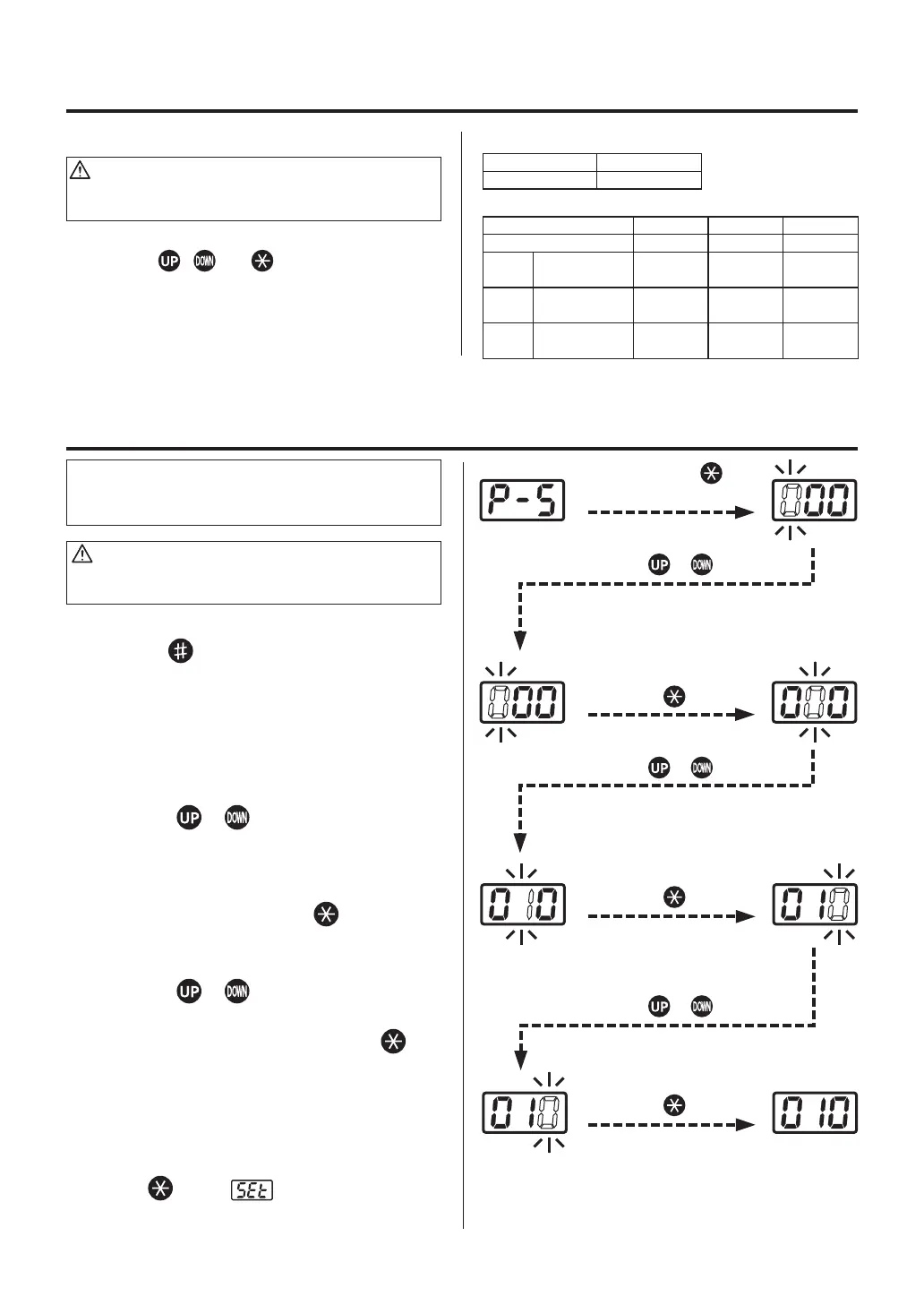
1. Press the
button for 1 second or more.
The mode will be shifted to the offset inputting
mode.
2. Input the offset value.
The input range is -50 to + 50°C (In °F mode,
from -90 to + 90°F)
Enter the HUNDREDS digit.
a. Use the
or buttons to select your
desired value for the HUNDREDS digit. Only
0 (in case of positive) and – (in case of nega-
tive) can be input (the same as in °F mode).
Select 0 or – and press the button. The
TENS digit begins to flash.
Enter the TENS digit.
b. Use the
or buttons to select your
desired value for the TENS digit. When your
desired value is displayed, press the
button. The UNITS digit begins to flash.
Enter the UNITS digit.
c. Select your desired value for the UNITS digit
in the same manner as for the TENS digit.
When your desired value is displayed, press
the button. displays and indicates
that the temperature setting procedure is
completed.
Press the or button
Press the button.
Press and hold the button
for more than 1 second.
Press the or button
Press the button.
Press the button.
Press the or button
<In MANUAL mode>
Temperature 300°C
Offset value
0
<In AUTO mode>
File 1 File 2 File 3
Mode INSTALL INSTALL INSTALL
Step 1 Setting temp.
Timer time
200°C
30
200°C
30
200°C
30
Step 2 Setting temp.
Timer time
250°C
30
250°C
30
250°C
30
Step 3 Setting temp.
Timer time
300°C
30
300°C
30
300°C
30
●
Factory setting
CAUTION
Be sure to insert the control card into the card slot
before initial resetting.
Turn the power switch ON while simultaneously
pressing the , and buttons to reset the
initial set values upon shipment from the factory. The
mode is displayed in MANUAL.
Upon shipment from the factory, the data are set to
the values as shown in the right tables.















 To Next Page