17
7. PARAMETERS
●
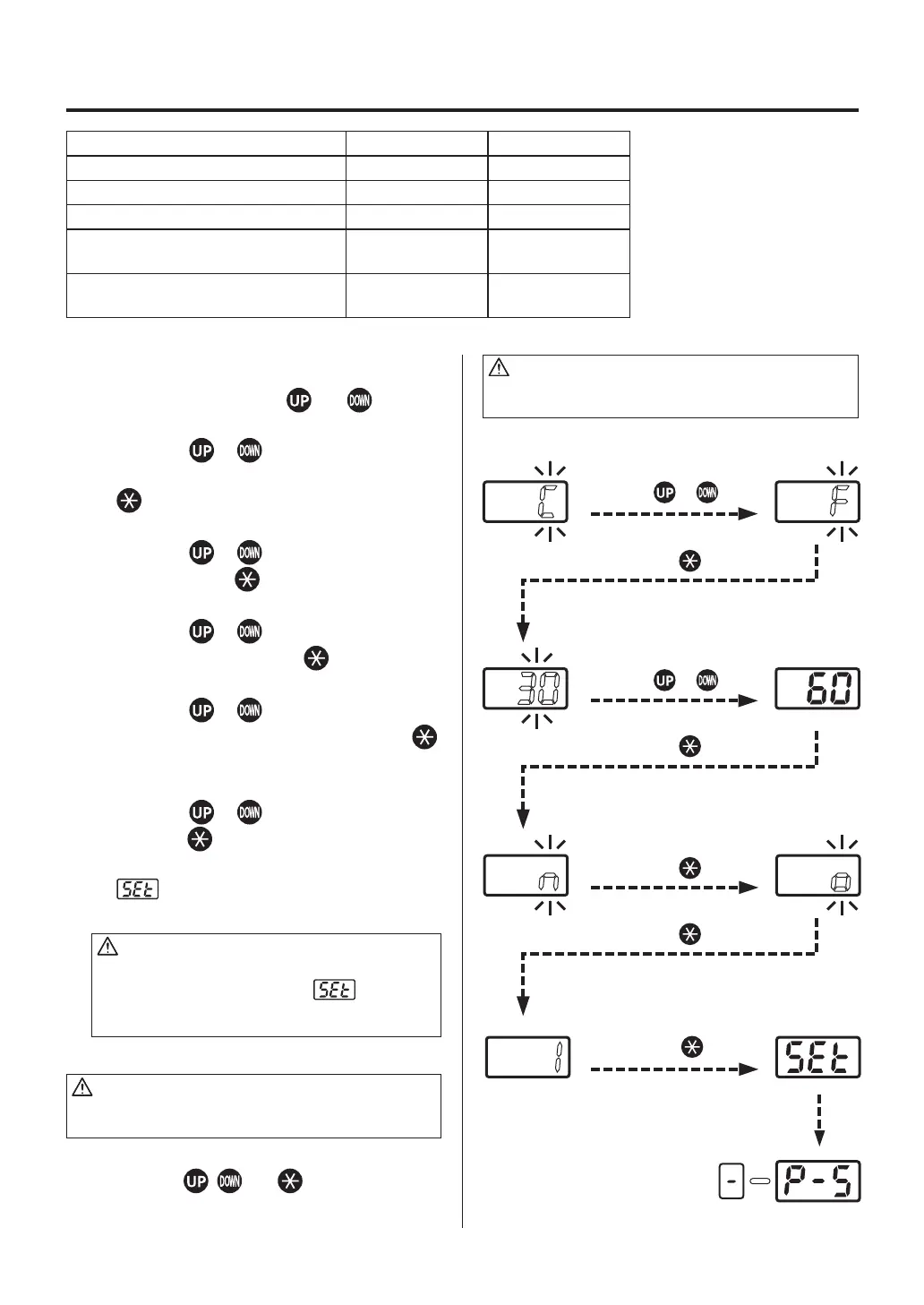
Parameter change method
Parameter change method and buttons.
1. °C/°F change
Press the or button, select "C"
(Celsius) or "F" (Fahrenheit) and press the
button to enter.
2. Change of power save time
Press the or select 30 min, 60 min or
∞ and press the button to enter.
3. Change of timer display unit
Press the or button, select “n” (min)
or “S” (sec) and press the button to enter.
4. Change of countdown method
Press the or select “o” (Opened
timer) or “c” (Closed timer) and press the
button to enter. (See the table on page 7.)
5. Change of card-lock function
Press the or button, select 1 or 2 and
press the button to enter.
The parameter input mode is completed,
is displayed and then returned to the
normal mode.
CAUTION
If the power is turned OFF before the parameter
setting procedure is completed ( is not
displayed), the new setting value will not be stored
in memory
.
Parameter Parameter display Initial setting
°C/°F change °C or °F C (°C)
Power saving time (30 min/60 min/∞) 30, 60 or ∞ 30 (30 min)
Timer display unit (min/sec) n or S n (min)
Change of count-down method
(Opened timer/closed timer)
o or c o
(opened timer)
Change of control card lock function
(Normal/single lock)
1 or 2 1
(normal)
* In case of simple lock, the change of file number in AUTO mode can be changed without inserting the control card.
CAUTION
Be sure to insert the control card into the card slot
before changing.
Press the button.
Press the or button.
Press the or button.
Press the button.
Press the button.
Press the button.
Press the button.
●
Initial resetting method
CAUTION
Be sure to insert the control card into the card slot
before initial resetting.
Turn the power switch ON while simultaneously
pressing the , and buttons to reset
to the initial set values upon shipment from the
factory. The mode is displayed in MANUAL.















 To Next Page