3
1. Mounting Procedure 3-1
Installation
1. Mounting Procedure
Mounting Procedure
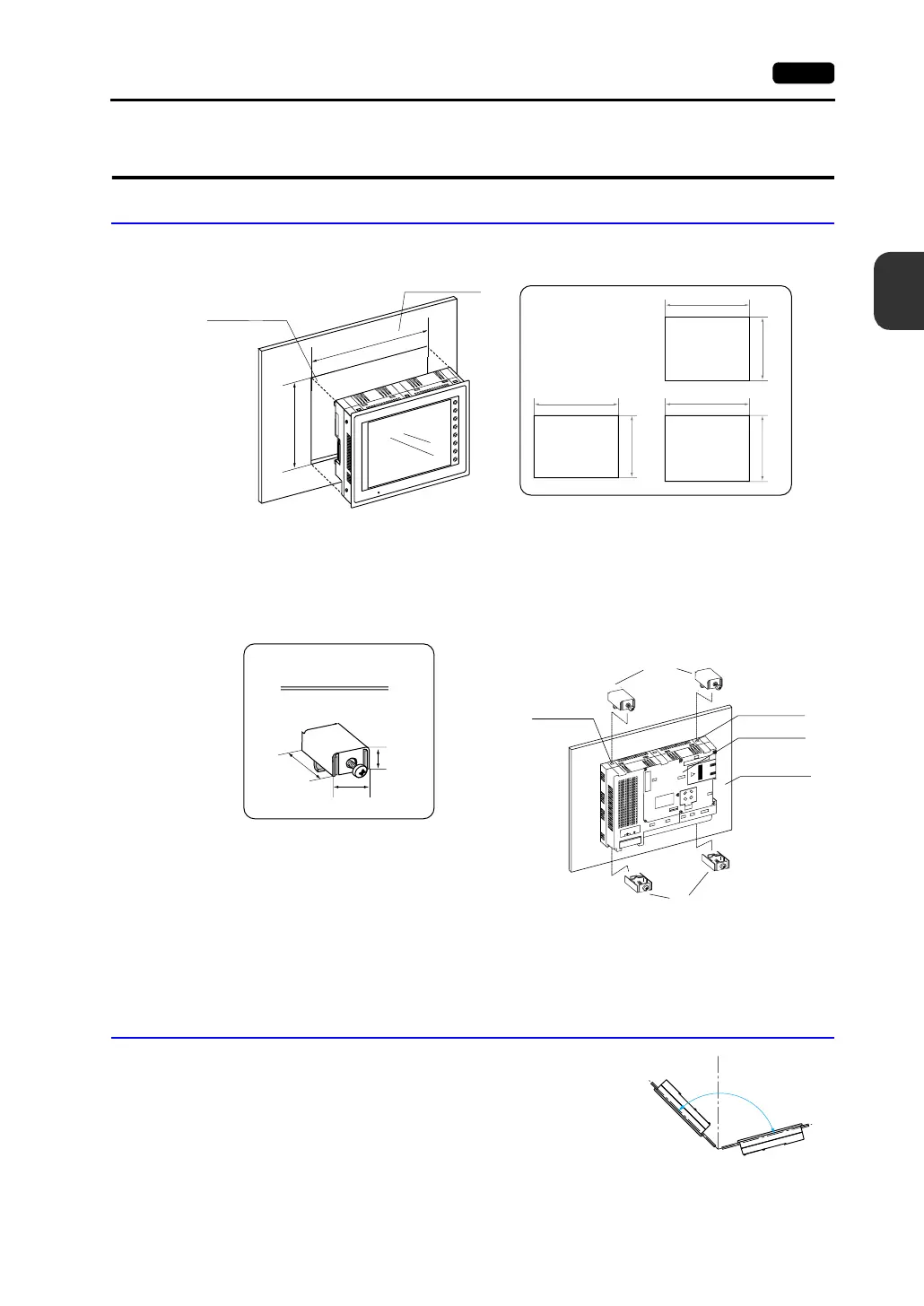
1. Cut out the mounting panel (max. thick: 5 mm) to match the dimensions shown below.
2. Insert four fixtures attached to the V7 series into the mounting holes, and tighten them with the
locking screws.
<Tightening torque>
V708/V708i/V710/V710i : 0.3 to 0.5 N•m
V712/V712i : 0.5 to 0.7 N•m
3. Mount the gasket so that it will be sandwiched securely between the unit and the mounting panel.
Mounting Angle
Install the unit within the angle of 15° to 135° as shown on the
right.
F
1
F
2
F
3
F
4
F
5
F
6
F
7
S
YS
T
E
M
P
O
W
ER
216.2
289
+
0
.5
−
0
−
0
+0.5
165.5
220.5
+0.5
−0
−0
+
0.5
246.2
313
V712/V712i
V708/V708i
216.2
289
+0.5
−0
−0
+
0.5
V710/V710i
+0.5
−0
−0
+
0.5
Mounting panel
Panel cut-out hole
• Panel cut-out
dimensions
(Unit: mm)
M
J
1
M
J
2
P
R
IN
T
E
R
C
F
C
N
5
M
E
M
O
R
Y
C
N
6
L
A
N
C
N
1
1
0
0
-
2
4
0
V
A
C
L
N
17.8
10.5
30.0
Fixture dimensions
(Unit: mm)
Fixtures
Mounting hole
Mounting hole
V7 unit
Mounting panel
Fixtures
* When the V7 unit is attached to the
mounting panel, the fixtures and frame
grounds (FG) are connected. To prevent
static electricity, be sure to connect the
mounting panel to the frame ground.
15°
135°
90°
D
i
s
p
l
a
y
D
i
s
p
l
a
y



 To Next Page