4
1. Coin-type Lithium Battery 4-1
Instructions
1. Coin-type Lithium Battery
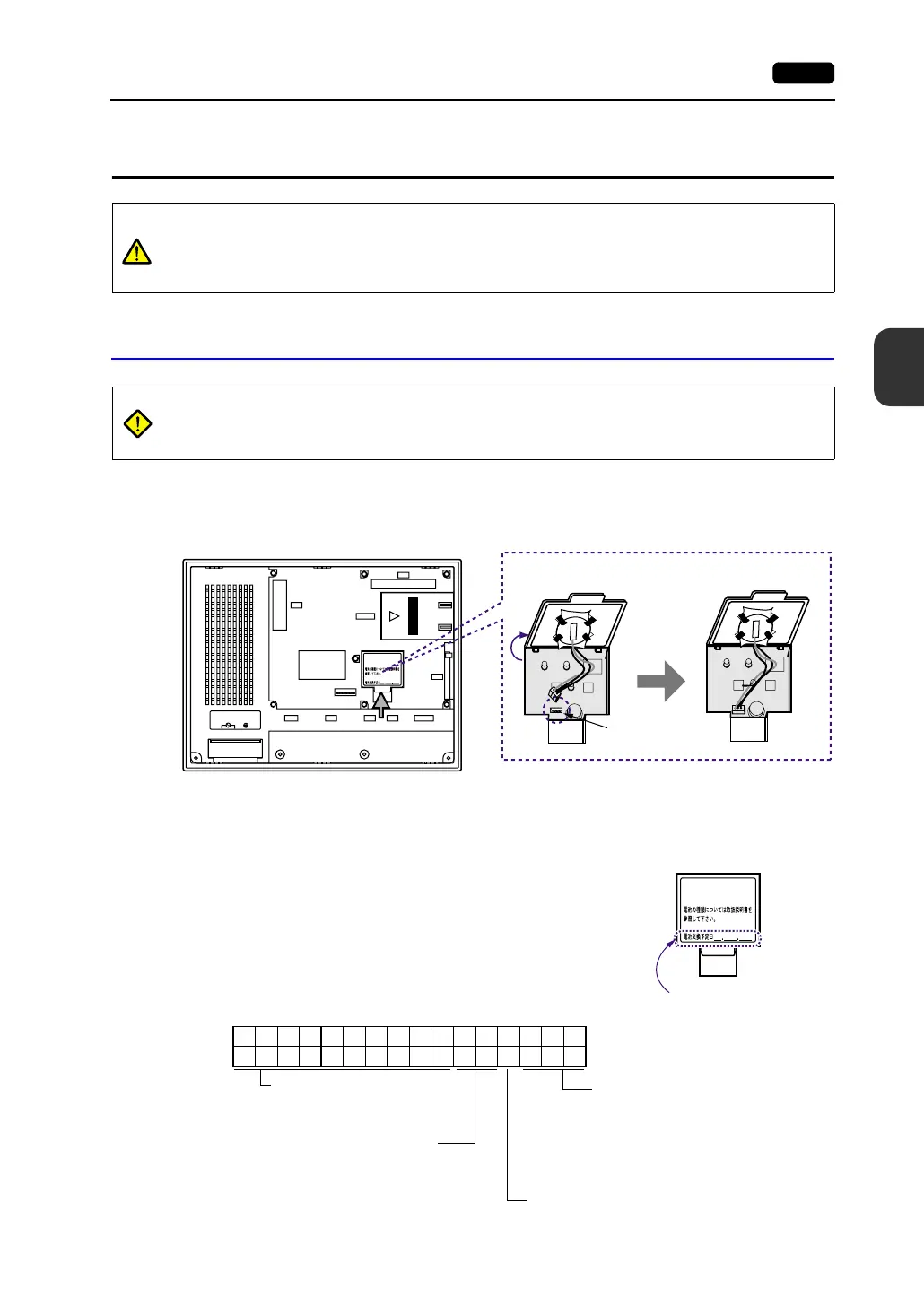
Battery Mounting Procedure
1. Turn the unit off.
2. Slide the battery holder cover in the direction of the arrow as shown in the left illustration below to
open it.
3. Check that the battery is securely attached to the backside of the cover, and connect the battery
connector.
4. Close the battery holder cover.
5. Enter a date five years from now for “Battery replacement”
on the sticker on the battery holder.
* The battery status is output to the internal memory
$s167 of the V7 series.
If the battery voltage drops before five years has
elapsed, replace the battery immediately.
CAUTION
The MONITOUCH is delivered without inserting the battery connector in the battery
holder on the back of the unit.
Be sure to set the battery when using the calendar function or SRAM.
Without battery, the contents in the SRAM or calendar will not be retained.
DANGER
Electric shock hazard
Steps 2 to 5 must be performed when the power to the V7 unit is turned off.
CF
100-240VAC
L N
LAN
CN1
MJ1 MJ2
PRINTER
CN5
MEMORY
CN6
See operating or maintenance
instruction for type of battery
to be used.
Battery replacement.
M
n
O
2
-
L
i
C
E
L
L
3
V
O
L
T
S
J
A
P
A
N
S
A
N
Y
O
CR2450
M
n
O
2
-
L
i
C
E
L
L
3
V
O
L
T
S
J
A
P
A
N
S
A
N
Y
O
CR2450
Battery holder
Battery connector
See operating or maintenance
instruction for type of battery
to be used.
Battery replacement.
Enter a date five years
from now
$s167
15 14 13 12 11 10 09 08 07 06 05 04 03 02 01 00
0000000000 0
MSB LSB
Memory cassette information
reserved (Setting: 0)
0: No memory cassette mounted
1: FROM 2 Mbyte (V6)
2: FROM 4 Mbyte (V6)
3: SRAM 512 byte (V7/V6)
4: FROM 8 Mbyte (V7)
0: Battery OK
1: Battery voltage drop
2: No battery
Memory cassette information reserved (Setting: 0)



 To Next Page