4
1. Coin-type Lithium Battery 4-3
Instructions
Battery Replacement Procedure
Replacement batteries are available from Hakko Electronics.
1. Replace the battery “V7-BT” within three minutes after the unit is turned off.
If it is not possible to replace within three minutes, use the V-SFT editor (cable: V6-CP) or a CF
card and make a backup copy of data in the SRAM.
• When using the V-SFT editor:
1) Start the V-SFT editor.
2) Click the [Transfer] icon. The [Transfer] dialog is displayed.
3) Select [Display] for [Transfer Device] and [SRAM Data] for [Transfer Data].
To save a backup copy from the V-SFT editor on the server via Ethernet, check [
Transfer through Ethernet/IP Address of the V7 Equipped with SRAM]. Keep [ Use
Simulator] and [ Read Comments in Data Transfer] unchecked.
4) Click the [PC <-] under [Transfer Mode].
5) Save the read data in the “∗.RAM” file.
• When using a CF card:
For the backup procedure with a CF card, refer to “Chapter 6 MONITOUCH Operations”.
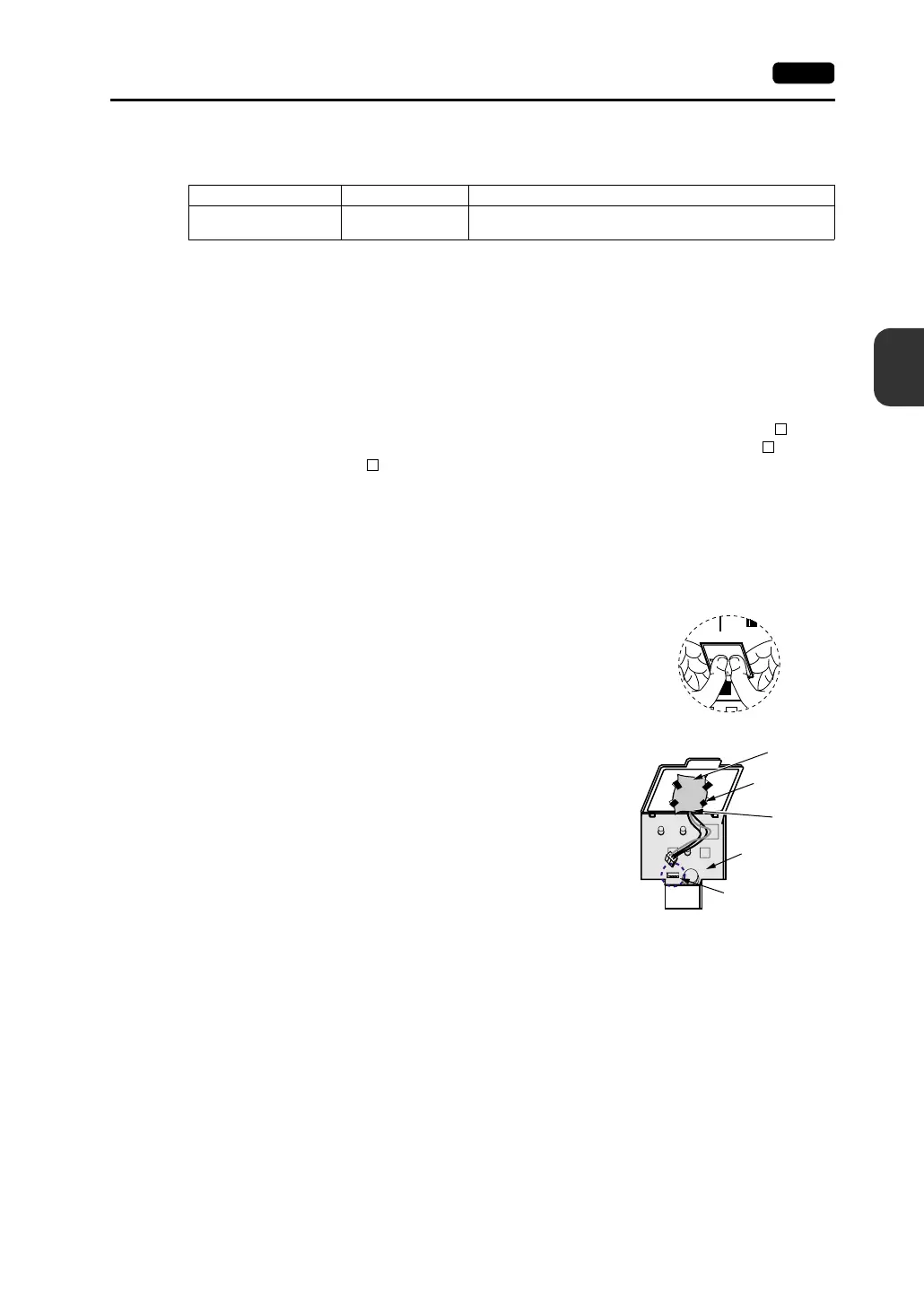
2. Turn the unit off, and open the battery holder. A battery is set at the socket.
3. Unplug the battery connector, and remove the battery from the
socket. Take out the battery while pressing the center of the
battery holder cover as shown in the figure.
4. Set a new battery. Fit the battery into the socket in such a
manner that the red cable side of the battery faces the board
and the cable branches from the bottom. Insert the battery in
the “b” side first, and push it down to “b” while inserted in the
“a” side.
5. Plug in the battery connector and close the battery holder
cover.
6. Remove the existing caution sticker. Enter a date five years
from now for “Battery replacement” on the new caution sticker,
and attach it to the backside of the unit.
7. When the backup copy of the SRAM data has been saved in step 1, turn on the unit and load the
data to the unit.
Name Type Contents
Replacement battery for
the V7 series
V7-BT
• Coin-type lithium primary cell 1 pce
• Cautions sticker 1 pce
MJ2
See operating or maintenance
instruction for type of battery
to be used.
Battery replacement.
“b” side
Battery holder
Battery connector
Printed circuit
board
“a” side
Socket



 To Next Page