41
Operation
3.3.3 Stopping and parking
• Remove your right foot from the ac-
celerator to slow down. When the
foot is fully removed from the accel-
erator, the vehicle rolls to a stop.
• Now press the right foot on the ser-
vice brake pedal to stop the vehicle
and
bring it to a stop.
• Turn the key in the key switch coun-
terclockwise to lock position 0 and
remove the key.
• Press the left foot on the parking
brake
pedal to park the vehicle.
Always apply the parking brake
and remove the key before get-
ting out of the vehicle!
3.3.4 Cleaning
There are four cleaning programs avail-
abl
e for selection:
1. Wet scrubbing and vacuuming dry
2. Wet scrubbing (basic cleaning)
3. Vacuuming dry
4. Vacuuming with the hand-held suc-
tion hose (option)
The cleaning programs are activated
via th
e left-hand operating panel, refer
to Section 3.2.2. Press the required but-
ton as soon as the Hakomatic B1050 is
ready to drive (see above).
Wet scrubbing and vacuuming dry
This program is the standard cleaning
program for this vehicle.
• Press the green Hako but-
ton on the left-hand operat-
ing panel.
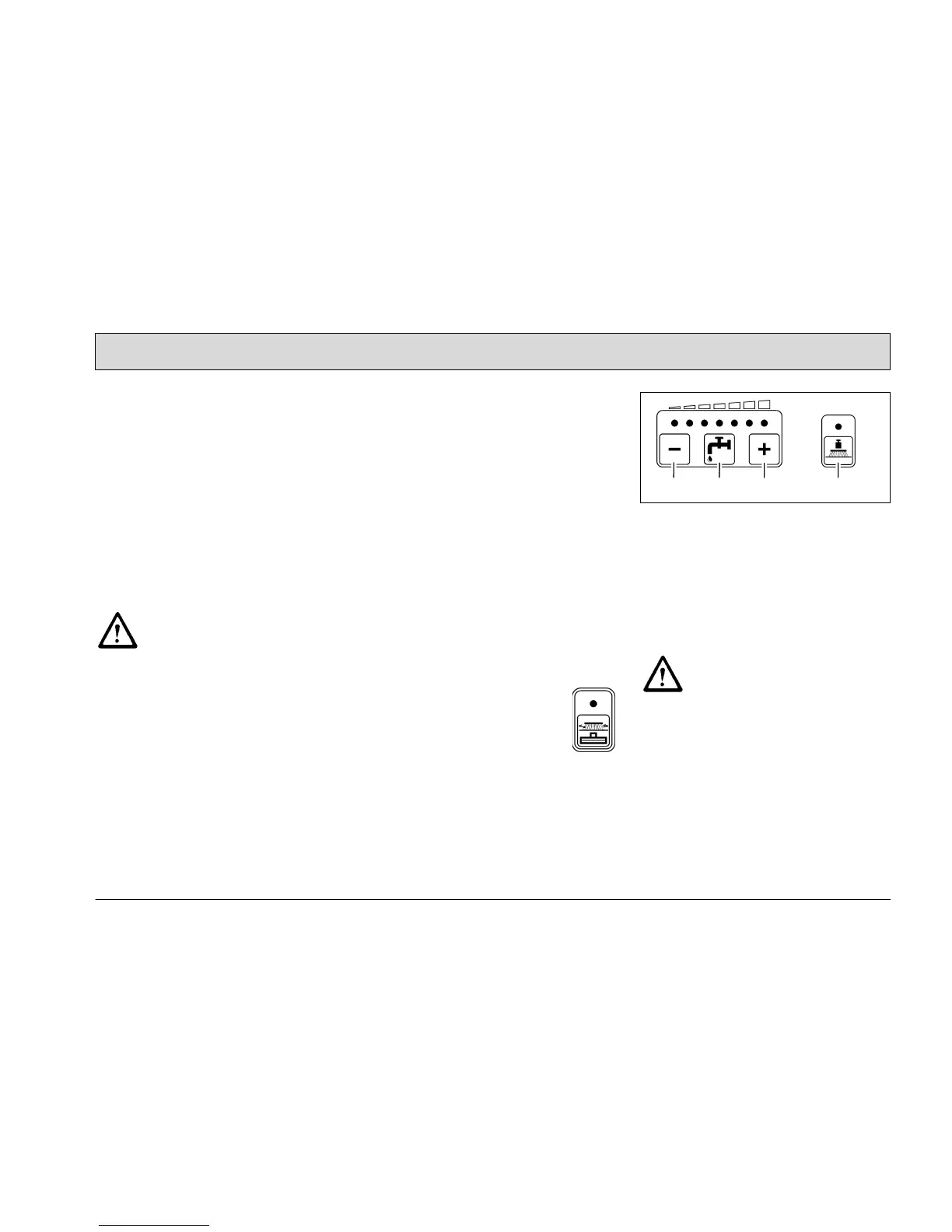
Various functions can be switched on or
off wi
th the following buttons according
to the conditions at the location of use:
Fig. 21
• Reduce solution quantity
(Fig. 21/1)
• Increase solution quantity
(Fig. 21/3)
• Solution on/off (Fig. 21/2)
• Increase brush pressure (Fig. 21/4)
Check whether the floor is suf-
ficiently dry at regu
lar intervals,
otherwise people could slip. If
the floor is excessively wet,
check the vehicle for leaks and
that the sealing strips are in a
good condition. If the sealing
strips are damaged, change
them; refer to Section 5.8.4.
1
2
3
4



 To Next Page