29
Operation
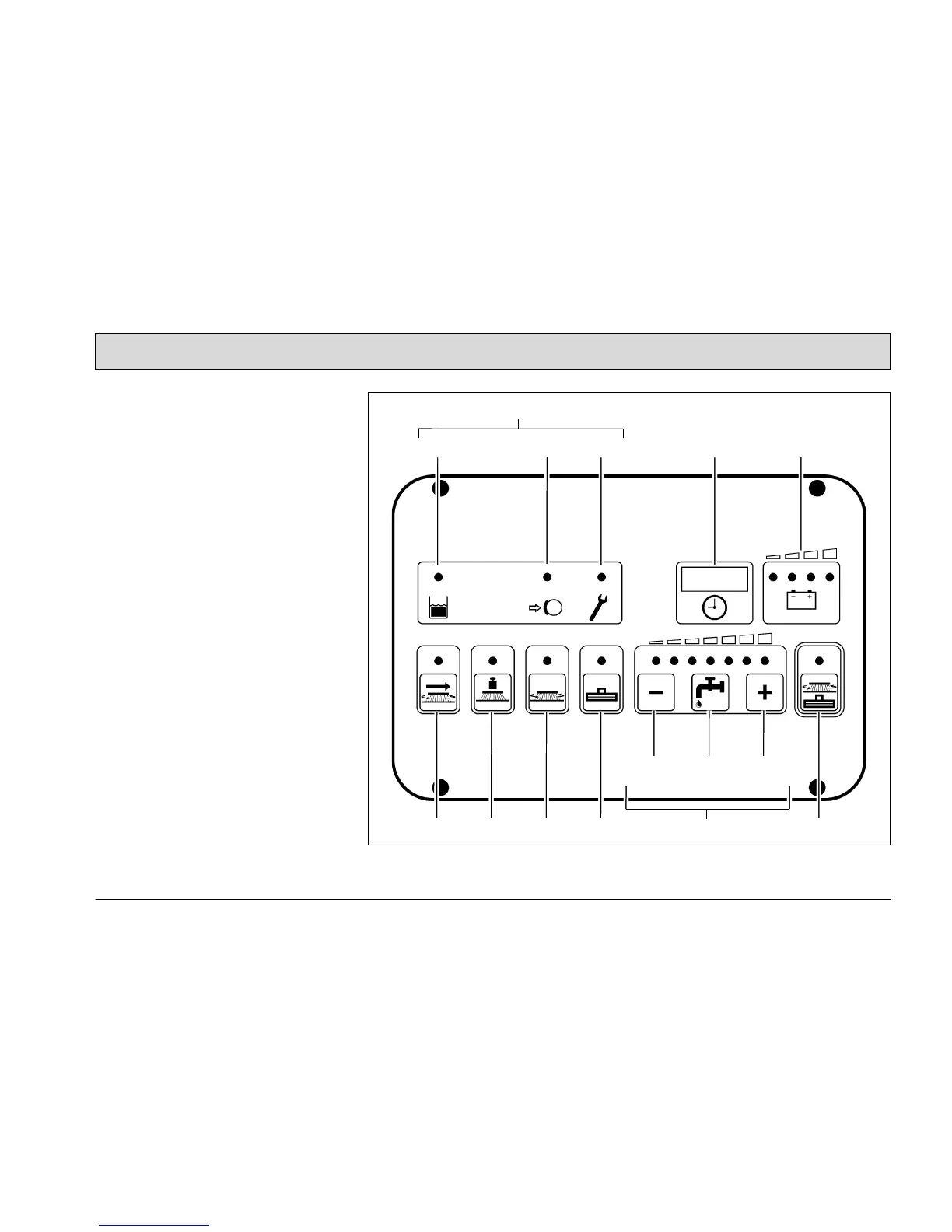
3.2.2 Left-hand operating panel
(Fig. 16)
1 Indicator field
2 Recovery tank indicator: When the
control lamp is on (yellow), the max-
imum fill level has been reached.
3 Parking brake indicator: When the
control lamp is on (red), the parking
brake is applied.
4 Alarm indicator: When the control
lamp is on (red), a functional fault
has occurred.
5 Operating hour counter
and service indicator
6 Battery and charge control indicator
7 Button for side scrubbing brush
(option)
8 Button for brush pressure
9 Button for brush drive
10Button for squeegee and suction tur-
bine
11 Buttons for controlling the solution
supply
12Button to reduce solution quantity
13Button to switch solution supply
on and off
14Button to increase solution quantity
15Green Hako button for simultaneous
activation of scrubbing unit and vac-
uuming function
Fig. 16
2
1
3
54
6
7 8 9 10 11 15
12 13 14



 To Next Page