PIANO / ENSEMBLE Voice Sections 39
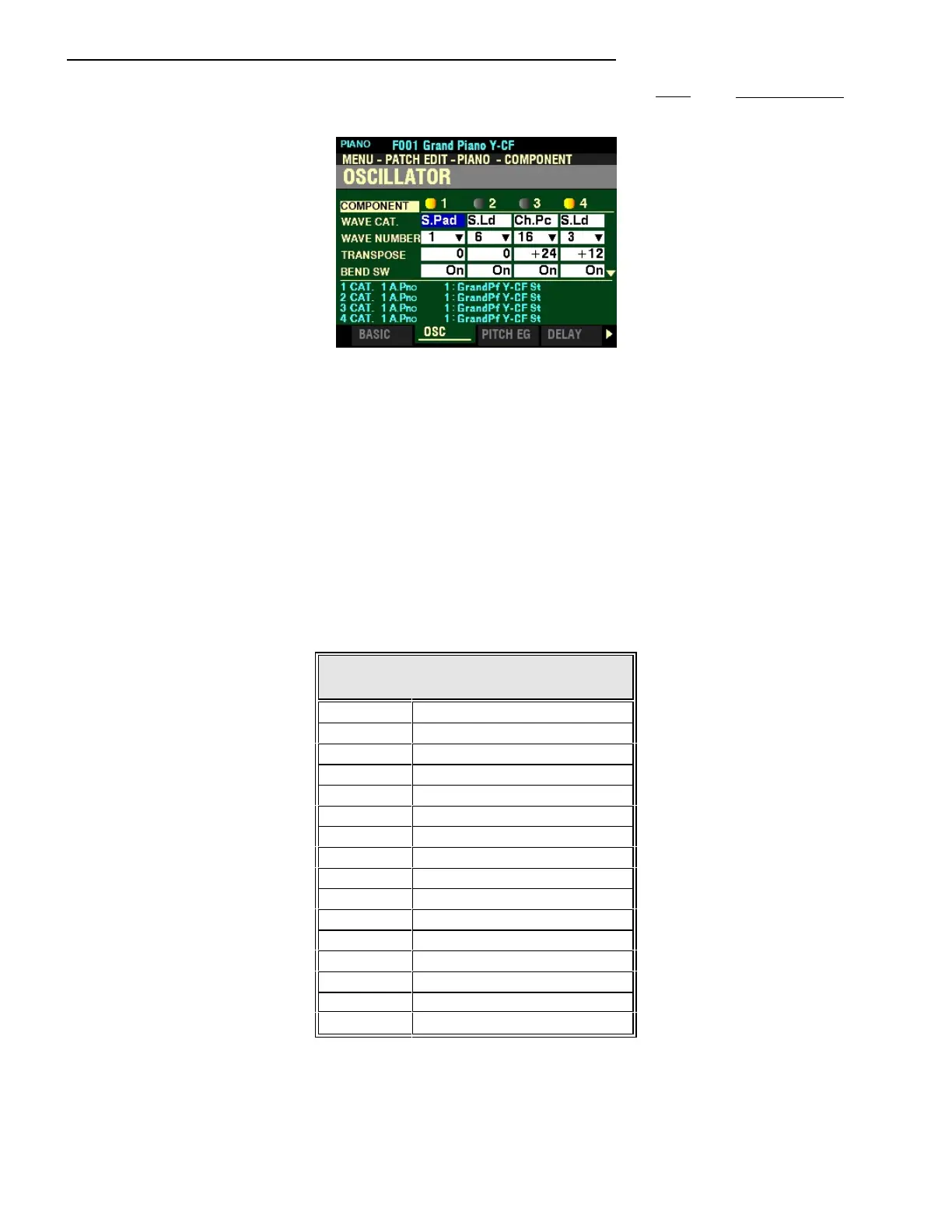
From the screen shown on the previous page, press the PAGE “u” button once. The OSCILLATOR
Page should now display.
The box to the right of “WAVE CAT.” should be highlighted.
NOTE: As a reminder, use the DIRECTION “t” and “u” buttons to select the Component you want to edit.
OSCILLATOR
This Page allows you to select the Waveform and adjust various Pitch Parameters. These are explained
starting below.
WAVEFORM CATEGORY
This Parameter allows you to select the Waveform Category. The data chart below shows the numbered
categories for each Waveform Type.
WAVEFORM CATEGORIES
Number Description
1 Acoustic Piano
2 Electric Piano
3 Harpsichord
4 Clav
5 Chromatic Percussion
6 Guitar
7 Ethnic
8 SFX (Special Effects)
9 Wind
10 Strings
11 Choir
12 Synth Pad
13 Bass
14 Synth Lead
15 Free Reed
16 Percussion
Turn the VALUE knob to make your selection.



 To Next Page