TEC0020 2018JAN3 P/N: 630-00025 Rev D AL600 & AL690 Hybrid Installation & Owner's Manual
3
SECTION 1 : OWNER
AL600 Operation
LOADING & SECURING YOUR
CHAIR
Lower the Lift Platform. Using your remote control,
lower the lift platform until it reaches the ground and
becomes level.
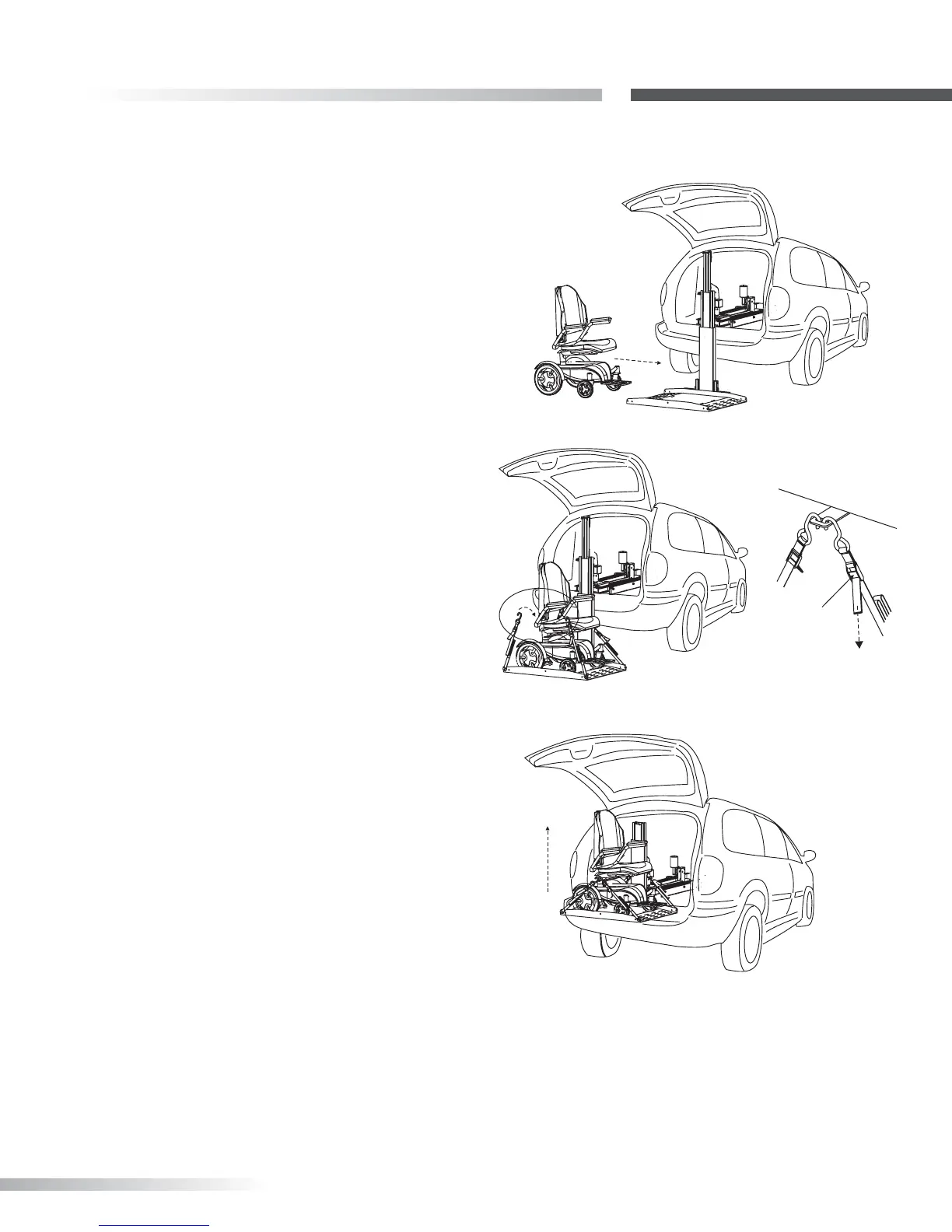
1. Drive Chair/Scooter onto Platform. Determine
heaviest portion of the power chair or scooter.
This is usually under the drive wheels, motor(s),
and batteries. Always drive onto platform with
the heaviest portion closest to the lifting tower. If
loading a scooter and the plaform has the AL617
Extension Plate, drive onto the platform so that the
scooter's front wheels are resting on the extension
plate, and rear wheels are on the main platform.
This allows the heaviest portion of the scooter to be
closest to the lifting tower. Set your chair or scooter’s
speed control to slow speed to maneuver easily onto
the platform. [Figure 3-1] You can drive onto the
platform from either side.
2. Secure the Chair. Each corner of the AL600
platform has a restraint attached, with a hook on
the end. Place each hook in either the anchor plate
slot or in each U-bolt. [Figure 3-2] Pull the loose end
of each restraint tight. To release, simply press the
release tab and remove the hooks. [Figure 3-3]
3. Fold Seat Backs. If your chair has a folding seat
back, you may want to place it in the down position
for easier clearance when loading the chair into the
vehicle. Depending on the size of your chair, you
may need to remove the headrest as well.
4. Raise the Chair. Double-check that the chair is
secured properly on the platform. While holding the
hand control, stand to the side and away from the
lift. Press the "UP" button. [Figure 3-4]
SLOW
Figure 3-1
Figure 3-4
Figure 3-2
PULLto
TIGHTEN
PUSHto
RELEASE
Figure 3-3
The platform will rise and retract into the vehicle.
When the platform stops retracting release the
button. The platform will automatically lock itself
into travel position. Close the
door slowly, making sure that no part of the chair or
other objects in the cargo area contact the door.









 To Next Page