| www.harmar.com | 800-833-0478
TEC0020 2018JAN3 P/N: 630-00025 Rev D AL600 & AL690 Hybrid Installation & Owner's Manual
18
Installation - AL600 SECTION 2 : INSTALLER
With Folding 3rd Row Seating
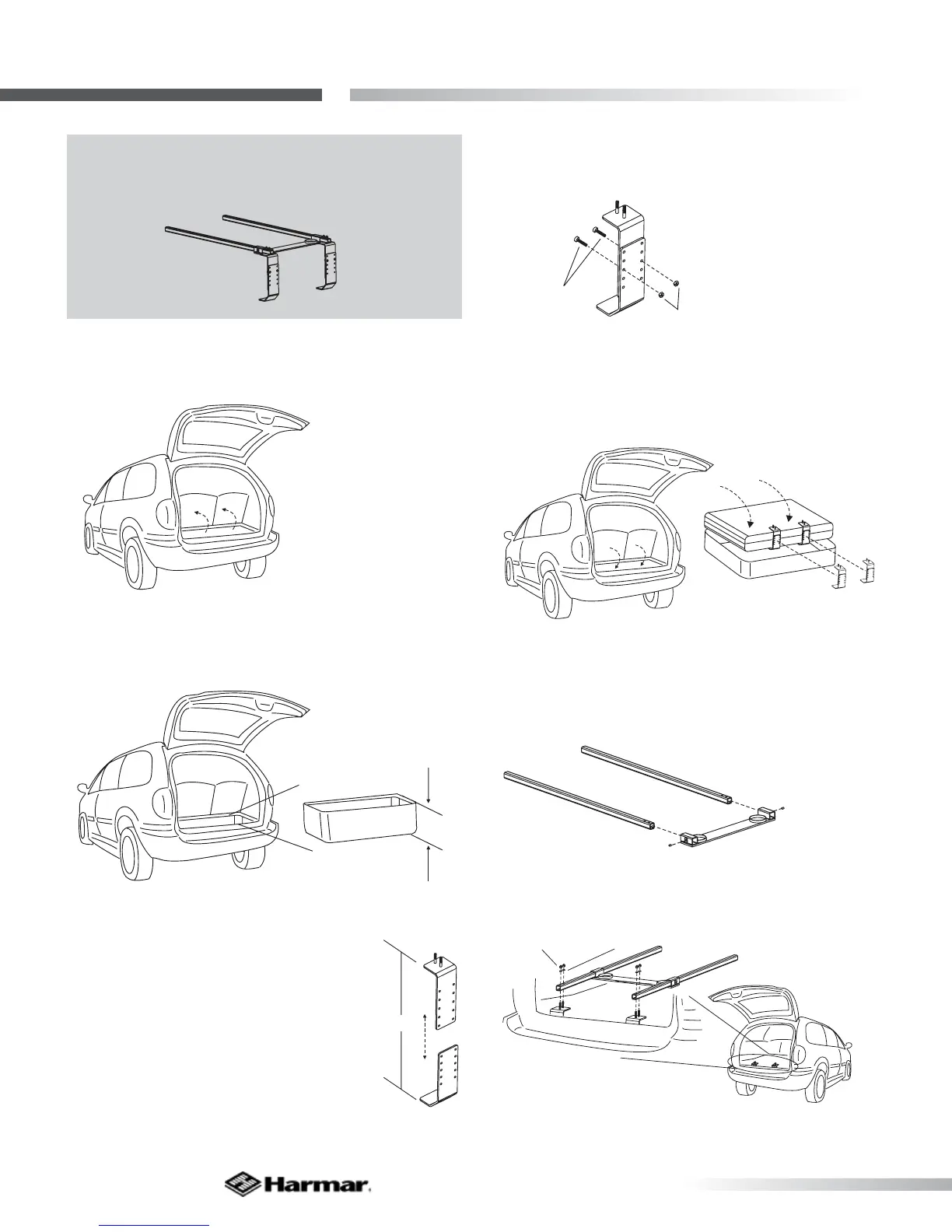
1. Fold 3rd Row seating up, exposing the storage
well. [Figure 18-1]
NOTE: A BA-02 Kit is needed for this installation.
More detailed instructions on BA-02 installation
will be provided with the BA-02 Kit.
Figure 18-1
2. Measure the height of the well. [Figure 18-2]
X
Figure 18-2
3. Position brackets as shown. Slide up
or down until you achieve the measured
well height. (Holes are arranged for ¼”
increments) [Figure 18-3]
X
4. Attach brackets together and fasten using
supplied hardware. [Figure 18-4]
BHCS
1/4-20x3/4"
1/4-20
Nylock Nut
5. Position assembled parts around third row
seat(s) then fold into well. [Figure 18-5]
folded
seat
storage well
6. Install set screws (leave loose) as shown. Slide
foot plate assembly onto legs. [Figure 18-6]
7. Attach rails to brackets. [Figure 18-7]
Figure 18-4
Figure 18-5
Figure 18-6
Figure 18-7
1/4-20 Acorn Nuts
1/4" Split Lock Washers
Figure 18-3









 To Next Page