TEC0020 2018JAN3 P/N: 630-00025 Rev D AL600 & AL690 Hybrid Installation & Owner's Manual
17
Installation - AL600
SECTION 2 : INSTALLER
With Removable 3rd Row Seating
From vehicle harness
(installed on page 12)
A
B
A
B
BLACK
BLACK
LIFT
FROMVEHICLE HARNES
(FROMBATTERY )
Figure 17-2
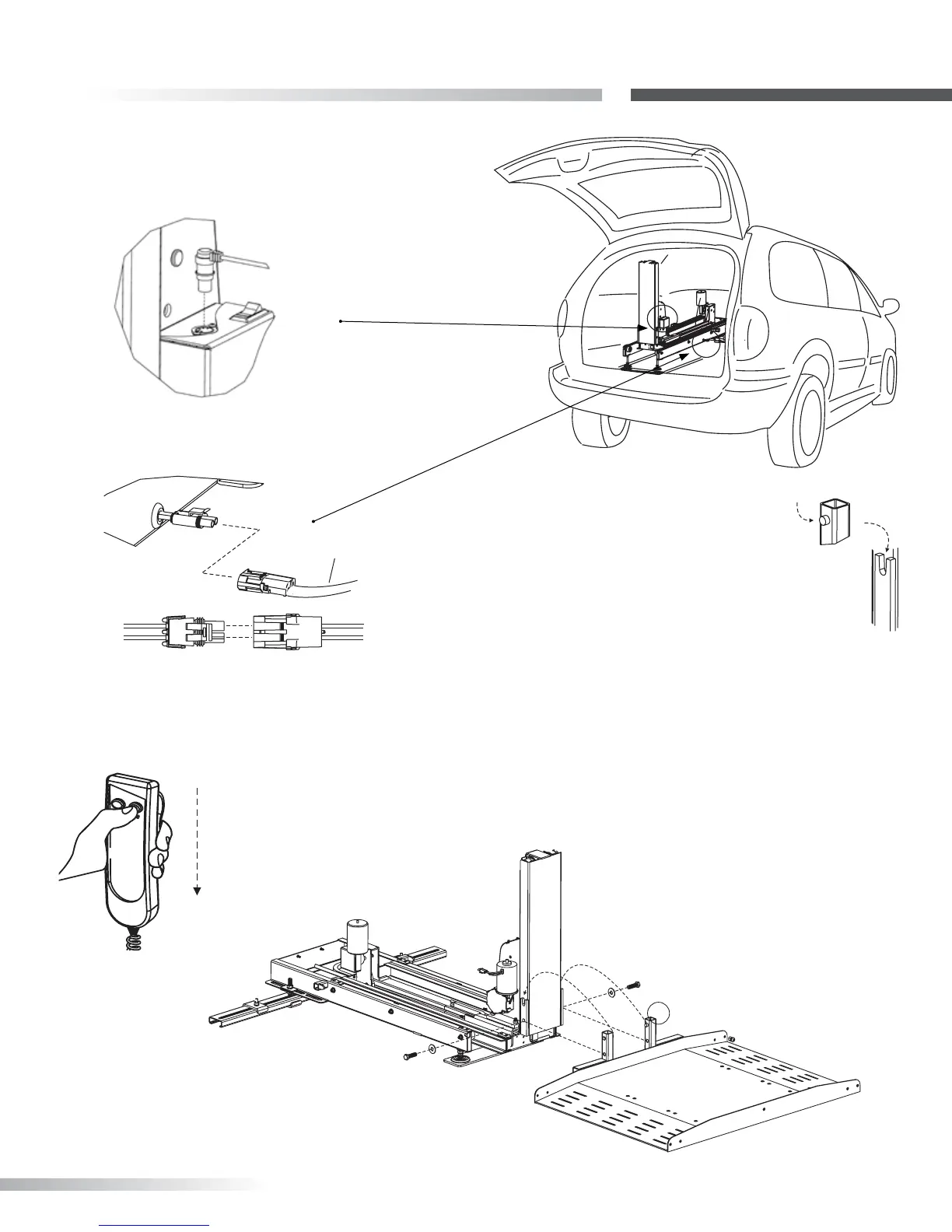
9. Press the DOWN button until the lift’s tower has
moved out of the vehicle. [Figure 17-3]
Figure 17-3
10. Attach platform by placing
platform’s upright pins into
u-shaped bracket on tower. [Figure
17-4]
Figure 17-4
11. Thread ½-13 x 1-3/4” L Hex head Bolts and
½” washers into threaded holes as shown. [Figure
17-5] Test full motion of lift into and out of the vehicle.
Be sure lift is level and no obstructions interfere with
platform travel.
Figure 17-5
Tighten all fasteners from all
steps at this time.
8. Plug hand controller into lift. [Figure 17-1]
Connect to vehicle harness. [Figure 17-2]
Figure 17-1









 To Next Page