26
! WARNING: CONSULT YOUR VEHICLE OWNER’S
MANUAL FOR THE EXACT PLACEMENT OF THESE
ELEMENTS IN YOUR VEHICLE, AND FOR MAXIMUM
UAS WEIGHT ALLOWANCES PRIOR TO INSTALLATION
AS SOME MANUFACTURERS HAVE LOWER MAXIMUM
WEIGHT ALLOWANCES FOR UAS USAGE.
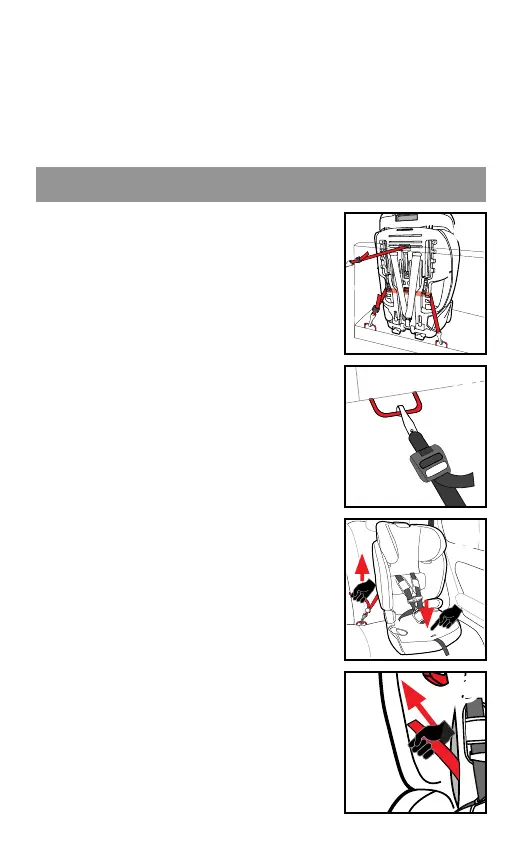
1. Unhook UAS from storage loops.
For ease of installaon, extend
UAS to its maximum length. Ensure
the UAS strap is NOT twisted and
that the UAS connectors are facing
down ❶.
2. Place the child restraint ush
against a forward-facing vehicle
seat, centered between the UAS
anchors.
3. Fasten UAS hooks to vehicle lower
anchors ensuring the hooks are
facing downwards ❷. Pull rmly
to be sure that they are aached.
BELT MUST LAY FLAT AND NOT BE
TWISTED.
4. Tighten UAS by placing your knee
on the child restraint base and
by using your full weight to push
the child restraint down as you
simultaneously pull upwards on
the free end of the adjustment
belt ❸.
TIP: If you are not able to ghten
UAS using the method above, try
pulling the UAS strap up through
the belt path (under the fabric)
❹, then ghten.
INSTALLING WITH UAS SYSTEM



 To Next Page