Prepare the Devices
Charge the Master Transmitter
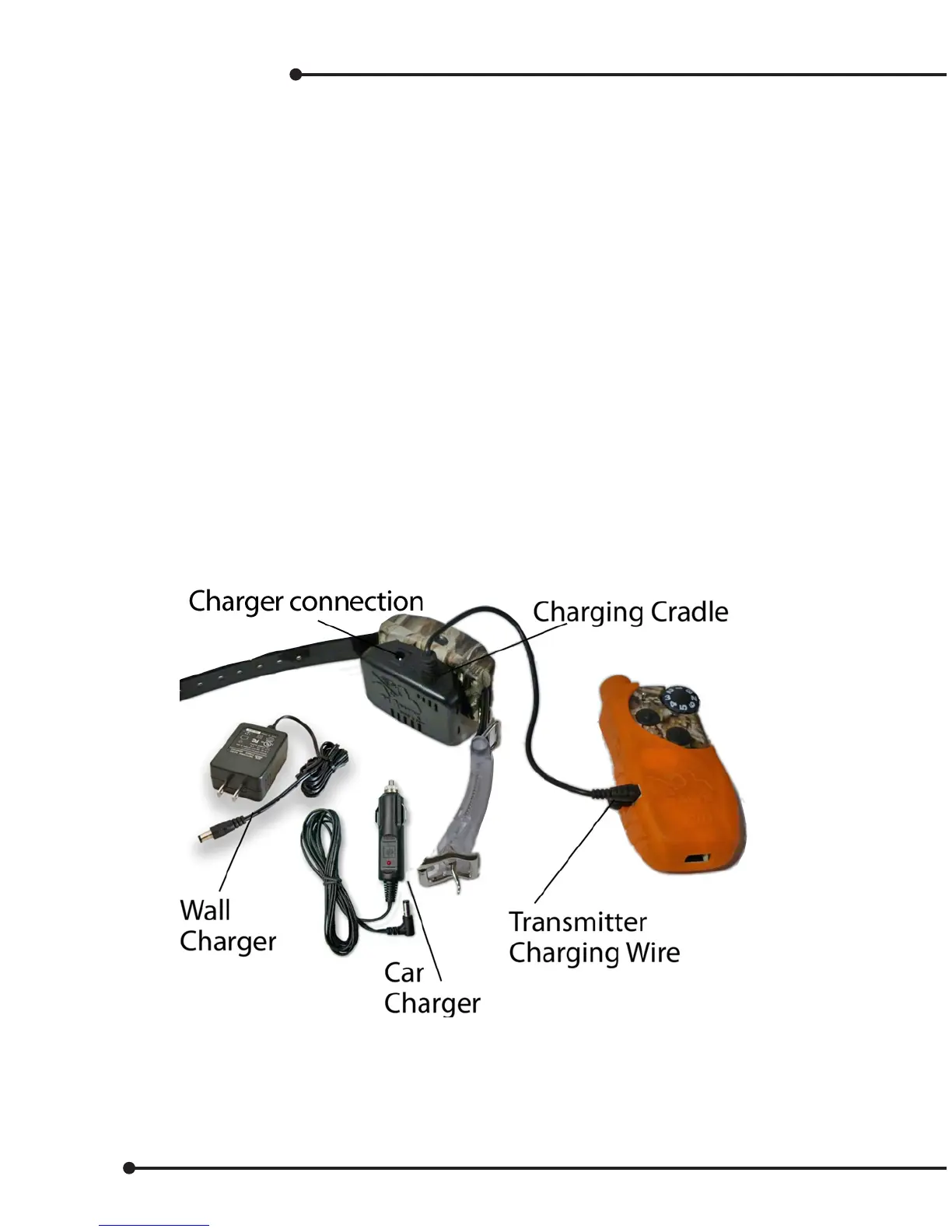
• Lift the rubber cover protecting the Charging Jack.
• Connect the Transmitter Charging Wire to the Master Transmitter.
• Connect the AC adapter or car adapter to the Charging Cradle.
• Plug the AC adapter into a 120V AC outlet, or plug the car charger into car power.
• LED ashes red every 2 seconds.
• The charging takes about 2 to 3 hours for the rst charge.
• LED stops ashing when the Master Transmitter is fully charged and will
automatically turn o when charging is complete.
• Replace rubber cover.
Charge the collar receiver
• Place the collar receiver in the Charging Cradle as shown.
• Connect the AC adapter or car adapter to the Charging Cradle.
• Plug the AC adapter into AC outlet, or car adapter into car power.
• The collar LED ashes every 3 seconds during charging.
• The charging takes about 2 to 3 hours for the rst charge.
• LED stops ashing when the receiver collar is fully charged.
10


 To Next Page