28
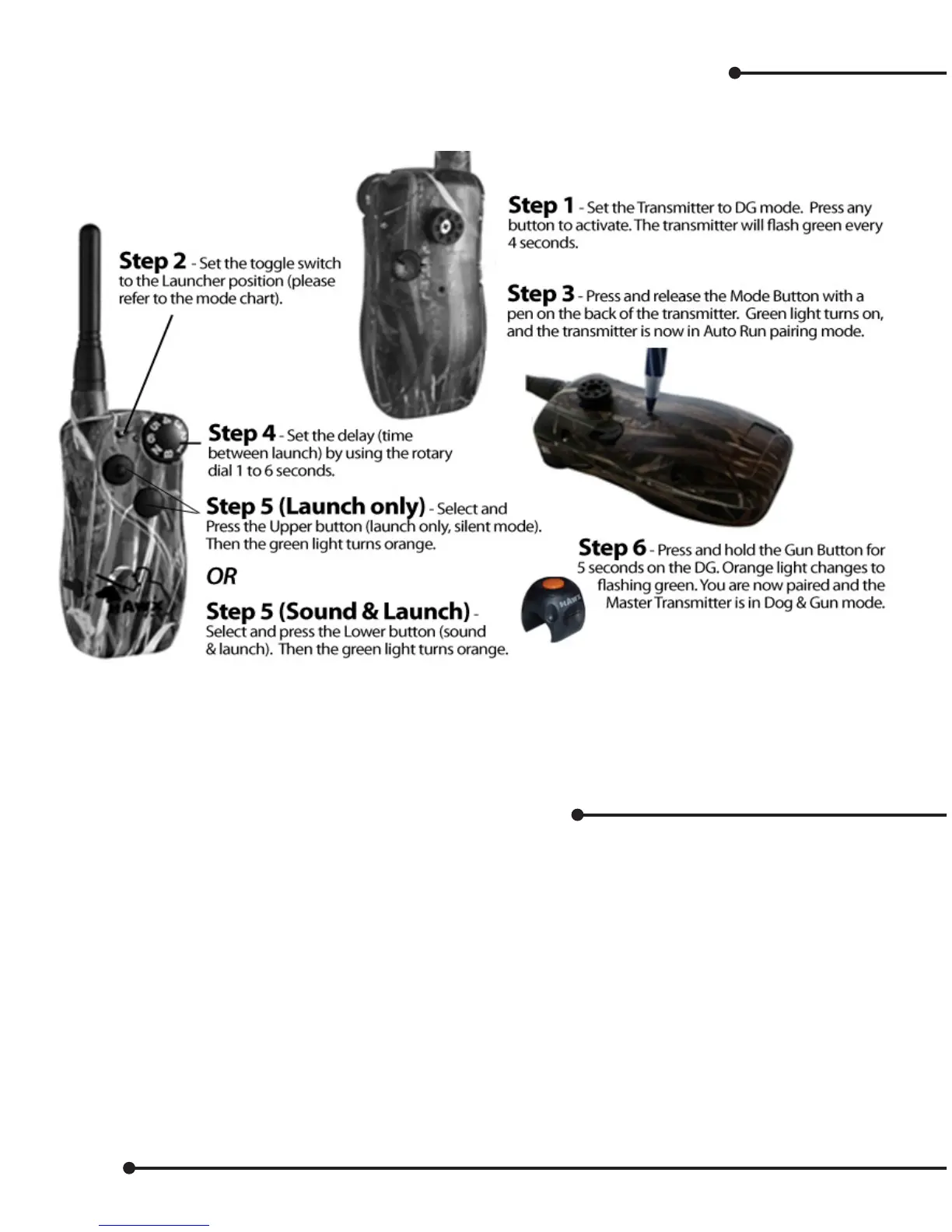
Pairing a Dog & Gun button for Auto Run (Launcher Control)
Note: Before pairing Auto Run the transmitter must be in a mode or model that supports launcher control
(see Mode Chart pages 21 to 22).
Test your unit by turning on launcher receivers (make sure they are unloaded).
Press once to start, press again to pause, press once more to restart.
Press and hold for 2 seconds to clear and reset.
Changing the Master Transmitter ID Manually
The Master Transmitter is programmed in 1 of 65535 ID codes. Therefore, there is a very small chance that
you will experience interference with any other user. 99% of the time this will never have to be changed.
However, sometimes training groups like to have transmitters on the same digital IDs for backup, or to
control common equipment like launchers. Just in case, you may want to set two transmitters on the same
digital ID.
The following are steps to change the digital transmitter ID. Note that once this is done, all devices paired to
it must be paired again.
1. Set the Dog & Gun Switch to “T” position.
2. Set the Toggle Switch to down position, and the Selector Dial to 6. This will not change the mode of
operation of the Master Transmitter.
3. On the back of the transmitter, press and release the Mode Button with a pen.
4. Green LED lights up for 20 seconds.
When the LED is still on, turn the Selector Dial to select the 1st digit of ID code. Then press the Side


 To Next Page