To turn OFF the Beeper Collar remotely:
• Flip the Toggle Switch to the down position.
• Press the Upper Button** on the Master Transmitter.
*The Power Switch on the Beeper Collar must be in the Standby position for the remote on/o to work. To save battery life,
the Power Switch should be in the o position. **Upper Button: Dog #1, Lower Button: Dog #2, Side Button: Dog #3
• Add-On Collar 2 – repeat steps A to G, but press Lower Button (instead of Upper button) in step D.
• Add-On Collar 3 – repeat steps A to G, but press Side Button (instead of Upper button) in step D.
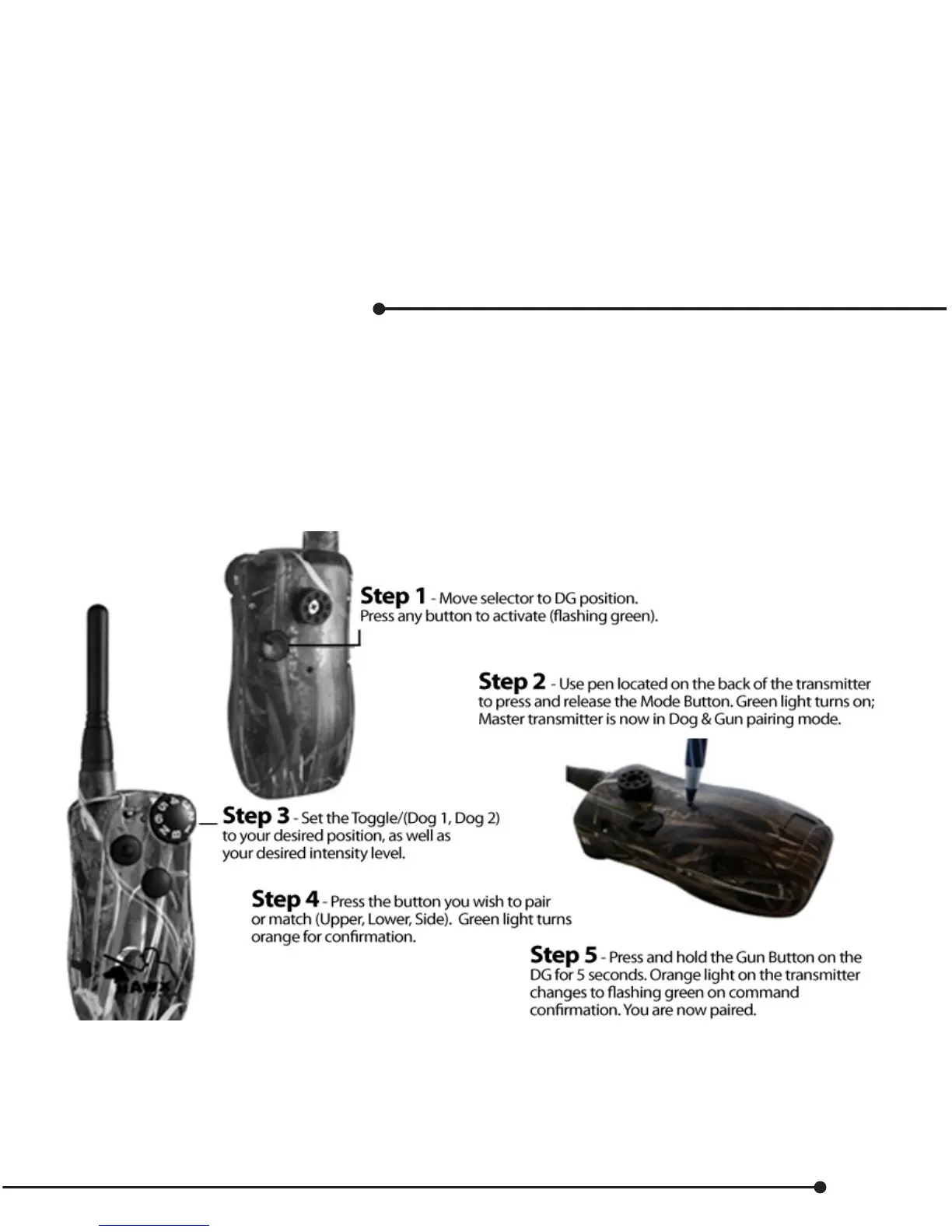
Pairing a Dog & Gun button
It is also possible to pair a maximum of 10 Dog & Gun button transmitters to just one Master Transmitter.
This may be a requirement for the following applications:
• Multiple dogs each having a dierent stimulation level
• Multiple levels and multiple buttons
• A set of buttons for dierent guns (20g, 12g, 10g)
Pair your First Button
Test your unit by pressing the button and watching the collar receiver for a command ash. Note the level
has been set by your stimulation level selection. See page 5 for changing intensity in Dog & Gun mode.
The procedure can be repeated for a maximum of 10 Dog Gun buttons.
*In Dog & Gun Program Mode, if no signal is received from the DG in 10 seconds, the Master Transmitter will automatically
switch back to Dog & Gun Run Mode.
25


 To Next Page