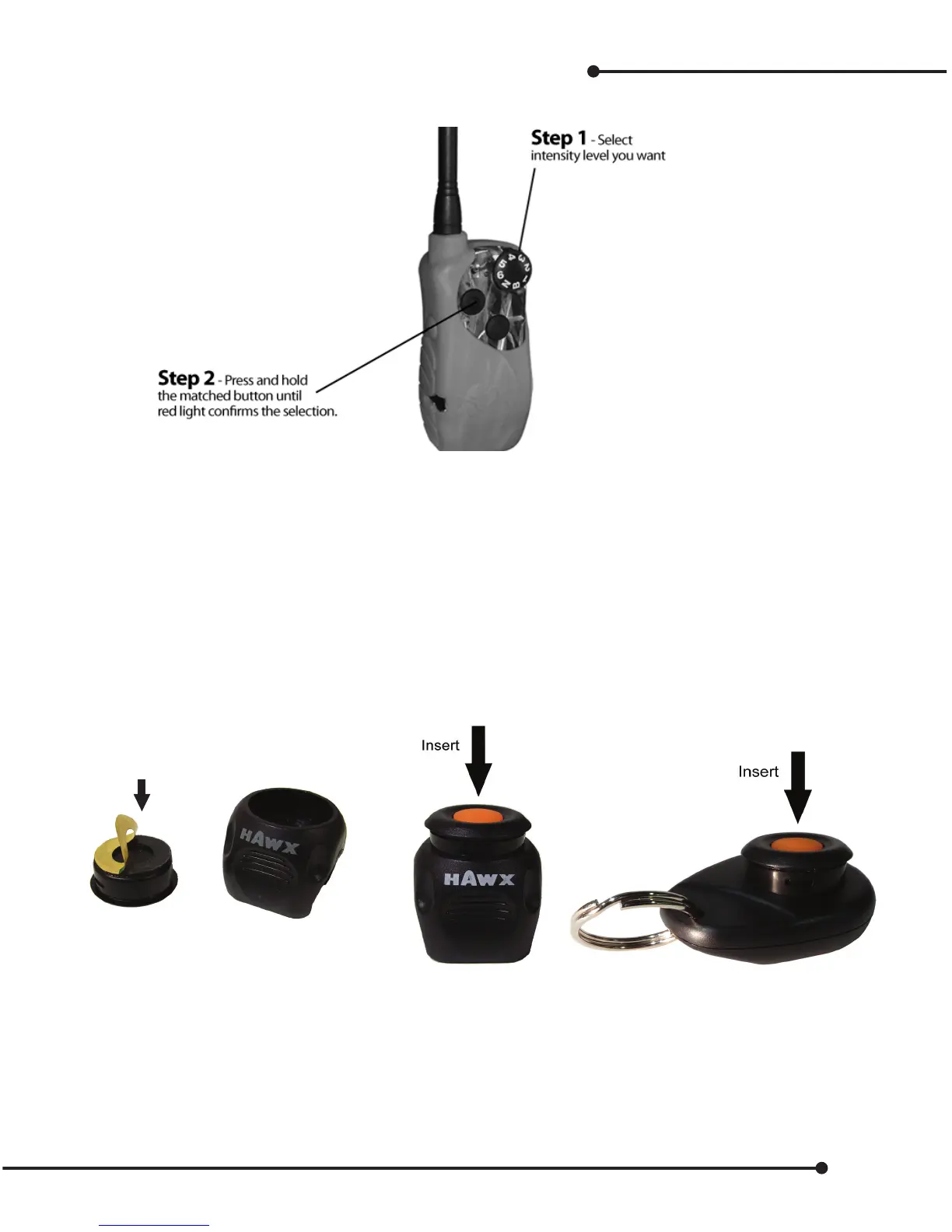
Setting Dog & Gun Transmitter Intensity Level
Once paired and setup, your Gun transmitter will be matched to one of the buttons on your transmitter.
Note: You can change intensity levels at any time by repeating the above. You can move back and forth from training
mode to D&G mode by moving the selector button. Don’t forget when moving into D&G mode, you must press a but-
ton to activate and the lights will ash green. You must use the matched button to change intensity as it is the paired
button. No other button will change the level.
Note (Optional): Move the Selector Intensity dial to “N” to stop accidental stimulation, depending on the environment.
Installing Dog & Gun Button on your Gun
• Stick the double-sided tape mounting ring to the bottom of the DG Button.
• Remove the adhesive backing.
• Insert the DG into the gun clip or keychain.
Double Sided
Mounting
Fitting Dog & Gun button on your gun
Gun clip comes with spacers to t dierent sized barrels. The following procedure will ensure the correct
barrel t.
• Remove all spacers.
•Test t – place gun clip above the forearm stock and press rmly.
• Check t – if loose, insert one spacer and try again.
• Check t – if loose, insert second spacer and try again.
17


 To Next Page