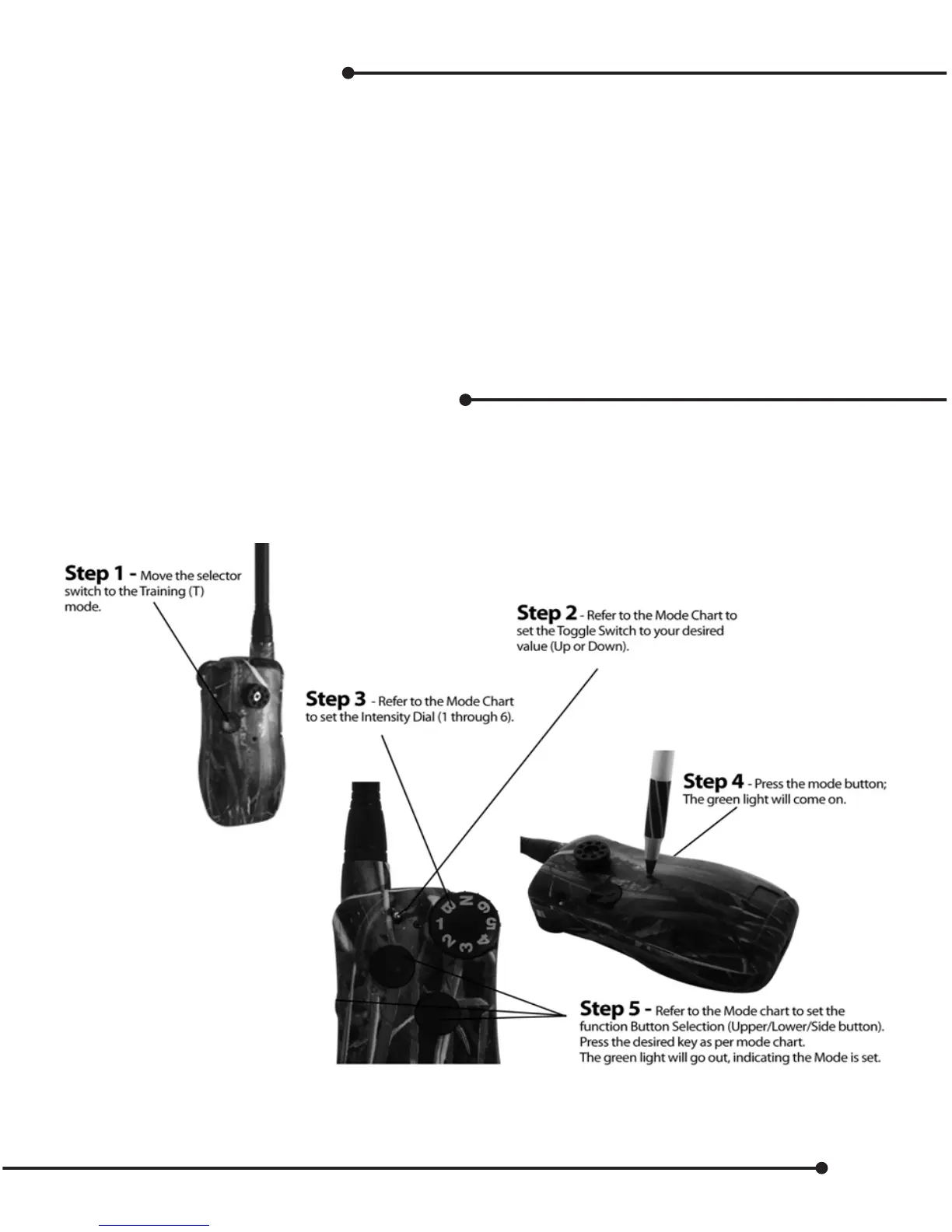
Conguring a new mode
The Hawx system provides up to 27 dierent modes to provide custom key functions for any kind of training
or hunting environment. In addition, if you can’t nd the mode that meets your requirements, you can re-
quest a custom mode. Hawx can custom program your unit. The transmitter comes factory set on the hunter
default (mode 11). See page 20 for mode chart.
Hawx collars oer control for Ecollar features:
High Continuous, Medium Continuous, Low Continuous, High Momentary, Medium Momentary
Low Momentary, Vibrate, Tone, Beeper
Launcher control:
Launch, Sound (duck, Pheasant, human, goose), Sound/Launch, Motion, Aux – third party, Auto run
Selecting mode or changing modes
Refer to the mode conguration chart on the next page and select the mode that best ts your requirement.
Note: Tone/Vibrate is available on all 2 dog modes by using the “B” on the intensity dial, or selecting Tone/Vibrate
mode.
19


 To Next Page