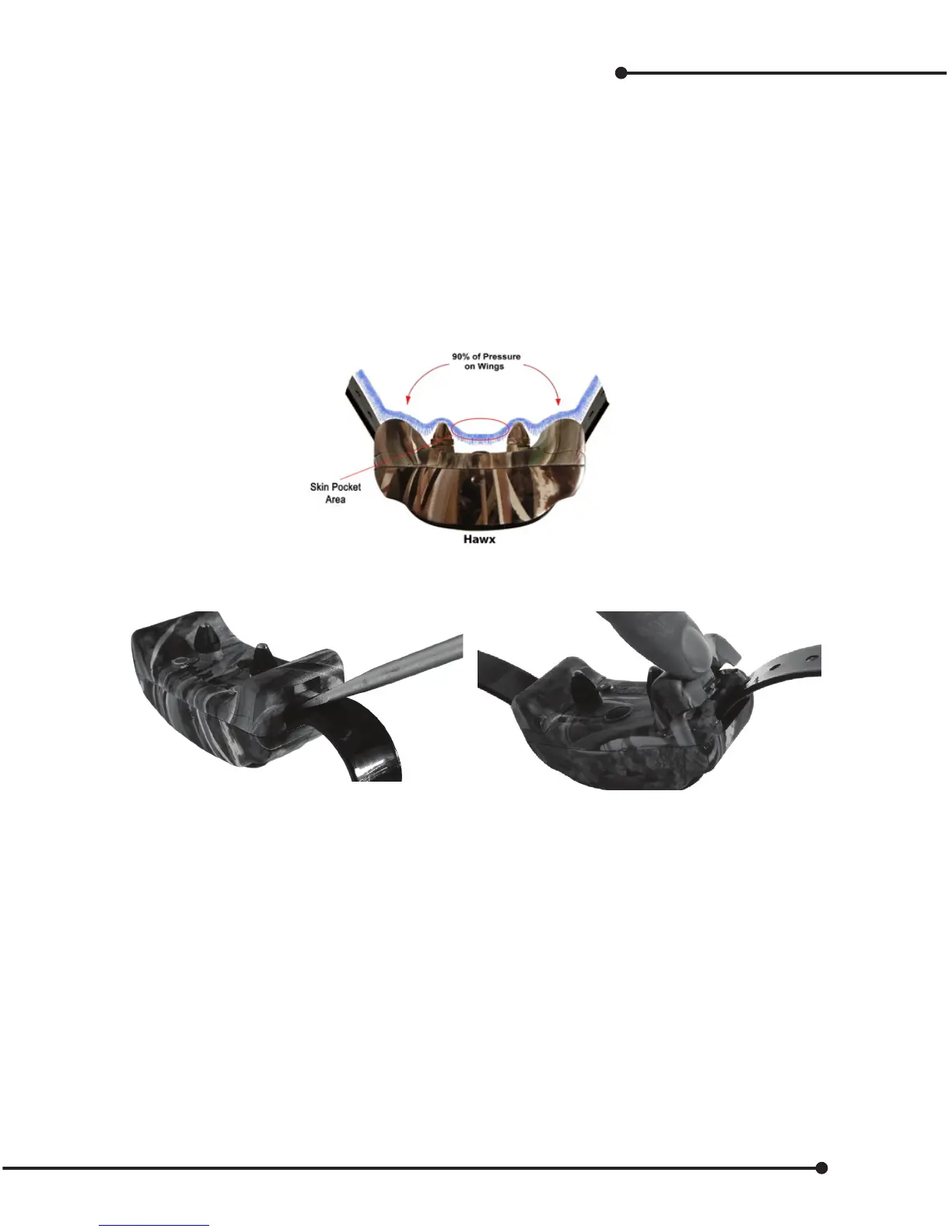
Performance comfort wing technology (PC wings)
This technology acts like long contacts, but feels like short contacts. The skin/coat penetration depth is the same
as a conventional collar with long contacts. However, the large wings’ surface area takes 90% of the pressure o
of the contacts and distributes it to the dog’s neck. This is due to the wings having several thousand times more
surface area. Therefore, the square inch pressure on the dog’s neck is considerably less, but still provides good
skin contact. This provides greater comfort, better t, extended wear, and less movement; great benets for any
dogs, especially working dogs.
Another set of wings is included for additional custom tting on dogs with thicker or thinner coats, or
smaller necks.
General Concept
Performance / Comfort Technology
Each wing is marked L & R (Left and Right) on the underside.
Position the collar so you can read Hawx, then insert Right and Left wings.
Removing or changing wings
Hawx provides three styles of t: no wings, (conventional mode), small wings, or large wings. These can be
used for all types of dogs with dierent coats and neck sizes.
Remove
Insert minimum 1/4” screwdriver into the lower slot against the tab, press rmly, and the wing will pop out.
Install
Align wings for left and right side, as the left and right wings are identied on the underside of the wing.
Insert the wing tabs into the body of the collar and press rmly until the wing snaps into place.
15


 To Next Page