Six-Dog Operation
In this mode, you can control collar receivers 4, 5 and 6 by moving the toggle switch to the down position.
For six-dog operation (only available in mode 13 and 15):
Repeat the above steps but, for pairing 4, 5 and 6 collars, make sure the toggle switch is in the down
position.
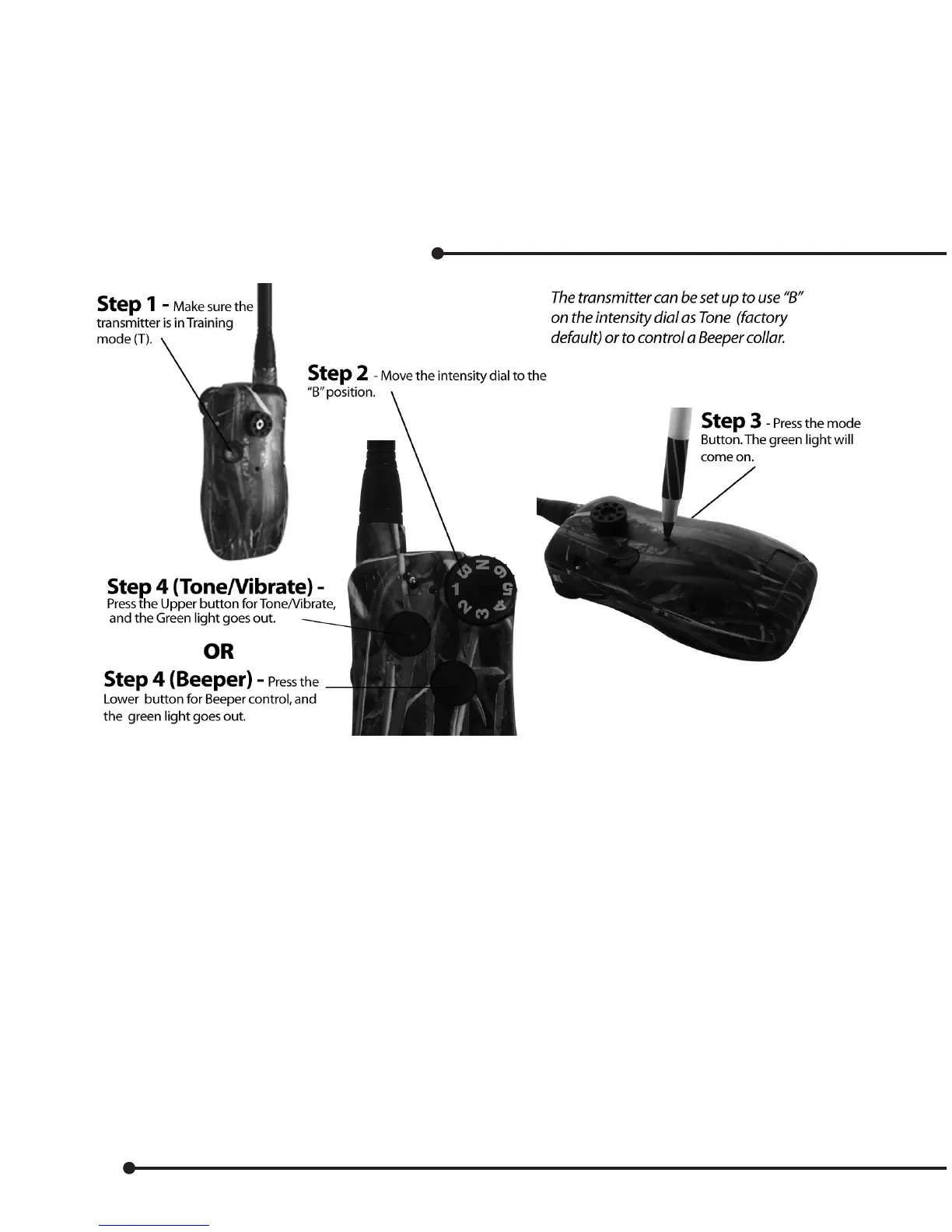
Selecting Beeper or Tone Control
Add a Beeper Collar
(Note: “B“ setting must be changed on Transmitter for beeper. See above.)
• Switch the Beeper Collar to Program position.
• Set the Selector Dial to B on the Master Transmitter.
• Flip the Toggle Switch to the up position on the Master Transmitter.
• Press the Upper Button* on the Master Transmitter.
• Beeper Collar beeps twice when matching is complete.
*Upper Button: Dog #1, Lower Button: Dog #2, Side Button: Dog #3
Turning On/O the Beeper Collar Remotely
• Switch the Beeper Collar to Standby position.*
• Set the Selector Dial to B on the Master Transmitter.
To turn ON the Beeper Collar remotely:
• Flip the Toggle Switch to the up position.
• Press the Upper Button** on the Master Transmitter.
24


 To Next Page