30
•
Plug in the new battery.
• Close the case and put the screws back in.
To Replace the Dog & Gun Battery
The coin battery used for DG is 3V Lithium, 1620.
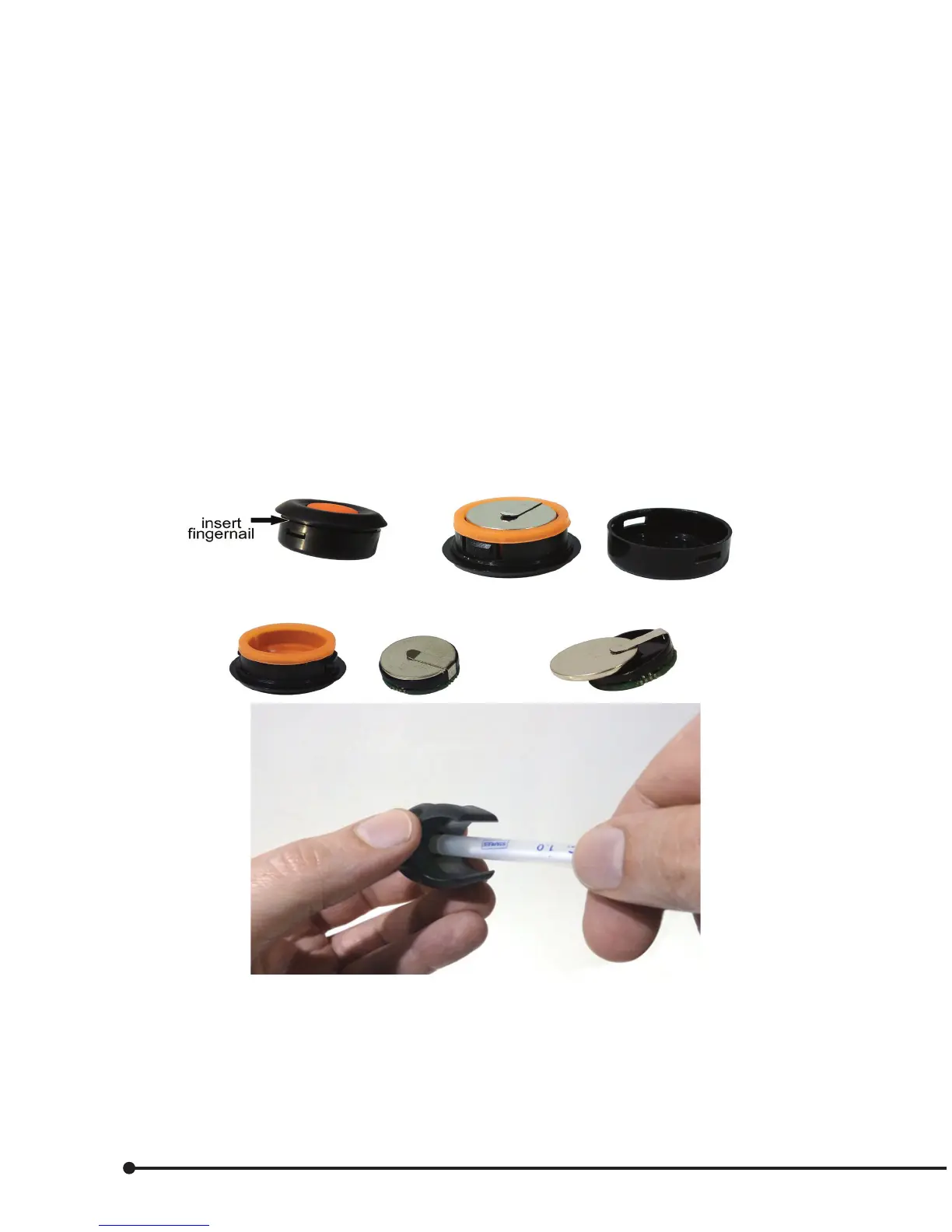
• Remove the DG from the gun clip or gunstock by pushing a small screwdriver under the slot indicator
marks on the bezel.
• To open the DG case, insert a ngernail into the slot between the top and bottom case.
• Separate the top and bottom case.
• Remove the board along with the rubber.
• Remove the board from the rubber.
• Remove the coin battery from the battery holder.
• Taking note of the polarity, slide the new coin battery into the battery holder.
• Insert the board into the rubber.
• Insert the board and rubber back into the top case; make sure the battery clip in aligned to the latch.
• Close the case. Make sure that it is aligned correctly.


 To Next Page