AED9101D
I3563-1.0 en 29
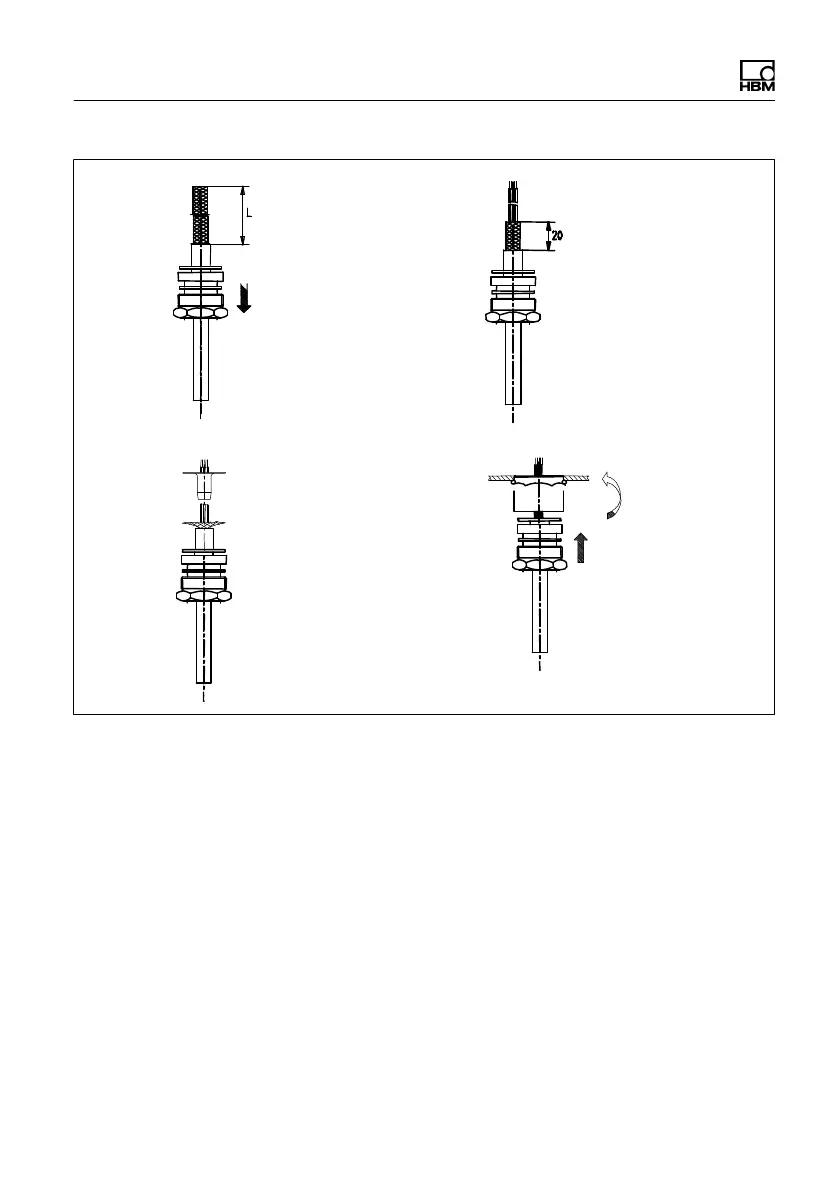
Remove the outer cable
sheath to the required
length of wire L
Push the screwed cable
gland with the gasket
and thrust collars over
the end of the cable
Strip the insulation from
the cable termination
and tin it
Shorten the cable shield
and bare the stranded
wires
Ground sleeve
Radially
fan out the
cable
shield
Push the ground sleeve
between the stranded
wires and the cable shield
until it comes to a stop,
press the shield to the
sleeve flange, cut off any
excess
Push the cable through
the intermediate gland
on the housing until it
comes to a stop, bring
the screwed cable
gland forward and
screw down tightly
12
3
4
Fig. 6.13 Cable connection via PG glands
6.8 Ground (GND) and shield wiring
GND or ground/0V must not be connected to cable
shields, as otherwise the effectiveness of the shielding
would be impaired. Extensively connect the cable shields
on both sides to the device housing, not to the measure-
ment ground or the supply voltage GND and 0V. If a suit-
able connector is not available at a node of the RS-485
bus, you can use shielded terminals, for example.


 To Next Page