9
Navigation Menu
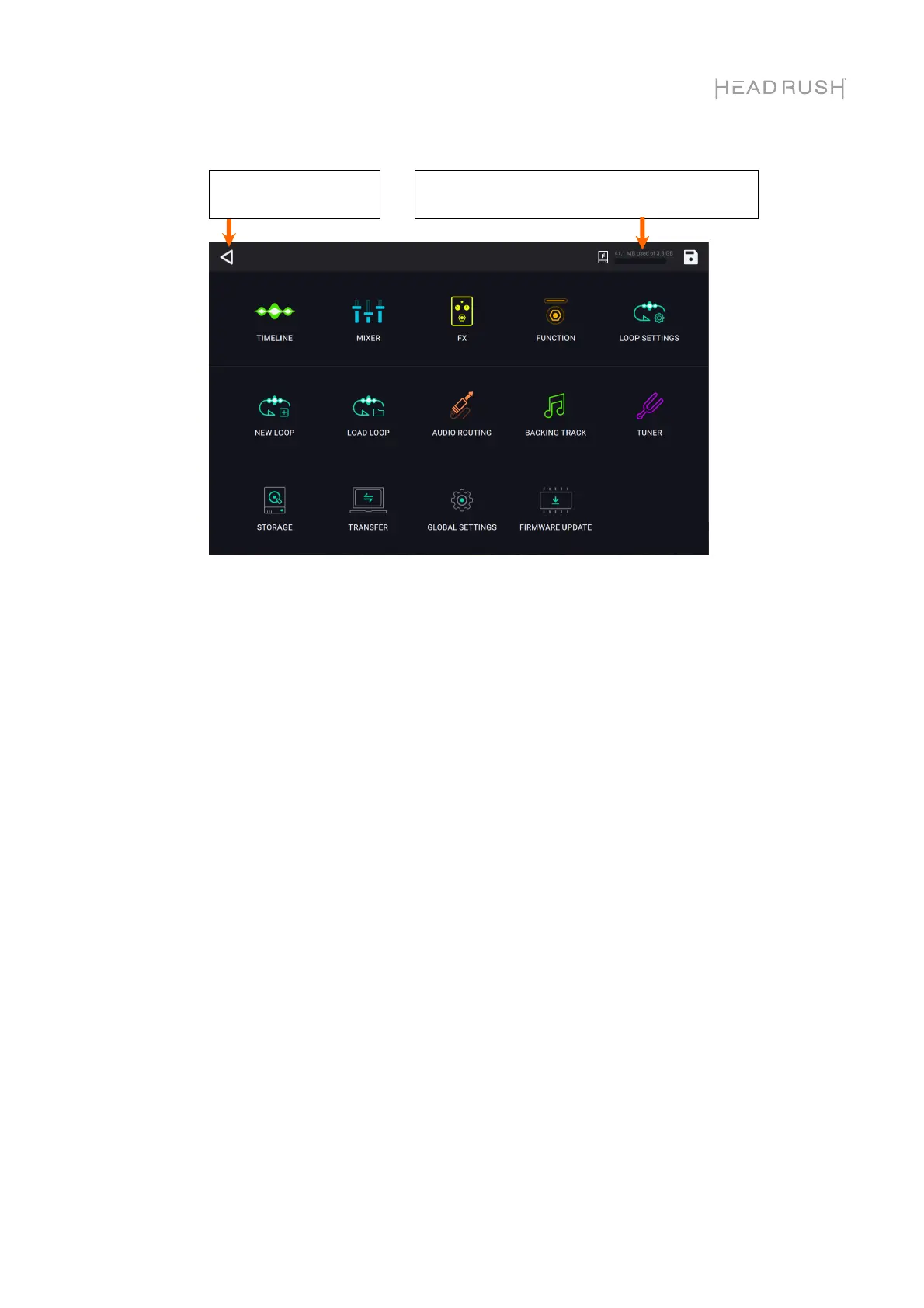
On the Navigation Menu page, you can tap an icon to quickly navigate to HeadRush Looperboard’s
features:
• Timeline: Tap here to access HeadRush Looperboard’s timeline performance view.
• Mixer: Tap here to adjust volume and panning of looper tracks, the click track, and the backing
track.
• FX: Tap here to assign and use the built-in FX.
• Function: Tap here to access the features of the Function footswitch.
• Loop Settings: Tap here to adjust the available settings that can be configured per loop.
• New Loop: Tap here to discard the current loop and create a new loop.
• Load Loop: Tap here to load a previously saved loop.
• Audio Routing: Tap here to adjust HeadRush Looperboard’s audio routing settings.
• Backing Track: Tap here to access the backing track player feature.
• Tuner: Tap here to access the tuner feature.
• Storage: Tap here to view available storage and to select a target storage device.
• Transfer: Tap here to enter USB Transfer Mode and transfer files to/from a computer.
• Global Settings: Tap here to adjust the available settings that can be adjusted globally.
• Firmware Update: Tap here to enter Firmware Update mode.
This indicator shows the amount of space used
on the currently selected storage device.
Tap here to return to
the previous page.



 To Next Page