8
Operation
This chapter describes some of HeadRush Looperboard’s basic functions.
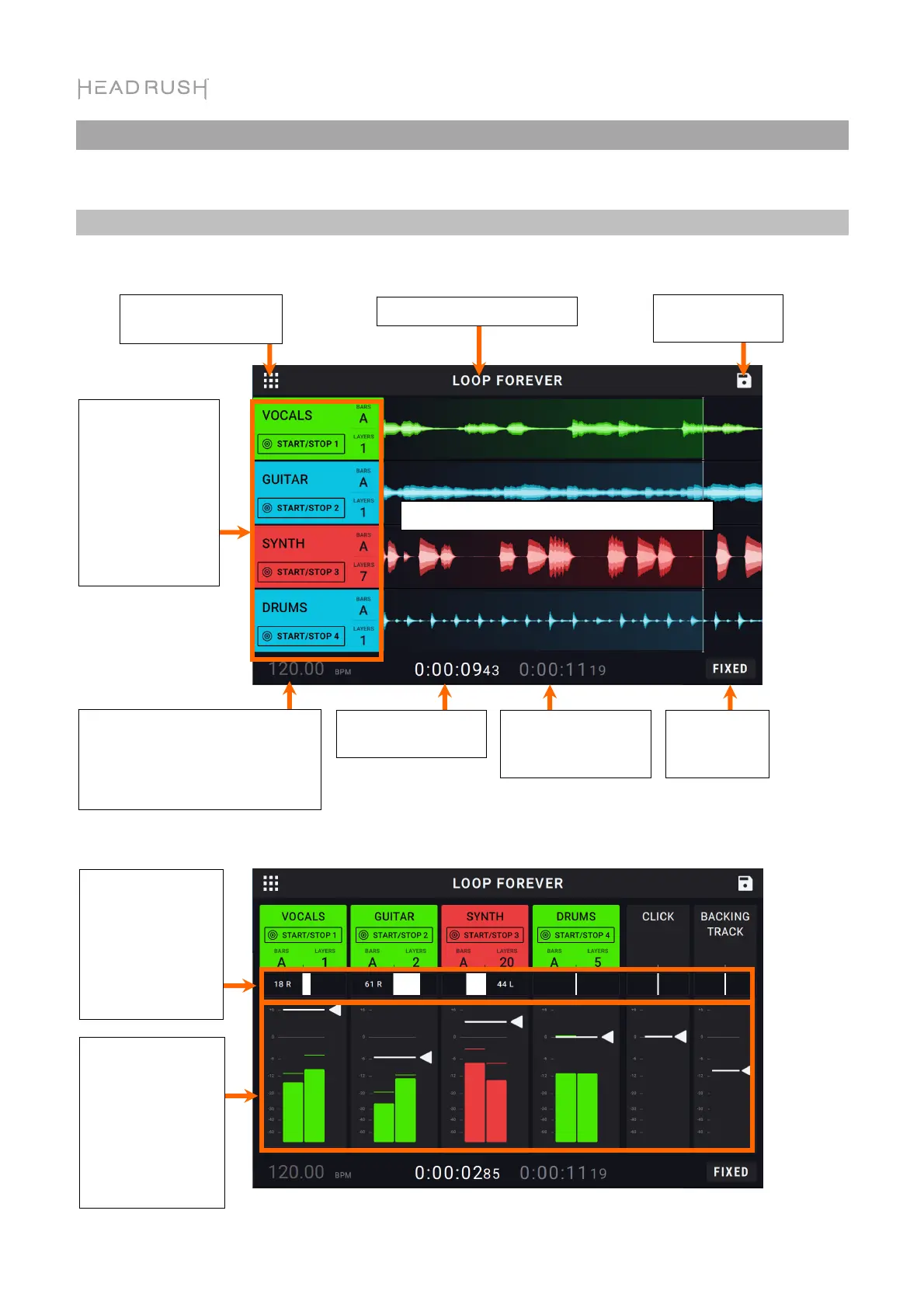
Overview
Timeline Page
Mixer Page
This is the length of
the longest track in
this loop.
This is the current tempo, which
you can change by pressing the
Tempo footswitch at the desired
speed, or by tapping here and
turning the encoder.
Tap here to access the
navigation menu.
Each lane displays the track’s recorded audio
Tap here to save
the loop.
This is the name of the loop.
This is the current
playback position.
The track info
boxes show each
track’s name,
number of bars,
and the number of
recorded layers.
Double-tap the
track name to
change it.
This is the
Looper Mode
indicator.
Touch and drag
these sliders to
adjust the balance
of each track.
Double-tap to
enlarge the slider
for fine
adjustments.
These meters show
the volume level of
the tracks as they
play. Tap and drag
the white line at
the top of a meter
to adjust the
volume level of a
track.



 To Next Page