30
Functions
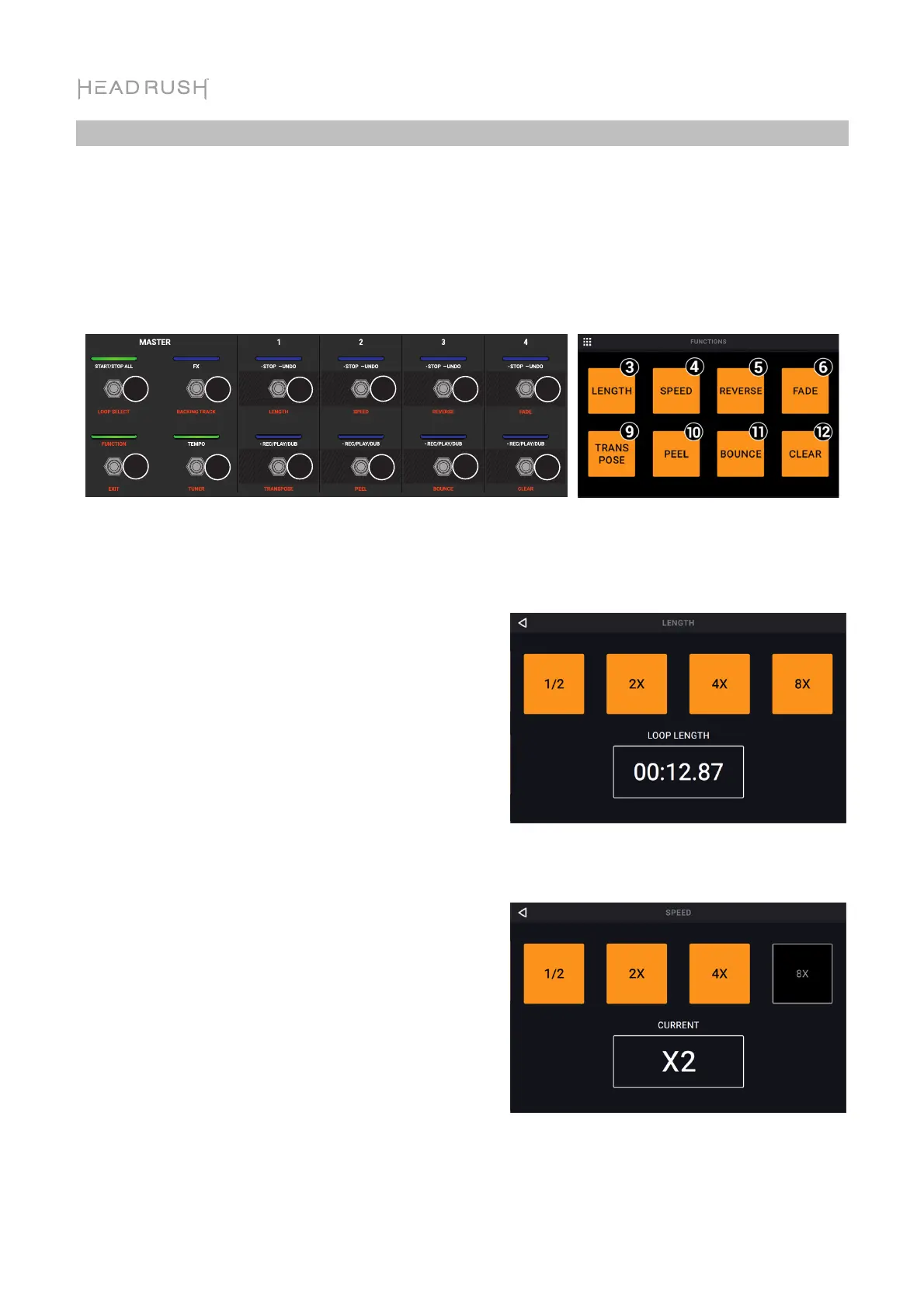
Press the Function footswitch to show the Functions page in the touchscreen. The footswitch
indicator will be lit orange.
To select a function, press the corresponding footswitch (labeled on the top panel in orange)
or tap it on the touchscreen.
To exit the Functions page, press the Function/Exit footswitch.
12
5
4
6
78
3
9
10
11 12
You can access these functions by using their corresponding footswitches 3–6 or 9–12 or tapping
the respective icon on the touchscreen:
Length:
Use footswitches 3–6 to adjust the length of the
full loop by 1/2, 2X, 4 or 8X. If the minimum or
maximum length limits have been reached,
unavailable options will be grayed out.
The total loop length will be shown in the box
below.
Speed:
Use footswitches 3–6 to adjust the speed (and
pitch) of the full loop by 1/2, 2X, 4 or 8X. If the
speed limits for the loop have been reached,
unavailable options will be grayed out.
The current speed setting will be shown in the box
below.



 To Next Page